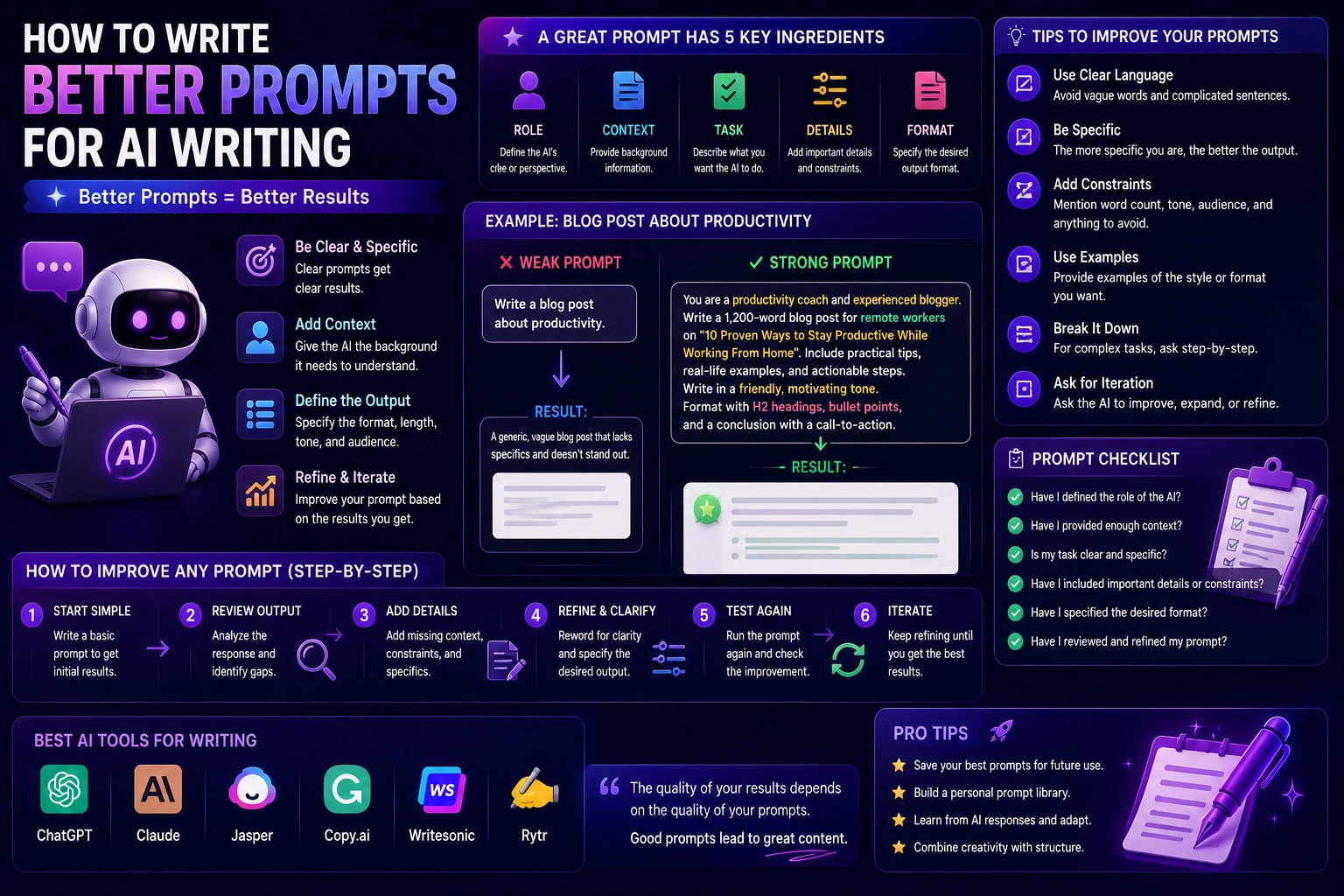

The quality of AI-generated writing depends heavily on the instructions you give the AI. A short and vague prompt can produce generic content, while a clear and detailed prompt can produce writing that is much closer to what you actually need.
Whether you use ChatGPT, Claude, Gemini, or another AI writing assistant, learning how to write better prompts can save time and reduce the amount of editing you need to do.
The good news is that you don't need to become an expert in prompt engineering. A few simple principles can make a major difference: explain the task, provide context, define the audience, specify the format, describe the tone, and tell the AI what a successful result should look like.
In this guide, we'll explain how to write better prompts for AI writing and provide practical examples you can adapt to your own work.
What Is an AI Writing Prompt?
An AI writing prompt is the instruction or request you give to an AI system to generate, rewrite, summarize, analyze, or improve text.
For example, a basic prompt might be:
Write an article about artificial intelligence.
The instruction is understandable, but it doesn't provide much information about the desired result.
A more detailed prompt could be:
Write a 1,500-word beginner-friendly article explaining artificial intelligence. The target audience is people with no technical background. Use simple language, short paragraphs, practical examples, and clear H2 and H3 headings. Keep the tone friendly and educational. Avoid unnecessary technical jargon.
The second prompt gives the AI much more direction.
Why Do Better Prompts Produce Better Results?
AI systems generate responses based on the instructions and context you provide. If important information is missing, the AI has to make assumptions.
Those assumptions may not match what you wanted.
A good prompt reduces unnecessary guessing by explaining:
- What you want the AI to do
- Who the content is for
- What information should be included
- What format to use
- What tone to use
- How detailed the response should be
- What should be avoided
The more relevant context you provide, the easier it is for the AI to produce a useful first draft.
The Basic Structure of a Good AI Writing Prompt
A useful AI writing prompt can be built from several simple components.
- Role: Tell the AI what perspective or expertise to use.
- Task: Explain exactly what you want it to do.
- Context: Provide the information it needs.
- Audience: Explain who will read the content.
- Format: Define the structure and output format.
- Tone: Describe how the writing should sound.
- Constraints: Explain important limitations or requirements.
You don't have to include every component in every prompt. Use the parts that are relevant to the task.
1. Clearly Define the Task
Start by telling the AI exactly what you want it to do.
Compare these two prompts:
Write about email marketing.
and:
Write a beginner-friendly introduction explaining how email marketing works for small businesses.
The second prompt gives the AI a much clearer objective.
Avoid vague instructions such as "make this better" when you can explain what better means.
Instead, say:
- Make the introduction more concise.
- Improve the clarity of the second paragraph.
- Make the tone more conversational.
- Remove repetitive sentences.
- Rewrite the headline to make the benefit clearer.
2. Give the AI Context
Context is one of the most important parts of an effective prompt.
Without context, the AI may produce generic content because it doesn't know enough about your situation.
For example, instead of:
Write a product description for a laptop.
provide details such as:
Write a product description for a lightweight 14-inch laptop aimed at university students. It has a long battery life, a comfortable keyboard, and enough performance for studying, web browsing, video calls, and office applications. The main selling point is portability.
The additional information gives the AI material to work with.
3. Define Your Target Audience
The same topic can require completely different writing depending on who will read it.
A technical article for software developers should not sound like a beginner's guide for someone who has never used a computer.
Tell the AI:
- Who the readers are
- Their knowledge level
- Their goals
- Their problems
- What they already know
For example:
The audience is small-business owners who understand basic marketing but have little experience with AI. Explain technical concepts in simple language and focus on practical business examples.
4. Specify the Tone
"Tone" describes how the writing should feel.
You can ask for a tone such as:
- Friendly
- Professional
- Conversational
- Educational
- Persuasive
- Confident
- Technical
- Casual
- Direct
You can also combine them.
Use a professional but conversational tone. Keep the language simple and avoid sounding like a corporate press release.
Specific descriptions usually work better than simply saying "make it good."
5. Specify the Format
Tell the AI what the final output should look like.
For example:
- Blog article
- Product description
- Social media post
- Listicle
- FAQ
- Step-by-step tutorial
- Table
- Outline
- Landing page
You can also specify structural requirements.
Create a blog article with an introduction, six H2 sections, practical examples, a comparison table, and a frequently asked questions section.
6. Tell AI How Long the Response Should Be
If length matters, specify it.
For example:
Write approximately 1,200 words.
Or:
Write a concise introduction of approximately 100 words.
You can also specify the desired level of detail:
- One paragraph
- Brief explanation
- Detailed guide
- Comprehensive article
- Short summary
Remember that word-count instructions are useful guidelines rather than guarantees of an exact length.
7. Give AI Examples
Examples can be extremely useful when you want a specific style or format.
Suppose you want short product descriptions. Instead of explaining the desired style with several paragraphs, provide an example.
Example style: "A lightweight laptop built for students who need reliable performance throughout the day. Its long battery life makes it easy to study, work, and attend classes without constantly searching for an outlet."
Then explain:
Write five product descriptions using a similar structure and tone.
This gives the AI a concrete reference.
8. Tell AI What to Avoid
Good prompts don't only describe what you want. They can also explain what you don't want.
For example:
Avoid clichés, unnecessary filler, exaggerated claims, repetitive phrases, and overly formal language.
You can also specify words or expressions you don't want to appear.
This is especially useful when you are creating content for a consistent brand voice.
9. Use Specific Instructions Instead of "Make It Better"
"Make this better" gives the AI too much freedom.
A better editing prompt could be:
Rewrite this paragraph to make it clearer and more concise. Keep the original meaning and tone. Remove repetition and unnecessary words. Do not add new information.
The second prompt defines exactly what should change and what should remain unchanged.
10. Ask for Multiple Versions
AI is particularly useful for generating alternatives.
Instead of asking for one headline, ask for several.
Generate 10 headline options for this article. Create five straightforward headlines and five curiosity-driven headlines. Keep each headline under 65 characters.
You can then compare the options and choose the strongest one.
This approach is useful for:
- Headlines
- Email subject lines
- Calls to action
- Social media hooks
- Advertising copy
- Product names
11. Ask AI to Improve Your Draft Instead of Starting From Zero
AI doesn't always need to write the first draft.
You can write your own ideas first and then use AI as an editor.
Review my draft for clarity, grammar, repetition, and structure. Preserve my writing style and opinions. Do not rewrite the entire piece unless necessary.
This approach can help preserve your voice while still benefiting from AI assistance.
12. Break Large Tasks Into Smaller Prompts
One huge prompt isn't always the best approach.
If you're creating a long article, you can divide the process into several stages:
- Research the topic.
- Identify the target audience.
- Create an outline.
- Develop each section.
- Review the draft.
- Improve the introduction.
- Write the FAQ section.
- Proofread the final article.
Breaking the workflow into stages gives you more control over the final result.
13. Ask AI to Think About the Reader
Writing becomes more useful when it is focused on the reader's needs rather than simply the topic.
For example:
Write this guide from the perspective of a beginner who wants to learn how to use AI for the first time. Focus on practical questions a beginner is likely to have and explain unfamiliar terms when they appear.
This encourages the content to answer real reader questions.
14. Include SEO Requirements When Appropriate
If you're creating content for a website, you can include relevant SEO requirements in your prompt.
For example:
Write a beginner-friendly article targeting the keyword "best AI writing tools." Use the keyword naturally. Create a descriptive title, clear H2 and H3 headings, a concise introduction, practical examples, and an FAQ section. Do not keyword-stuff the article.
You can also request:
- Meta title
- Meta description
- Suggested URL slug
- Related keywords
- FAQ questions
- Internal linking suggestions
SEO instructions should support useful content rather than replacing good writing.
15. Ask AI to Fact-Check Important Claims
AI-generated writing can contain incorrect or outdated information.
For important topics, ask the AI to identify claims that need verification.
Review this article and identify every factual claim that should be verified before publication. Separate easily verifiable facts from claims that require a reliable external source.
When accuracy is important, you should still verify the information using reliable sources rather than assuming the AI is correct.
16. Use a Two-Step Prompt
For complex writing tasks, you can ask the AI to create a plan before writing the final content.
For example:
First create a detailed outline for the article. Do not write the article yet. Include the purpose of each section and the main points that should be covered.
After reviewing the outline, you can ask the AI to write the article.
This gives you an opportunity to correct the direction before a large amount of text is generated.
17. Tell AI What a Successful Answer Looks Like
One of the most useful prompting techniques is to define the desired outcome.
For example:
The final article should allow a complete beginner to understand what AI writing tools are, how they work, and how to choose one without needing prior technical knowledge.
This gives the AI a clear goal beyond simply "write an article."
A Simple Prompt Formula
You can use the following formula for many AI writing tasks:
Task + Context + Audience + Format + Tone + Requirements + Restrictions
For example:
Write a 1,500-word beginner-friendly article explaining how AI writing tools work. The audience is small-business owners with no technical background. Use clear H2 and H3 headings, practical examples, and short paragraphs. Use a friendly and professional tone. Explain technical terms in simple language. Avoid unnecessary jargon, exaggerated claims, and repetitive conclusions.
You can adapt this formula to almost any writing task.
Before and After: Improving a Weak Prompt
Weak prompt
Write a blog about AI.
Better prompt
Write a 1,200-word beginner-friendly blog post explaining how generative AI works. The target audience is people who have heard about ChatGPT but don't understand how AI generates text and images. Use simple language, practical examples, and clear H2 headings. Explain the basic process without requiring technical knowledge. Use a friendly educational tone and avoid unnecessary jargon.
The second prompt gives the AI a clear objective, audience, length, structure, tone, and level of technical detail.
Examples of Better AI Writing Prompts
Blog writing prompt
Write a 1,500-word SEO-friendly article about the benefits of AI writing tools for small businesses. The audience is small-business owners with limited technical knowledge. Use a professional but conversational tone. Include an introduction, six H2 sections, practical examples, a comparison table, and FAQs. Avoid generic filler and unsupported statistics.
Email writing prompt
Write a short professional email asking a client for an update on an ongoing project. Keep the tone friendly and respectful. Don't sound demanding. Keep the email under 150 words.
Social media prompt
Create five LinkedIn posts explaining practical ways small businesses can use AI. Keep each post conversational and useful. Start each post with a strong hook and end with a simple question that encourages discussion. Avoid exaggerated claims and corporate jargon.
Product description prompt
Write three product descriptions for a wireless keyboard designed for students and remote workers. Highlight portability, comfortable typing, and long battery life. Use a clear and persuasive tone. Keep each description between 80 and 100 words and avoid unsupported performance claims.
Editing prompt
Edit the following article for grammar, clarity, and readability. Preserve the author's original voice and meaning. Remove unnecessary repetition and awkward wording. Do not add new facts or change the structure unless necessary.
Common AI Prompting Mistakes
Even experienced AI users can get poor results when their prompts are unclear.
- Being too vague
- Providing no context
- Not defining the audience
- Giving contradictory instructions
- Asking for too many unrelated tasks at once
- Not specifying the desired format
- Using vague words such as "better" without explanation
- Accepting the first response without reviewing it
- Failing to provide examples when a specific style is required
- Trusting factual claims without verification
How to Improve a Prompt After Getting a Bad Result
You don't always need to start over when an AI response isn't good.
Instead, identify what went wrong and adjust the prompt.
For example, if the response is too formal, say:
Rewrite the response in a friendly, conversational tone. Use shorter sentences and simpler vocabulary.
If it is too long:
Reduce the response by approximately 40%. Keep the key information and remove repetition and unnecessary explanations.
If it is too generic:
Make the examples more specific to small online businesses. Include practical situations rather than general statements.
Prompting is often an iterative process. You can improve the result by giving the AI more precise feedback.
Prompting Is an Iterative Process
You don't need to create the perfect prompt on your first attempt.
A useful workflow is:
- Write your initial prompt.
- Review the response.
- Identify what is missing or incorrect.
- Give specific feedback.
- Generate a revised version.
- Review the final result yourself.
This is often more effective than trying to include every possible instruction in one enormous prompt.
Final Verdict
Writing better prompts is one of the easiest ways to get more useful results from AI writing tools.
The most important principle is to give the AI enough information to understand what you actually want. Define the task, provide context, explain the audience, specify the format, describe the tone, and include important requirements and restrictions.
Don't be afraid to refine your prompt after seeing the first response. Good prompting is not about finding one magical sentence. It is about communicating clearly and improving the instructions when the result isn't what you expected.
Whether you're writing blog posts, emails, advertisements, product descriptions, social media posts, or reports, a better prompt can reduce editing time and produce content that is much closer to your goal.
The best AI users aren't necessarily the people who write the longest prompts. They're the people who know what information the AI needs in order to produce the right result.
Frequently Asked Questions
What makes a good AI writing prompt?
A good prompt clearly explains the task and provides relevant context. It can also specify the target audience, format, tone, length, requirements, and things the AI should avoid.
How long should an AI prompt be?
There is no ideal length for every prompt. A simple task may only require one sentence, while a complex writing project may need several paragraphs of context and instructions. Include the information that is relevant to the task.
How can I get better results from ChatGPT?
Be specific about what you want, provide useful context, define the audience, specify the desired format and tone, and give examples when necessary. If the first response isn't right, provide specific feedback and ask for a revision.
Should I include examples in AI prompts?
Yes. Examples can help communicate the desired style, structure, length, and level of detail. They are particularly useful when you need the AI to follow a specific format or writing style.
Can AI prompts improve SEO content?
Yes. You can include SEO-related instructions such as the target topic, search intent, keyword, headings, meta description, and FAQ requirements. However, useful and accurate content should remain the priority.
What should I do if AI gives me a bad answer?
Identify the specific problem and give the AI precise feedback. Explain whether the response is too long, too generic, too formal, incomplete, or inaccurate, then ask for a targeted revision.
Do I need advanced prompt engineering to use AI writing tools?
No. Most everyday writing tasks can be handled with clear natural-language instructions. Understanding how to provide context, define the task, and communicate your desired result is often more useful than learning complicated prompting techniques.