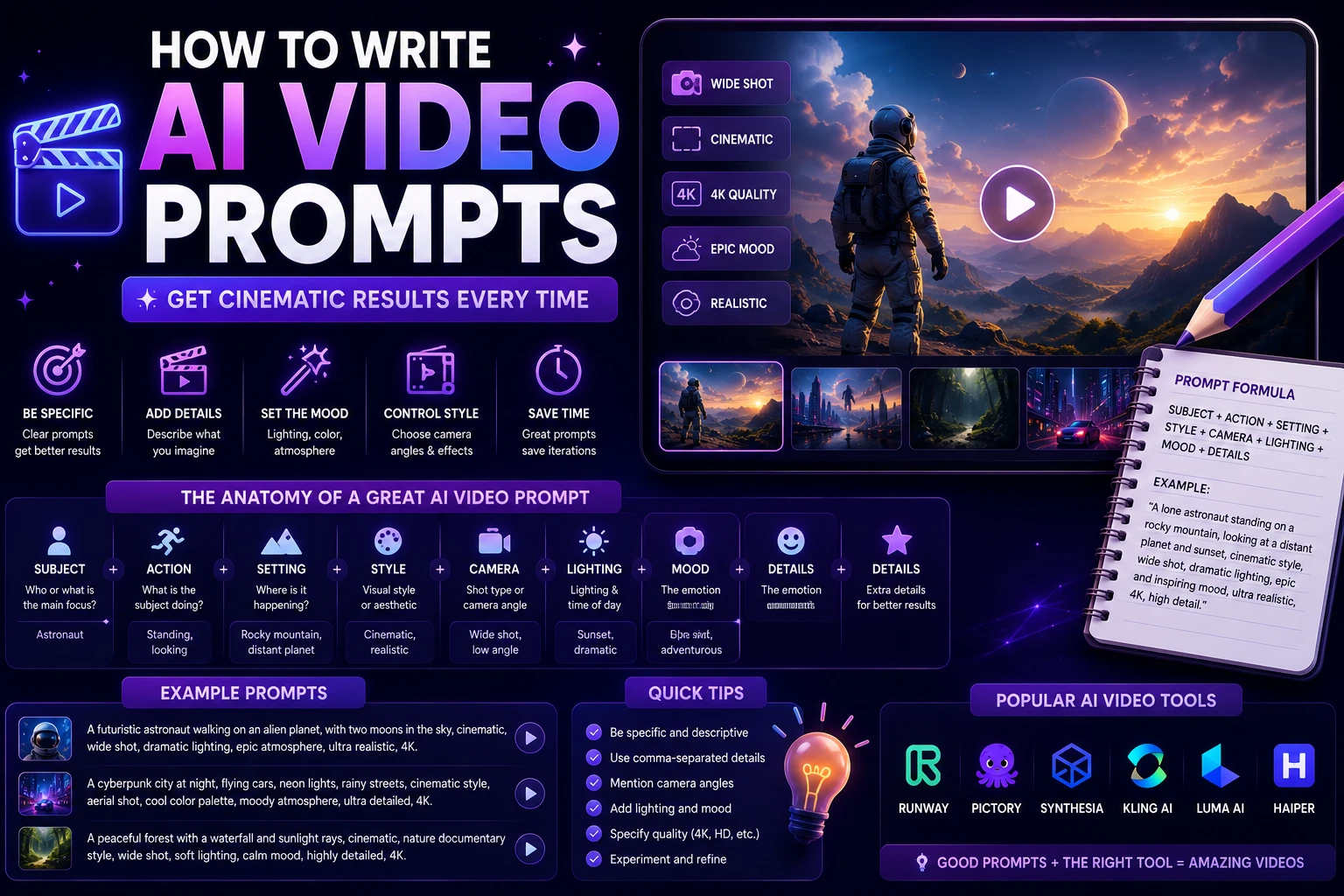

AI video generators have become powerful tools for creating cinematic scenes, social media clips, advertisements, product videos, animations, and visual concepts from simple text descriptions. However, the quality of the result depends heavily on how clearly you describe what you want.
A short prompt such as "a woman walking in a city" may produce a usable result, but a detailed prompt can give the AI much more information about the subject, environment, movement, camera, lighting, composition, and visual style.
In this guide, you'll learn how to write better AI video prompts and create more consistent results across different AI video generators.
What Is an AI Video Prompt?
An AI video prompt is a written description that tells an AI video generator what kind of video you want it to create.
Depending on the tool, a prompt can describe the subject, environment, action, camera movement, lighting, visual style, mood, composition, and other details.
For example, a simple prompt might be:
A dog running on a beach.
A more detailed prompt could be:
Cinematic tracking shot of a golden retriever running along a wide sandy beach at sunset, ocean waves moving in the background, warm natural light, realistic fur movement, gentle camera motion, shallow depth of field, photorealistic cinematic style.
The second prompt gives the video generator much more information about how the scene should look and move.
Why Do AI Video Prompts Matter?
AI video generators do not understand your idea in exactly the same way a human filmmaker would. The more clearly you describe the important elements of a scene, the easier it is for the model to generate a result that matches your intention.
A strong prompt can help communicate:
- What should appear in the video
- What the subject should do
- Where the scene takes place
- How the camera should move
- What the lighting should look like
- What visual style you want
- How fast or slowly the action should happen
- What mood the scene should communicate
Good prompting does not mean writing the longest possible description. It means including the details that actually matter for the shot.
Basic AI Video Prompt Structure
A useful AI video prompt can follow this simple structure:
Subject + Action + Environment + Camera + Lighting + Style + Motion + Mood
For example:
A young photographer walking through a futuristic city, looking at the skyscrapers around him, nighttime urban environment with glowing neon signs, slow cinematic tracking shot, reflections on wet pavement, realistic lighting, photorealistic cinematic style, subtle background movement, mysterious atmosphere.
You do not always need every element. For a simple shot, three or four components may be enough.
1. Describe the Subject
Start by explaining what the viewer should see.
The subject could be a person, animal, product, vehicle, building, landscape, character, or fictional object.
Instead of:
A man.
Try:
A young man wearing a dark jacket and carrying a leather backpack.
You can add details such as age, clothing, appearance, position, or important objects when they are relevant to the scene.
Subject prompt examples
- A professional chef preparing a gourmet dish
- A futuristic electric sports car
- A golden retriever running through a field
- A young woman working on a laptop in a modern office
- An astronaut exploring an alien planet
2. Describe the Action
Video is different from a still image because something needs to happen over time. Tell the AI what the subject is doing.
Examples include:
- Walking slowly toward the camera
- Running through a forest
- Turning around and looking toward the horizon
- Pouring coffee into a ceramic cup
- Driving through a futuristic city
- Opening a door and entering a room
Action words are especially important because they help communicate motion.
Compare:
A woman in a city.
With:
A woman walks slowly through a crowded downtown street while pedestrians move naturally around her.
The second prompt provides a much clearer description of the desired movement.
3. Describe the Environment
Explain where the scene takes place.
The environment can dramatically change the appearance and mood of the video.
You can describe:
- Location
- Architecture
- Weather
- Time of day
- Background objects
- Foreground elements
- Atmosphere
For example:
A quiet European street during a rainy evening, historic stone buildings on both sides, warm lights coming from small cafes, wet pavement reflecting street lamps.
This creates a much stronger visual context than simply saying "a street."
4. Add Camera Movement
One of the most important differences between image prompts and video prompts is camera movement.
Instead of only describing what the scene looks like, tell the AI how the camera should behave.
Useful camera movements
- Tracking shot: The camera follows the subject.
- Dolly in: The camera moves toward the subject.
- Dolly out: The camera moves away from the subject.
- Pan: The camera rotates horizontally.
- Tilt: The camera moves vertically.
- Crane shot: The camera moves vertically through the scene.
- Orbit shot: The camera moves around the subject.
- Static shot: The camera remains mostly stationary.
- Aerial shot: The scene is filmed from above.
For example:
Slow cinematic tracking shot following a cyclist as they ride through a mountain road.
Or:
Slow camera orbit around a futuristic sports car parked in a neon-lit underground garage.
5. Describe the Lighting
Lighting can completely change the appearance and mood of an AI-generated video.
Useful lighting descriptions include:
- Soft natural light
- Golden-hour lighting
- Warm cinematic lighting
- Cold blue lighting
- Dramatic shadows
- Neon lighting
- Studio lighting
- Low-key lighting
- Volumetric light
- Backlighting
For example:
Warm golden-hour sunlight illuminating the character from behind, soft shadows, subtle atmospheric haze.
Lighting descriptions are particularly useful when you want to create a specific cinematic atmosphere.
6. Choose a Visual Style
Tell the AI what visual style you want.
Common styles include:
- Photorealistic
- Cinematic
- Documentary
- Animation
- 3D animation
- Stylized
- Surreal
- Vintage film
- Futuristic
- Minimalist
For example:
Photorealistic cinematic style with natural skin texture, realistic environmental details, subtle film grain, and professional movie lighting.
Avoid combining too many conflicting styles. A prompt asking for a photorealistic documentary scene, cartoon animation, and watercolor painting at the same time can produce inconsistent results.
7. Describe the Motion
AI video generators need to understand how objects should move.
Describe important movements using clear language.
For example:
Gentle wind moves the character's hair while tree branches sway naturally in the background.
Or:
The camera moves slowly forward while the car drives toward the city skyline.
Try to avoid describing too many complicated movements in one short clip. A simple and controlled action is often easier for the model to generate consistently.
8. Add the Mood
The mood tells the AI what emotional atmosphere you want.
Useful mood descriptions include:
- Calm
- Dramatic
- Mysterious
- Energetic
- Romantic
- Peaceful
- Epic
- Futuristic
- Suspenseful
- Joyful
For example:
Peaceful and cinematic atmosphere with gentle movement and warm natural lighting.
9. Control the Composition
Composition describes how the subject is positioned within the frame.
Useful terms include:
- Close-up
- Medium shot
- Wide shot
- Extreme close-up
- Over-the-shoulder shot
- Low-angle shot
- High-angle shot
- Centered composition
- Foreground and background separation
For example:
Medium close-up of a young entrepreneur speaking directly to the camera, centered composition, softly blurred modern office in the background.
10. Specify the Aspect Ratio
If your AI video tool supports aspect-ratio instructions, specify the format based on where you plan to publish the video.
- 16:9: YouTube, websites, presentations, and traditional video
- 9:16: TikTok, Instagram Reels, and YouTube Shorts
- 1:1: Some social-media posts and square content
For example:
Vertical 9:16 composition designed for a short-form social media video.
Simple AI Video Prompt Formula
If you're a beginner, use this formula:
[Subject] + [Action] + [Environment] + [Camera] + [Lighting] + [Style] + [Mood]
Example:
A young woman walking through a futuristic city, moving slowly between illuminated skyscrapers, nighttime downtown environment with wet streets, smooth tracking shot following her from behind, neon blue and purple lighting, photorealistic cinematic style, mysterious and futuristic mood.
AI Video Prompt Examples
Cinematic City Prompt
Cinematic aerial shot of a futuristic city at sunset, thousands of illuminated buildings stretching toward the horizon, flying vehicles moving between skyscrapers, dramatic clouds, warm orange sunlight, slow camera movement, realistic atmospheric effects, photorealistic science-fiction style.
Product Advertisement Prompt
Premium product advertisement showing a modern smartphone rotating slowly on a reflective black surface, elegant studio environment, soft dramatic lighting, subtle reflections, smooth camera orbit, shallow depth of field, luxury commercial style, highly realistic product details.
Nature Prompt
Wide cinematic shot of a waterfall flowing through a lush tropical forest, mist floating above the water, leaves moving gently in the breeze, slow camera push forward, soft morning sunlight filtering through the trees, peaceful atmosphere, photorealistic nature documentary style.
Social Media Prompt
Vertical 9:16 video of a young content creator walking confidently through a modern city while speaking to the camera, energetic movement, natural facial expressions, bright daytime lighting, smooth handheld camera movement, realistic urban background, modern social media style.
Food Video Prompt
Close-up cinematic shot of a chef preparing fresh pasta in a modern kitchen, hands moving naturally while adding ingredients, steam rising from the pan, warm restaurant lighting, shallow depth of field, slow camera movement, realistic food textures, premium cooking advertisement style.
Travel Prompt
Cinematic drone shot flying above a beautiful coastal village surrounded by turquoise water and mountains, small boats moving across the sea, golden-hour sunlight, gentle camera movement, realistic atmospheric haze, high-detail travel documentary style.
How to Write Better Character Prompts
Characters can be difficult for AI video generators because appearance and movement may change between frames.
To improve consistency, clearly describe the character's important visual characteristics.
For example:
A young woman with shoulder-length dark brown hair, wearing a beige jacket and white sneakers, carrying a small black backpack, walking through a modern downtown street.
If you are using image-to-video generation, an existing reference image can also help maintain the character's appearance.
How to Write Better Product Prompts
Product videos benefit from precise descriptions of the product's shape, material, position, and movement.
For example:
A premium black smartwatch with a brushed metal frame placed on a dark marble surface, rotating slowly under soft studio lighting, subtle reflections on the glass screen, elegant luxury advertisement, smooth camera movement, photorealistic product details.
Avoid unnecessary background details if the product itself is the most important element.
Text-to-Video vs. Image-to-Video Prompts
Text-to-video prompts
Text-to-video prompts describe the entire scene from scratch.
You need to explain the subject, environment, action, camera, lighting, and style because the model does not have an existing visual reference.
Image-to-video prompts
Image-to-video prompts usually focus more on movement because the starting image already establishes the appearance and composition.
For example:
Slowly push the camera toward the subject while her hair moves gently in the wind. Keep the character's appearance and clothing consistent.
This type of prompt tells the model what should change while preserving the important elements of the original image.
How to Avoid Common AI Video Prompt Mistakes
1. Writing Extremely Vague Prompts
A prompt such as "make a cool video" gives the AI very little useful information.
Describe the scene, action, camera, and visual style instead.
2. Adding Too Many Unrelated Ideas
Trying to create several completely different scenes in one short generation can lead to inconsistent results.
Focus on one clear shot at a time.
3. Ignoring Motion
Remember that AI video generation is not simply image generation with extra frames. Describe how the subject and camera should move.
4. Overloading the Prompt
More words do not automatically mean a better result. Remove details that do not contribute to the shot.
5. Forgetting the Camera
If camera movement matters, specify it. Words such as tracking shot, dolly in, orbit, aerial shot, and slow push-in can communicate useful visual direction.
6. Using Conflicting Instructions
Avoid combinations such as "static camera with rapidly moving camera" or "extreme close-up and wide aerial shot" unless the tool specifically supports transitions.
7. Expecting One Prompt to Create a Complete Film
AI video generators generally work best when you break a larger idea into individual shots.
Instead of generating an entire advertisement in one prompt, create several short clips and combine them during editing.
How to Create Consistent AI Video Scenes
Consistency becomes especially important when creating multiple shots featuring the same character, product, or environment.
Try to keep important details consistent across prompts.
- Character appearance
- Clothing
- Location
- Time of day
- Lighting style
- Color palette
- Camera style
- Product design
For example, if a character is wearing a black jacket in one shot, continue describing the same black jacket in subsequent prompts when visual continuity matters.
Use AI to Improve Your AI Video Prompts
You can also use a language model to help transform a simple idea into a detailed video prompt.
For example, start with:
A futuristic car driving through a city.
Then ask an AI assistant to turn it into a cinematic video prompt containing a subject description, camera movement, lighting, environment, motion, and visual style.
This approach can be useful when you know what you want to create but are unsure how to describe it.
AI Video Prompt Checklist
Before generating a video, check whether your prompt answers the most important questions:
- Subject: What is the main focus?
- Action: What is happening?
- Environment: Where is it happening?
- Camera: How should the camera move?
- Composition: What should the framing look like?
- Lighting: What kind of light is required?
- Style: Should it be realistic, cinematic, animated, or stylized?
- Motion: How should the objects move?
- Mood: What feeling should the scene communicate?
- Format: Is the video horizontal, vertical, or square?
Final Verdict
Writing effective AI video prompts is mostly about communicating visual direction clearly. You do not need complicated language or hundreds of words. You need the right information in the right places.
Start with the subject and action, then describe the environment, camera movement, lighting, style, motion, and mood when those details matter.
For cinematic results, think like a filmmaker. Instead of simply describing what an image should contain, describe what happens during the shot and how the camera captures it.
The best approach is to experiment with different prompts, compare the results, and gradually learn which descriptions work best with your chosen AI video generator.
Frequently Asked Questions
What is the best format for an AI video prompt?
A useful structure is subject, action, environment, camera movement, lighting, visual style, motion, and mood. You can include only the elements that are relevant to your particular shot.
How long should an AI video prompt be?
There is no universal ideal length. A prompt should be detailed enough to communicate the important visual information without adding unnecessary or conflicting instructions.
How do I make AI videos look more realistic?
Use clear descriptions of natural movement, realistic lighting, physical environments, camera behavior, and visual details. Terms such as photorealistic, cinematic lighting, natural motion, and realistic textures can help communicate the intended style.
Should I include camera movements in AI video prompts?
Yes, when camera behavior is important. Descriptions such as tracking shot, slow push-in, camera orbit, aerial shot, and dolly movement can help communicate how the scene should be filmed.
Can I use the same prompt structure for different AI video generators?
Yes. The basic concepts of subject, action, environment, camera, lighting, and style work across many AI video generators. However, individual platforms may interpret prompts differently and may support different controls.
Are AI video prompts useful for social media?
Yes. You can specify vertical 9:16 composition, fast or slow movement, short-form visual styles, and other characteristics appropriate for platforms such as Instagram Reels, TikTok, and YouTube Shorts.