
Debugging is one of the most time-consuming parts of software development. A missing character, incorrect condition, database error, or unexpected input can cause an application to stop working correctly.
AI coding tools can make debugging much faster by helping developers analyze error messages, inspect code, identify possible causes, and suggest fixes.
However, AI should not simply be given an error and expected to magically solve everything. The quality of an AI debugging session depends on the information you provide and how carefully you verify the suggested solution.
In this guide, you'll learn how to debug code with AI step by step, how to write better debugging prompts, and how to avoid common mistakes when using AI to fix programming problems.
What Is AI Debugging?
AI debugging means using an artificial intelligence tool to help identify and resolve problems in software code.
Instead of manually searching through every line of a program, you can provide the AI with your code, error message, expected behavior, and relevant project information.
The AI can then help you:
- Understand error messages
- Identify potential bugs
- Find problematic code
- Explain why an error occurs
- Suggest possible fixes
- Improve error handling
- Generate debugging tests
- Identify edge cases
AI does not replace the debugging process. It can make the investigation faster, but developers should still verify the diagnosis and test every important fix.
Why Use AI for Debugging?
Traditional debugging often requires reading documentation, searching forums, inspecting logs, and testing different hypotheses.
AI can combine several of these activities into a conversational workflow. You can describe the problem, show the relevant code, and ask the AI to reason about possible causes.
AI debugging can be particularly useful when:
- You don't understand an error message
- You are working with an unfamiliar programming language
- You inherited an unfamiliar codebase
- A bug is difficult to reproduce
- You need help identifying possible causes
- You want a second opinion about a solution
Step 1: Collect the Error Information
Before asking AI for help, collect as much useful information as possible.
Start with the exact error message rather than rewriting it in your own words.
For example:
Undefined variable $user in /var/www/html/profile.php on line 42Also record:
- The file where the error occurs
- The line number
- The programming language
- The framework or library being used
- What you expected to happen
- What actually happened
- Any recent changes you made
This information gives the AI a much clearer picture of the problem.
Step 2: Give AI the Relevant Code
Do not always paste your entire project into an AI chat. Start with the smallest amount of code that is relevant to the error.
For example, if the error occurs in a PHP function, provide the function and the code that calls it.
A useful request might be:
This PHP function produces an "Undefined variable" warning on line 42. Explain why the variable is undefined and show the safest way to fix the problem without changing the rest of the application.
If the first attempt does not solve the issue, provide additional surrounding code or related files.
Step 3: Explain What Should Happen
An error message alone does not always tell the AI what the correct behavior should be.
Explain what you expected the application to do.
For example:
When a user visits the article page, the application should retrieve the published article from MySQL using its slug and display the article. Instead, the page returns a 404 error even though the article exists in the database.
This gives the AI both the problem and the expected result.
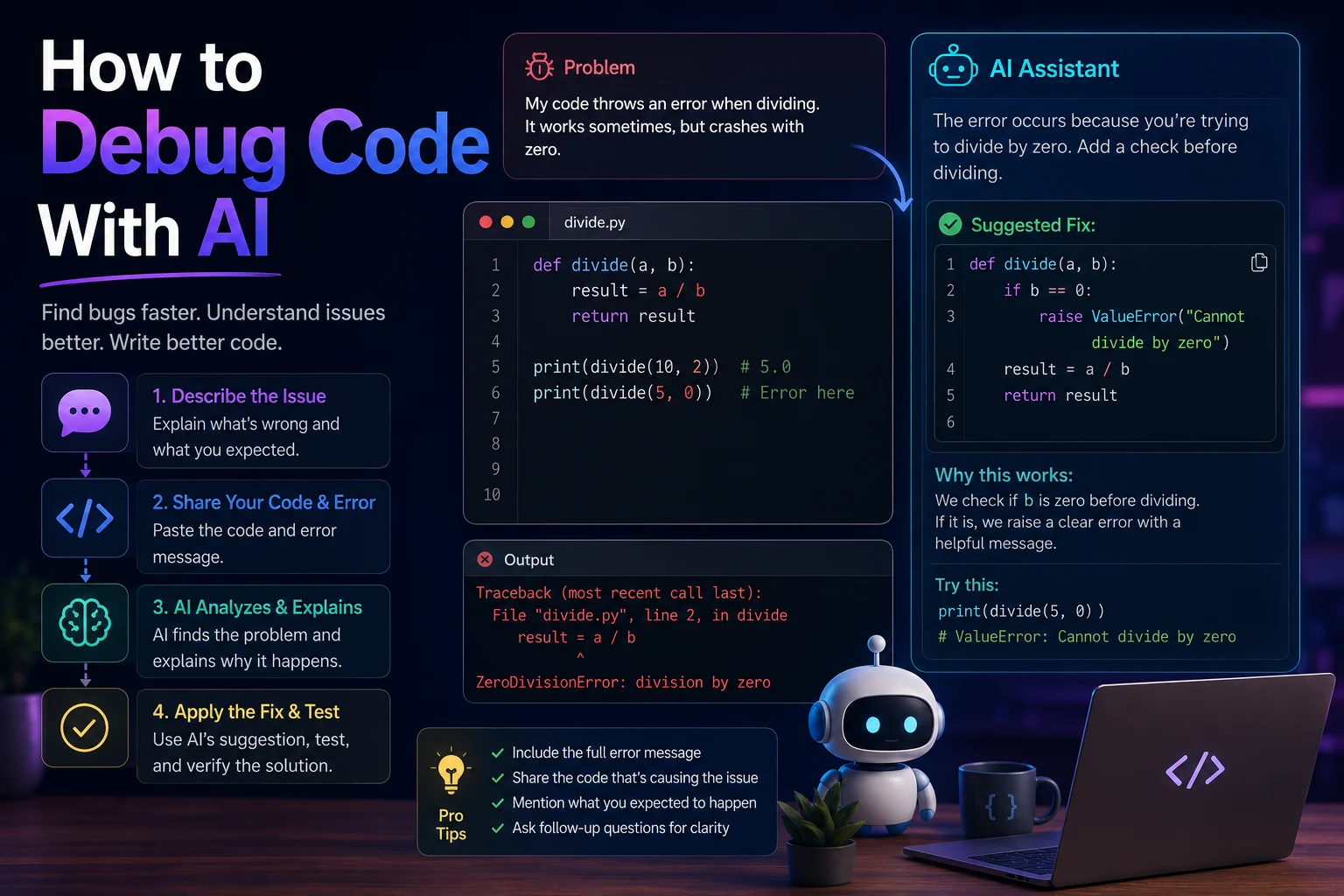
Step 4: Use a Structured Debugging Prompt
A structured prompt usually produces more useful debugging results than simply saying "fix this code."
A good debugging prompt can include five important parts:
- Context: Explain what the application does.
- Problem: Describe what is going wrong.
- Error: Provide the exact error message.
- Code: Provide the relevant code.
- Expected result: Explain what should happen.
For example:
I have a PHP application using PDO and MySQL. The application displays articles using clean URLs. The article exists in the database and has a published status, but visiting the clean URL returns a 404 error. Here is the .htaccess rule and the relevant article.php code. Identify the root cause, explain why it happens, and provide the minimum changes needed to fix it.
Step 5: Ask AI to Find the Root Cause
Do not immediately ask AI to rewrite everything.
First ask it to identify the likely root cause.
For example:
Analyze this code and identify the most likely root cause of the error. Do not change the code yet. Explain exactly which part is causing the problem.
This approach is useful because it forces the debugging process to begin with analysis rather than immediately replacing working code.
Step 6: Ask for the Minimum Fix
Once the likely cause has been identified, ask AI for the smallest change that solves the problem.
For example:
Now provide the minimum code change required to fix this problem. Keep all existing functionality unchanged and do not rewrite unrelated parts of the application.
This can reduce the risk of introducing new bugs.
Step 7: Test the Suggested Fix
Never assume that an AI-generated fix is correct simply because the explanation sounds convincing.
After applying the change:
- Run the application.
- Reproduce the original problem.
- Check whether the error disappeared.
- Test related functionality.
- Check for new warnings or errors.
If the problem remains, give the AI the new error message and explain what happened after applying the suggested fix.
Step 8: Give AI the New Error
Debugging is often an iterative process.
If the first fix does not work, do not simply ask the AI to rewrite everything.
Instead, provide the result of your test:
I applied your suggested change, but the problem still occurs. The new error is: [error]. The page now behaves like this: [describe behavior]. Here is the updated code. Reconsider the previous diagnosis and identify what we missed.
This gives the AI new evidence and encourages it to reconsider its earlier assumption.
Debugging Different Types of Errors With AI
Syntax Errors
Syntax errors occur when code does not follow the rules of the programming language.
AI can usually explain these errors quickly when you provide the exact message and surrounding code.
For example:
PHP Parse error: syntax error, unexpected token "}"You can ask:
Explain this PHP syntax error and identify where the unmatched bracket is likely located.
Runtime Errors
Runtime errors happen while the program is executing.
Examples include undefined variables, missing files, database connection failures, and invalid function calls.
Provide the complete error message, relevant code, and expected behavior so the AI can analyze the situation.
Logic Errors
Logic errors can be harder to find because the program runs without producing a technical error, but the result is wrong.
For example, a search feature might return the wrong results even though the database query executes successfully.
In this situation, explain both the expected result and the actual result.
Database Errors
AI can help analyze SQL queries, PDO errors, missing columns, incorrect joins, and unexpected query results.
For database debugging, provide:
- The database engine
- The SQL query
- The exact database error
- The relevant table structure
- The expected result
Never provide real database passwords or other sensitive credentials.
404 Errors
404 errors can have several different causes, including incorrect URLs, missing files, rewrite rules, routing problems, or application logic that fails to find a resource.
When debugging a 404 error with AI, provide:
- The URL that returns the error
- Your .htaccess or routing configuration
- The relevant application code
- The database query if the page depends on database data
- The expected URL structure
This allows AI to investigate whether the problem occurs at the web-server level or inside the application.
Debugging JavaScript With AI
AI can also help debug JavaScript errors in the browser.
When a JavaScript error appears in the browser console, copy the exact error and provide the relevant JavaScript code.
For example:
Uncaught TypeError: Cannot read properties of nullYou can ask:
Explain why this JavaScript code is trying to access a property on null. Identify the likely cause and show how to safely handle the missing element.
Browser console errors, stack traces, and the relevant HTML can provide additional context.
Debugging Python With AI
Python developers can use AI to investigate exceptions, incorrect outputs, dependency issues, and problems with functions or classes.
For example:
TypeError: unsupported operand type(s) for +: 'int' and 'str'A useful prompt could be:
Explain this Python TypeError. Identify which values have incompatible types and provide two possible ways to fix the issue depending on whether the value should be treated as a number or text.
Debugging CSS With AI
AI can also help diagnose visual problems such as incorrect spacing, overflowing elements, responsive layouts, and unexpected styles.
For CSS issues, provide:
- The relevant HTML
- The relevant CSS
- A description of the visual problem
- The expected appearance
- The screen size where the problem occurs
If possible, a screenshot can also provide useful visual context.
Use AI to Explain Stack Traces
Stack traces can look intimidating, especially when you are learning programming.
AI can translate a stack trace into a more understandable explanation.
Ask:
Explain this stack trace in beginner-friendly language. Start with the original error, identify where it occurred, explain how execution reached that point, and tell me what I should investigate first.
This can help you understand not only what failed but also where to start debugging.
Ask AI for Possible Causes
Sometimes you don't know what is causing a bug.
Instead of asking AI to immediately fix it, ask for a ranked list of possible causes.
List the five most likely causes of this problem, starting with the most likely. For each cause, explain how I can test whether it is responsible.
This creates a more systematic debugging process.
Use AI as a Debugging Partner
One of the best ways to use AI is as a debugging partner rather than an automatic code generator.
You can have a conversation like this:
- Explain the problem.
- Provide the error message.
- Show the relevant code.
- Ask for possible causes.
- Test the most likely cause.
- Report the result.
- Ask AI to reconsider the diagnosis.
- Apply the smallest safe fix.
- Run tests again.
This approach keeps you involved in the debugging process and helps you understand why the problem occurs.
Common AI Debugging Mistakes
1. Saying Only "Fix This"
A vague prompt gives the AI very little context. Explain what the code should do, what it actually does, and what error you are seeing.
2. Providing the Wrong Code
If the error occurs in one file but you provide an unrelated section of the application, the AI may make incorrect assumptions.
3. Hiding the Exact Error
Always provide the complete error message when possible. Small details in an error message can identify the underlying problem.
4. Applying a Fix Without Understanding It
Do not blindly copy a generated solution. Ask the AI to explain the change and make sure you understand its effect.
5. Letting AI Rewrite Everything
A complete rewrite may solve one problem while introducing several others. Start with the smallest possible change.
6. Not Testing After the Fix
A debugging suggestion is only a hypothesis until you test it.
Protect Your Code and Secrets
When using AI for debugging, never expose sensitive information unnecessarily.
Remove or replace:
- Passwords
- API keys
- Authentication tokens
- Private certificates
- Database credentials
- Private user information
For example, replace a real API key with:
API_KEY = "YOUR_API_KEY"You can usually provide the relevant structure of the code without exposing the actual secret.
Best AI Debugging Prompt Template
You can use the following template whenever you encounter a programming problem:
I am working on a [language/framework] project.
The feature should: [expected behavior].
The problem is: [actual behavior].
The exact error message is:
[error message]
Relevant code:
[code]
Please:
1. Identify the most likely root cause.
2. Explain why it happens.
3. Suggest the minimum safe fix.
4. Explain the fix.
5. Tell me how to test that the problem is solved.
AI Debugging Workflow
| Step | What to Provide | What AI Can Do |
|---|---|---|
| 1. Identify | Error message and symptoms | Explain the problem |
| 2. Context | Relevant code and environment | Analyze possible causes |
| 3. Diagnose | Expected vs actual behavior | Find likely root causes |
| 4. Fix | Relevant code | Suggest minimal changes |
| 5. Test | New results | Help verify the solution |
| 6. Improve | Working implementation | Suggest safer or cleaner improvements |
Final Verdict
AI can make debugging significantly faster by helping developers understand errors, inspect code, identify possible causes, and test potential solutions.
The most effective approach is to treat AI as a debugging assistant rather than an automatic replacement for your development process. Give it accurate information, ask it to identify the root cause, apply small changes, and verify every fix.
The better your debugging prompt, the more useful the AI's response is likely to be. Include the exact error, relevant code, expected behavior, actual behavior, and information about your development environment.
Most importantly, never assume that an AI-generated fix is correct. Test it, review it, and understand what changed before deploying it to a real application.
Frequently Asked Questions
Can AI debug code?
Yes. AI can analyze code and error messages, identify potential bugs, explain problems, and suggest fixes. Developers should still verify the suggested solution.
What should I give AI when debugging?
Provide the exact error message, relevant code, programming language, framework or environment, expected behavior, and actual behavior. Recent changes can also be useful.
Can AI fix any programming error?
AI can help with many common programming problems, but it cannot guarantee a correct solution. Complex bugs may require deeper investigation, documentation, testing, and developer judgment.
Should I paste my entire project into AI?
Usually, no. Start with the smallest relevant section of code and provide additional context when necessary. Avoid sharing passwords, API keys, database credentials, or other sensitive information.
How do I ask ChatGPT to debug my code?
Explain what the code should do, describe what is happening instead, provide the exact error message and relevant code, and ask ChatGPT to identify the root cause before suggesting a minimal fix.
Is AI debugging useful for beginners?
Yes. Beginners can use AI to understand error messages, learn debugging techniques, and receive explanations of programming concepts. It is still important to learn the fundamentals and understand the code being changed.