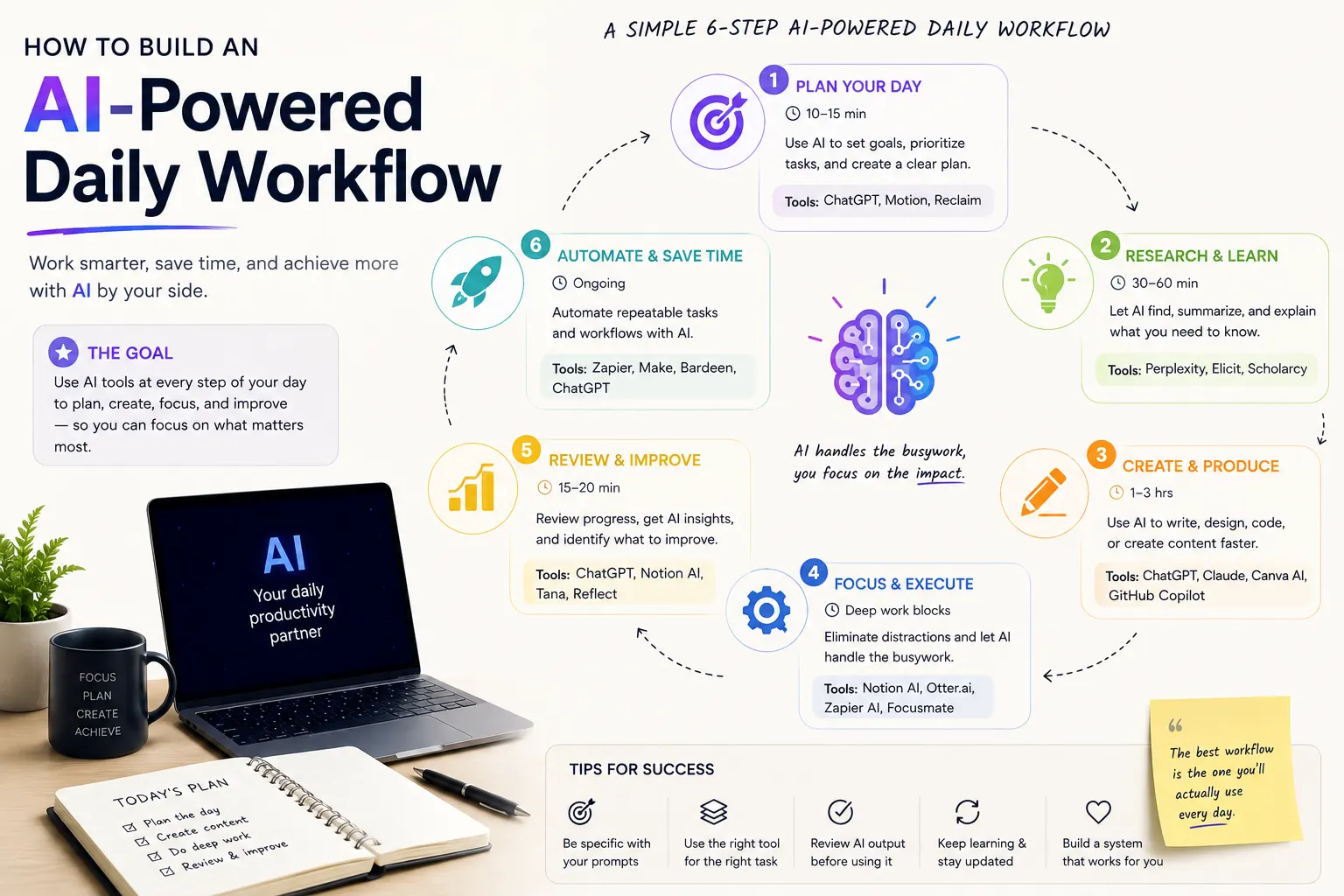

Modern work often involves managing tasks, emails, meetings, documents, research, messages, and repetitive administrative work at the same time. AI can help reduce this workload by assisting with planning, organization, writing, summarization, and automation.
However, simply using several AI tools does not automatically create a productive workflow. The real benefit comes from connecting AI tools to the way you already work and giving each tool a specific role.
An AI-powered daily workflow can help you start the day with a clear plan, process information faster, automate repetitive tasks, and review your progress before finishing work.
In this guide, we'll explain how to build an AI-powered daily workflow, what tasks AI can handle, how to create useful AI prompts, how to automate repetitive work, and how to build a practical system that you can use every day.
What Is an AI-Powered Daily Workflow?
An AI-powered daily workflow is a structured routine that uses artificial intelligence to assist with recurring tasks throughout your day.
Instead of asking AI random questions whenever you need help, you create a repeatable system where AI has specific responsibilities.
For example, your workflow might use AI to:
- Plan your priorities each morning
- Organize your task list
- Summarize emails and documents
- Prepare for meetings
- Write and improve content
- Research topics
- Extract important information
- Automate repetitive administrative tasks
- Create daily summaries
- Review unfinished work
The goal is not to automate everything. The goal is to use AI where it can save time while keeping important decisions under human control.
Why Build an AI-Powered Daily Workflow?
A well-designed AI workflow can reduce the amount of time you spend switching between applications and performing repetitive tasks.
Instead of manually processing every piece of information, you can use AI to handle the first stage of many tasks.
For example, AI can turn a long email into a short summary, convert meeting notes into action items, or transform a collection of research notes into an organized outline.
Benefits of an AI Daily Workflow
- Less repetitive work
- Faster information processing
- Better task organization
- Faster writing and editing
- More efficient research
- Improved meeting preparation
- More consistent daily planning
- Less time spent switching between tasks
The 7 Parts of an AI-Powered Daily Workflow
A practical AI workflow can be divided into seven stages:
- Capture: Collect tasks, ideas, messages, and information.
- Plan: Decide what deserves attention today.
- Prioritize: Identify the most important tasks.
- Execute: Use AI to accelerate individual tasks.
- Automate: Remove repetitive manual steps.
- Review: Check what was completed and what remains.
- Improve: Adjust the workflow based on what worked.
These stages create a simple system that can be adapted to different jobs, businesses, study routines, and personal projects.
1. Start Your Day With AI Planning
One of the easiest ways to introduce AI into your daily routine is to use it as a planning assistant.
Instead of beginning the day by reacting to every notification, create a list of everything you need to accomplish and ask AI to help organize it.
For example:
Here are my tasks for today. Organize them by priority and urgency. Identify the three most important tasks, estimate how much time each task may require, and create a realistic schedule. Leave enough time for unexpected work and breaks.
AI can help you turn an unstructured list into a more manageable plan.
Use AI for Daily Prioritization
Not every task deserves the same amount of attention.
You can ask AI to classify tasks into categories such as:
- High priority
- Important but not urgent
- Quick tasks
- Tasks that can be delegated
- Tasks that can be automated
- Tasks that can be postponed
This can make it easier to focus on meaningful work instead of spending the entire day responding to small requests.
2. Create a Daily AI Task Manager
AI becomes more useful when it has consistent information about your tasks.
Create a simple task list containing:
- Task name
- Deadline
- Priority
- Estimated time
- Current status
- Related project
You can then ask AI to reorganize the list whenever priorities change.
Review this task list and create today's action plan. Prioritize tasks based on deadline, importance, and potential impact. Do not schedule more work than can realistically be completed in one day.
The important part is realism. An AI-generated schedule should not contain twelve hours of uninterrupted work when you only have six productive hours available.
3. Use AI to Process Emails
Email can consume a significant amount of time because messages often contain a mixture of information, requests, questions, and unnecessary details.
AI can help you process emails more efficiently by summarizing them and identifying required actions.
For example:
Analyze these emails and create a table with the sender, main topic, required action, deadline, and priority. Do not draft responses yet.
Once you understand what requires attention, you can ask AI to help draft responses.
Draft concise and professional responses to these emails. Preserve the original meaning, answer each question directly, and avoid making commitments that were not authorized.
Don't Let AI Send Important Emails Automatically
For important business, financial, legal, or personal communication, review AI-generated messages before sending them.
AI can help write the response, but you should remain responsible for what the message actually says.
4. Use AI to Summarize Information
Modern professionals often need to process large amounts of information every day.
This can include:
- Articles
- Reports
- Research papers
- News
- Meeting notes
- Documentation
- PDFs
- Long emails
Instead of asking AI for a generic summary, specify what information matters to you.
Summarize this document in 300 words. Identify the main argument, five important points, important statistics, decisions, risks, and recommended next steps. Do not include information that is not supported by the document.
This approach produces a more useful summary than simply asking AI to make a document shorter.
5. Use AI for Meeting Preparation
AI can help before, during, and after meetings.
Before a meeting, you can provide the agenda and background information and ask AI to prepare a briefing.
Prepare me for this meeting. Summarize the agenda, identify the most important topics, list questions I should ask, identify potential risks, and suggest the decisions that may need to be made.
After a meeting, AI can turn notes or a transcript into structured action items.
Turn these meeting notes into a concise summary. Separate decisions, action items, responsible people, deadlines, unresolved questions, and follow-up tasks.
This can make it easier to turn meetings into actual progress.
6. Build an AI Research Workflow
Research is another area where AI can save significant time.
Instead of immediately asking AI to provide an answer, use it to structure the research process.
A simple research workflow is:
- Define the research question.
- Break it into smaller questions.
- Find relevant sources.
- Summarize important sources.
- Compare the evidence.
- Identify disagreements.
- Verify important claims.
- Create a final summary.
For example:
Break this research topic into five specific questions. For each question, explain what type of evidence I should look for and what sources would be most useful.
This helps turn a broad topic into a structured research project.
7. Use AI as a Writing Assistant
AI can support many stages of the writing process without necessarily replacing the writer.
You can use AI to:
- Create outlines
- Improve clarity
- Rewrite paragraphs
- Generate ideas
- Fix grammar
- Summarize research
- Create headlines
- Adapt content for different audiences
For example:
Improve the clarity of this paragraph without changing its meaning. Keep the tone professional and concise. Do not add new facts.
This is generally more useful than simply asking AI to rewrite everything because you are giving it a specific objective.
8. Automate Repetitive Tasks
One of the biggest advantages of an AI-powered workflow is the ability to automate repetitive tasks.
Examples include:
- Moving information between applications
- Creating task records
- Generating summaries
- Sorting incoming information
- Creating notifications
- Preparing reports
- Extracting information from documents
- Creating draft responses
Automation platforms can connect different applications so that one action triggers another.
For example, a new form submission could trigger a workflow that extracts the important information, creates a task, generates a summary, and notifies the appropriate person.
Start With Simple Automations
Do not try to automate your entire business or daily life immediately.
Start with one repetitive task that happens frequently and has predictable steps.
Once the automation works reliably, add another.
9. Create an AI End-of-Day Review
Your AI workflow should not end when your working day ends.
An end-of-day review can help you understand what was completed and what needs attention tomorrow.
Review my completed and unfinished tasks. Summarize what I accomplished today, identify unfinished priorities, suggest what should move to tomorrow, and identify any tasks that can be eliminated, delegated, or automated.
This creates a feedback loop between today's work and tomorrow's plan.
AI-Powered Morning Routine
A practical morning AI workflow can take only a few minutes.
- Review your calendar.
- Collect new tasks and requests.
- Give the information to your AI assistant.
- Identify the three most important priorities.
- Create realistic time blocks.
- Prepare for important meetings.
- Start with the highest-impact task.
For example:
Here is my calendar and task list for today. Create a realistic work plan. Protect time for focused work, prioritize deadlines, identify meetings that require preparation, and keep lower-priority tasks for later in the day.
AI-Powered Workday Workflow
During the day, use AI when it can reduce the time required for a specific task.
A typical workflow might look like this:
| Time | Workflow | How AI Helps |
|---|---|---|
| Morning | Daily planning | Prioritizes tasks and creates a realistic plan |
| Morning | Research | Finds and summarizes relevant information |
| Midday | Email processing | Summarizes messages and identifies actions |
| Afternoon | Writing | Helps draft, edit, and structure content |
| Afternoon | Meetings | Creates preparation notes and action items |
| End of day | Daily review | Summarizes progress and prepares tomorrow's priorities |
AI Workflow for Content Creators
Content creators can use AI to accelerate research, planning, writing, editing, and content repurposing.
A simple workflow could be:
- Generate topic ideas.
- Research the topic.
- Identify important sources.
- Create an outline.
- Write the first draft.
- Improve clarity and structure.
- Create a title and description.
- Repurpose the content for other platforms.
- Review the final content manually.
The human should remain responsible for the accuracy, originality, and final quality of the content.
AI Workflow for Students
Students can use AI to organize study tasks, explain difficult concepts, summarize learning materials, and create practice questions.
For example:
Create a study plan for this week's exam. Organize the topics by difficulty and importance. Include review sessions, practice questions, and time for revisiting concepts I get wrong.
AI can also transform notes into study materials:
Turn these notes into a study guide with key concepts, definitions, examples, flashcard questions, and ten practice questions. Do not add facts that are not contained in my notes.
Students should use AI as a learning assistant rather than simply asking it to complete assignments for them.
AI Workflow for Business Owners
Business owners often manage many different types of work, making AI particularly useful for organizing information and reducing administrative tasks.
An AI-powered business workflow can include:
- Daily business planning
- Email organization
- Customer communication drafts
- Market research
- Competitor research
- Meeting summaries
- Report generation
- Content creation
- Task management
- Data analysis
The most valuable opportunities are usually repetitive processes that happen frequently and follow predictable rules.
How to Create Better AI Prompts
A good AI workflow depends heavily on good instructions.
Instead of:
Plan my day.
provide more context:
Create my work plan for today using the following tasks and meetings. Prioritize deadlines and high-impact work. I have six hours available for focused work. Do not schedule more than three major tasks, and leave at least 30 minutes of buffer time for unexpected requests.
A useful AI prompt often includes:
- Context: What is happening?
- Goal: What do you want?
- Constraints: What should AI avoid?
- Input: What information should it use?
- Output: What format should it produce?
- Quality requirements: What makes the result useful?
Useful AI Prompts for Daily Productivity
Morning Planning Prompt
Review my calendar and task list for today. Identify my three highest-priority tasks, create a realistic schedule, group similar tasks together, and leave buffer time for unexpected work.
Email Management Prompt
Analyze these emails and identify which ones require a response, which require action, and which are informational. Sort them by priority and summarize the required next step for each.
Research Prompt
Help me research this topic. Break it into specific questions, identify the information I need, suggest reliable source types, and create a structured research plan.
Writing Prompt
Improve this draft for clarity, structure, and readability. Preserve my original meaning, do not add unsupported claims, and keep the tone professional.
End-of-Day Prompt
Review today's completed and unfinished tasks. Summarize my progress, identify the most important unfinished work, and create tomorrow's top three priorities.
Don't Automate Everything
Automation can save time, but excessive automation can create new problems.
Some decisions require human judgment, context, creativity, or accountability.
Keep humans involved in tasks involving:
- Important financial decisions
- Legal decisions
- Security decisions
- Hiring decisions
- Sensitive customer communication
- Confidential information
- High-impact business decisions
AI can assist with these tasks, but automatically making the final decision may introduce unnecessary risks.
Protect Your Data When Using AI
An AI-powered workflow may involve emails, documents, customer information, business data, and other potentially sensitive information.
Before connecting an AI tool to your workflow, understand:
- What information the tool receives
- Where the information is stored
- How long information is retained
- Whether data can be used for model training
- Which applications have access
- What permissions the automation requires
- How access can be revoked
Follow the principle of least privilege: give an AI tool or automation only the access it actually needs.
Common AI Workflow Mistakes
1. Using Too Many AI Tools
You do not need a separate AI application for every task.
Using too many tools can create more complexity and context switching.
2. Automating Before Understanding the Process
Before automating a task, understand how the process works manually.
If the process is inefficient, automating it may simply make the inefficient process happen faster.
3. Giving AI Too Little Context
Generic prompts often produce generic results.
Provide the relevant background, constraints, examples, and desired output.
4. Trusting AI Without Verification
AI can produce incorrect information, even when the response sounds confident.
Verify important information before using it in professional, financial, legal, technical, or other high-impact situations.
5. Creating Unrealistic Schedules
AI can generate schedules that look organized but contain more work than you can realistically complete.
Always account for meetings, interruptions, breaks, and unexpected work.
AI Workflow vs Traditional Workflow
| Task | Traditional Workflow | AI-Powered Workflow |
|---|---|---|
| Daily planning | Manual task organization | AI-assisted prioritization |
| Email processing | Read messages individually | AI summarizes and categorizes messages |
| Research | Manual search and notes | AI assists with discovery and summarization |
| Writing | Draft and edit manually | AI assists with drafting and editing |
| Meetings | Manual notes and follow-up | AI can structure notes and action items |
| Repetitive tasks | Performed manually | Can potentially be automated |
| End-of-day review | Often skipped | AI can create a structured review |
How to Build Your AI Workflow Step by Step
- Track your work: Write down the tasks you perform during a normal day.
- Find repetitive work: Identify tasks that happen frequently.
- Choose one AI use case: Start with a task where AI can clearly save time.
- Create a standard prompt: Give AI consistent instructions.
- Test manually: Make sure the AI produces useful results.
- Add automation: Automate the repetitive parts of the process.
- Add human review: Keep important decisions under human control.
- Measure the result: Compare the time and quality before and after automation.
- Improve: Adjust the workflow based on real-world results.
A Simple AI-Powered Daily Workflow Example
You do not need a complicated system to get started.
A simple daily workflow could look like this:
- 8:00 AM: Review calendar and tasks.
- 8:10 AM: Ask AI to identify the day's top priorities.
- 8:20 AM: Start the highest-impact task.
- 10:30 AM: Use AI to process research or documents.
- 12:00 PM: Process important emails.
- 2:00 PM: Use AI for writing, analysis, or repetitive tasks.
- 4:30 PM: Review completed work.
- 4:45 PM: Ask AI to prepare tomorrow's priorities.
The exact schedule is less important than having a consistent process.
How to Measure Your AI Workflow
After implementing an AI workflow, measure whether it is actually improving your productivity.
Track metrics such as:
- Time saved per day
- Tasks completed
- Time spent on repetitive work
- Number of manual steps removed
- Errors introduced by automation
- Quality of AI-generated output
- Time spent reviewing AI output
An AI workflow is successful when it saves meaningful time without creating more work through errors, unnecessary complexity, or excessive review.
Final Verdict
Building an AI-powered daily workflow does not require dozens of tools or complicated automation systems. The most effective approach is to start with the tasks that consume the most time and determine where AI can provide practical assistance.
Use AI for planning, summarization, research, writing, meeting preparation, information organization, and repetitive tasks. Keep human judgment involved whenever accuracy, security, accountability, or important decisions are involved.
A simple workflow can begin with an AI-assisted morning plan, continue with AI support throughout the workday, and finish with an automated or AI-assisted end-of-day review.
The most important principle is to build a workflow around your actual work rather than forcing your work to fit a collection of AI tools.
Start with one repetitive task, create a reliable AI-assisted process, measure the results, and gradually expand the system. Over time, this can turn AI from an occasional assistant into a practical part of your daily productivity workflow.
Frequently Asked Questions
What is an AI-powered daily workflow?
An AI-powered daily workflow is a repeatable system that uses artificial intelligence to assist with tasks such as planning, research, writing, summarization, communication, organization, and automation.
How can AI improve daily productivity?
AI can improve productivity by reducing repetitive work, summarizing information, helping prioritize tasks, assisting with writing and research, preparing meeting notes, and automating predictable processes.
What is the best AI tool for daily productivity?
There is no single best AI productivity tool for everyone. The right choice depends on your workflow and the tasks you want to automate or accelerate. A general AI assistant can be a useful starting point before adding specialized tools.
Can AI plan my entire day?
Yes. AI can create a daily schedule based on your tasks, deadlines, meetings, and available time. However, you should review the schedule because AI may underestimate interruptions, task complexity, or the time required to complete work.
Can AI automate repetitive tasks?
Yes. AI can assist with repetitive tasks such as summarizing information, extracting data, categorizing messages, generating drafts, and moving information between applications. Automation should be tested carefully before being used for important processes.
Can AI manage my emails?
AI can help summarize emails, categorize messages, identify required actions, and draft responses. Important emails should still be reviewed by a person before they are sent.
Can AI help with meetings?
Yes. AI can help prepare meeting briefs, summarize notes or transcripts, identify decisions, create action items, and organize follow-up tasks.
How do I start building an AI workflow?
Start by identifying one repetitive task that takes significant time. Create a consistent AI prompt for that task, test the results, measure the time saved, and then consider automating the process.
Should I automate everything with AI?
No. Some tasks require human judgment, especially decisions involving security, finances, legal matters, confidential information, or significant business consequences. AI should assist with these tasks rather than automatically making every decision.
How do I make AI workflows more reliable?
Give AI clear instructions, provide sufficient context, define the expected output, use consistent prompts, validate important results, and keep human review for high-impact tasks.
Can AI replace a personal productivity system?
AI can enhance a productivity system, but it does not replace the need for clear goals, priorities, organization, and decision-making. The best results come from combining AI assistance with a well-designed personal workflow.