
Meetings can generate a huge amount of information, from important decisions and project updates to action items, customer feedback, and follow-up tasks. Taking detailed notes while actively participating in a meeting can make it difficult to stay focused.
AI meeting tools can help solve this problem by recording or transcribing conversations, generating summaries, identifying important decisions, extracting action items, and making previous meetings easier to search.
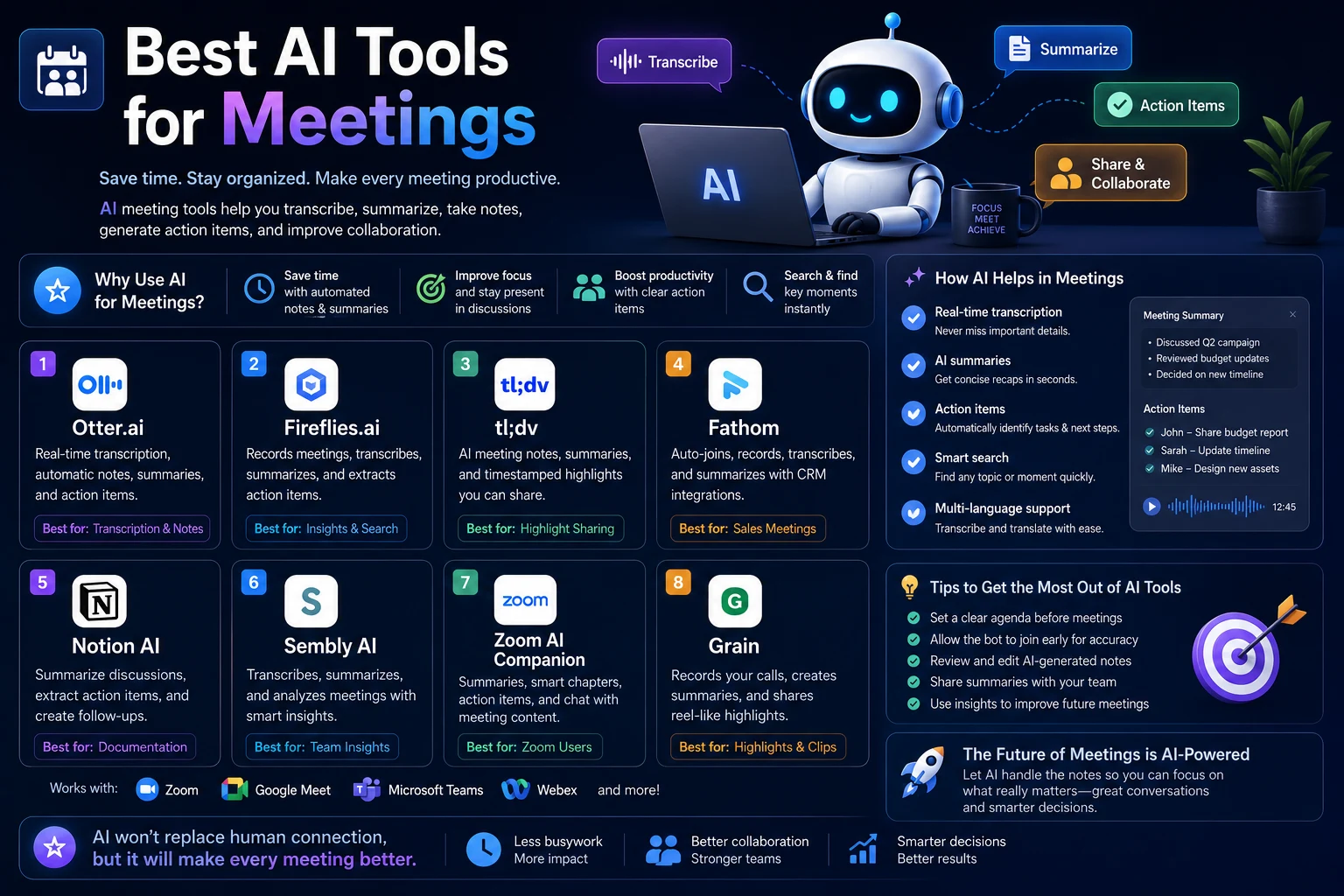
The best AI tools for meetings in 2026 go beyond simple transcription. Many can turn conversations into structured notes, help you find information across previous meetings, and connect meeting information with the rest of your workflow.
In this guide, we'll look at the best AI tools for meetings, what each tool is best for, how AI meeting assistants work, how to choose the right tool, and how to use AI to get more value from every meeting.
Best AI Tools for Meetings in 2026
Different AI meeting tools are designed for different workflows. Some focus on transcription and meeting notes, while others provide deeper meeting intelligence, collaboration features, integrations, or built-in AI assistance.
- Otter — Best for AI meeting transcription and searchable meeting notes
- Fireflies — Best for meeting intelligence and team workflows
- Fathom — Best for automated meeting summaries and follow-ups
- Granola — Best for AI-enhanced meeting notes without a traditional meeting bot
- tl;dv — Best for meeting recordings, summaries, and team collaboration
- Zoom AI Companion — Best for teams already using Zoom
- Microsoft Teams AI features — Best for organizations using Microsoft Teams
1. Otter
Otter is one of the most established AI meeting assistants. It can transcribe meetings in real time and turn conversations into searchable meeting records.
Otter's current Notetaker can join Zoom, Google Meet, and Microsoft Teams meetings, while its AI features can generate summaries and help users ask questions about meeting content. Otter also supports recording and transcription of conversations outside traditional online meetings.
Why use Otter?
- Real-time meeting transcription
- AI-generated meeting summaries
- Searchable meeting history
- AI chat for meeting information
- Speaker identification
- Meeting takeaways and action items
- Support for major meeting platforms
- Meeting recording capabilities
Otter can be particularly useful when you regularly attend meetings and want a searchable record of what was discussed rather than relying on manually written notes.
Best for: Professionals who want reliable transcription, summaries, and searchable meeting knowledge.
2. Fireflies
Fireflies is an AI meeting assistant focused on capturing conversations and turning them into structured information that teams can review and use after meetings.
Its meeting workspace can contain an AI-generated summary, full transcript, recording, analytics, and action items, giving teams a centralized place to review meeting information.
Why use Fireflies?
- AI meeting transcription
- Automated summaries
- Action item extraction
- Searchable meeting information
- Meeting analytics
- Recording and transcript access
- Team collaboration features
- Integrations with productivity workflows
Fireflies can be particularly useful for teams that have many recurring meetings and need to turn conversations into information that can be reviewed later.
Best for: Teams that want meeting intelligence, searchable conversations, and structured post-meeting workflows.
3. Fathom
Fathom is an AI meeting assistant designed to help users capture conversations and automatically create useful meeting notes and summaries.
Instead of trying to write down every sentence, you can focus on the discussion while the AI handles much of the documentation process.
Why use Fathom?
- Automated meeting summaries
- AI-generated meeting notes
- Action item extraction
- Meeting recordings
- Searchable meeting information
- Follow-up assistance
- Useful for sales and customer conversations
Fathom is particularly attractive for people who want to spend less time writing meeting notes and more time participating in conversations.
Best for: Professionals who want automated summaries and efficient post-meeting follow-up.
4. Granola
Granola takes a different approach to AI meeting notes. Instead of relying on a traditional meeting bot joining the call, it works as an AI notepad that combines meeting transcription with notes you write yourself.
Granola can use the meeting transcript, your own notes, and calendar information to generate enhanced meeting notes. You can also use its chat functionality to ask questions about individual meetings or information across multiple meetings.
Why use Granola?
- AI-enhanced meeting notes
- Real-time transcription
- Personal note-taking
- Custom note templates
- Chat with meeting notes
- Search across meetings
- Follow-up generation
- Sharing and collaboration features
One of Granola's strengths is combining human notes with AI-generated information. Your own notes can provide additional context and help guide the structure of the final meeting summary.
Best for: Professionals who want AI assistance while maintaining control over how they take and structure meeting notes.
5. tl;dv
tl;dv is an AI meeting assistant designed around recording, transcription, summaries, and collaboration. It can be useful for individuals and teams that need to capture conversations and revisit specific parts of meetings later.
Why use tl;dv?
- Meeting recording
- AI transcription
- AI-generated summaries
- Meeting highlights
- Action items
- Searchable meeting history
- Team collaboration
- Useful for customer and sales meetings
A major advantage of meeting recording tools is that you don't have to rely entirely on written summaries. You can return to the original conversation when an important detail needs additional context.
Best for: Teams that regularly record meetings and want AI summaries combined with access to the original conversations.
6. Zoom AI Companion
Zoom AI Companion is a natural option for organizations that already use Zoom for meetings and want AI assistance integrated into their existing workflow.
Built-in meeting AI can reduce the need to use a separate third-party meeting assistant for basic meeting summaries and related tasks.
Why use Zoom AI Companion?
- AI assistance inside Zoom
- Meeting summaries
- Meeting content assistance
- Action item support
- Integration with existing Zoom workflows
- Useful for organizations already using Zoom
The main advantage is convenience. If your team already spends most of its time inside Zoom, using its built-in AI capabilities can reduce the number of separate tools you need to manage.
Best for: Teams that already use Zoom and want integrated AI meeting assistance.
7. Microsoft Teams AI Features
Organizations that use Microsoft Teams can also take advantage of AI features integrated into Microsoft's collaboration ecosystem.
This approach can be attractive to businesses that already rely heavily on Microsoft 365 because meeting information can remain within an environment the organization already uses.
Why use Microsoft Teams AI?
- AI assistance inside Teams
- Meeting summaries
- Meeting recap capabilities
- Action item assistance
- Microsoft 365 integration
- Useful for business organizations
Best for: Organizations that already use Microsoft Teams and Microsoft 365 as their primary collaboration platform.
Best AI Meeting Tools by Use Case
| AI Tool | Best For | Main Strength |
|---|---|---|
| Otter | Transcription and meeting notes | Real-time transcription and searchable meeting knowledge |
| Fireflies | Meeting intelligence | Transcripts, summaries, analytics, and action items |
| Fathom | Automated summaries | Fast meeting documentation and follow-up |
| Granola | AI-enhanced notes | Combines personal notes with AI transcription and summaries |
| tl;dv | Recording and collaboration | Meeting recordings, summaries, and searchable conversations |
| Zoom AI Companion | Zoom meetings | AI assistance integrated into Zoom |
| Microsoft Teams AI | Microsoft 365 organizations | AI meeting assistance inside Teams |
What Can AI Do for Meetings?
1. Transcribe Meetings
AI meeting assistants can convert spoken conversations into text, allowing you to review what was said without manually taking detailed notes.
This is especially useful for long meetings, interviews, customer calls, research sessions, and team discussions.
2. Summarize Meetings
Instead of reading an entire transcript, AI can create a shorter summary highlighting the most important points.
A useful meeting summary should generally include:
- Key discussion points
- Important decisions
- Action items
- Open questions
- Deadlines
- Next steps
3. Extract Action Items
One of the most useful applications of meeting AI is identifying tasks that were assigned during a conversation.
For example, instead of manually reviewing a 60-minute transcript, you can ask the AI to identify:
- Who needs to do something
- What they need to do
- When it needs to be completed
- Any dependencies or unresolved questions
4. Find Important Information
Searchable meeting transcripts make it easier to find information that was discussed weeks or months ago.
Instead of asking, "Which meeting did we discuss the new pricing strategy?", you can search your meeting history or ask an AI assistant to locate the relevant discussion.
5. Create Follow-Up Messages
AI can turn meeting notes into follow-up emails, Slack messages, task lists, or project updates.
Create a concise follow-up email based on this meeting. Include the main decision, action items with owners, deadlines, and the next meeting date. Keep the tone professional and avoid adding information that wasn't discussed.
6. Prepare for Future Meetings
AI can also help you prepare before a meeting by summarizing previous conversations and identifying unresolved issues.
This is particularly useful for recurring project meetings, sales calls, customer relationships, and management discussions.
7. Search Across Multiple Meetings
Some AI meeting tools allow you to ask questions across your meeting history rather than searching one transcript at a time.
For example:
Find every meeting where the product launch deadline was discussed and summarize how the deadline changed over time.
This turns meeting recordings into a searchable knowledge base rather than a collection of isolated transcripts.
AI Tools for Zoom Meetings
If most of your meetings take place on Zoom, you have several options.
- Use Zoom's built-in AI capabilities.
- Use Otter for transcription and meeting notes.
- Use Fireflies for meeting intelligence.
- Use Fathom for summaries and follow-ups.
- Use another AI notetaker that supports your workflow.
The best choice depends on whether you prioritize an integrated Zoom experience or more advanced cross-platform meeting intelligence.
AI Tools for Google Meet
Google Meet users can choose between Google's built-in AI capabilities and third-party meeting assistants.
Third-party tools can be useful if you want to keep meeting information searchable across multiple meeting platforms or connect meeting data to other productivity systems.
If your organization uses Google Workspace extensively, an integrated solution can be simpler because fewer external tools need to be managed.
AI Tools for Microsoft Teams
Microsoft Teams users can similarly choose between built-in Microsoft AI features and external meeting assistants.
For organizations already using Microsoft 365, keeping meeting information within the existing collaboration ecosystem may simplify administration and user adoption.
How to Choose the Right AI Meeting Tool
If You Mainly Need Transcription
Choose a tool that provides accurate transcription, speaker identification, searchable transcripts, and easy access to recordings.
Otter is a strong option to consider if transcription is your primary requirement.
If You Need Team Meeting Intelligence
Look for features such as action item extraction, analytics, searchable meeting history, integrations, and centralized meeting management.
Fireflies is particularly relevant for this type of workflow.
If You Want Simple Meeting Summaries
If your primary goal is to stop manually writing meeting notes, a tool focused on automated summaries and follow-ups may be sufficient.
Fathom is worth considering for this workflow.
If You Prefer Taking Your Own Notes
Some people don't want an AI assistant to completely replace their note-taking process.
Granola is designed around combining personal notes with AI-generated meeting information, making it an interesting option for users who want more control over their notes.
If You Already Use Zoom
Start by evaluating Zoom's built-in AI features before adding another service. An integrated solution may be enough for basic meeting summaries and assistance.
If You Already Use Microsoft Teams
Evaluate Microsoft's native AI capabilities first, especially if your organization already has a Microsoft 365 workflow.
How to Get Better AI Meeting Summaries
AI meeting tools can produce useful summaries, but the quality of the output depends on the quality of the conversation, transcription, and instructions.
Before a meeting, define the purpose and expected outcome.
During the meeting, make important decisions and responsibilities explicit.
After the meeting, ask AI to organize the information into a consistent structure.
For example:
Turn this meeting transcript into a structured summary with these sections: Executive Summary, Key Decisions, Action Items, Owners, Deadlines, Open Questions, Risks, and Next Steps. Do not invent information that was not discussed.
Useful AI Meeting Prompts
Meeting Summary Prompt
Summarize this meeting in a concise format. Include the main topics discussed, important decisions, unresolved questions, action items, owners, and deadlines. Do not add assumptions.
Action Items Prompt
Extract every action item from this meeting. For each task, identify the owner, deadline, dependencies, and relevant context. If an owner or deadline was not specified, mark it as unknown.
Decision Prompt
Identify all decisions made during this meeting. For each decision, explain what was decided, why it was decided, and whether any follow-up is required.
Follow-Up Email Prompt
Write a professional follow-up email based only on this meeting transcript. Summarize the main decision, list action items with owners and deadlines, and include the agreed next steps. Do not introduce new information.
Project Update Prompt
Turn this meeting into a short project update for the team. Include progress since the previous meeting, completed work, current blockers, upcoming tasks, owners, and deadlines.
Customer Meeting Prompt
Analyze this customer meeting and identify the customer's main needs, concerns, objections, requested features, buying signals, unanswered questions, and agreed next steps. Separate confirmed information from assumptions.
How to Use AI Before a Meeting
AI can be useful before a meeting, not just afterward.
For recurring meetings, ask AI to review previous meeting notes and identify unresolved issues.
Review the notes from our previous three project meetings. Identify unresolved action items, decisions that still need confirmation, recurring blockers, and questions we should address in today's meeting.
You can also use AI to create an agenda based on outstanding tasks and previous discussions.
How to Use AI During a Meeting
During a meeting, AI can reduce the amount of information you need to manually capture.
Depending on the tool, you may be able to access live transcription, meeting summaries, or AI-assisted information while the meeting is happening.
However, avoid becoming so focused on the AI interface that you stop participating in the actual conversation.
The goal is to use AI to reduce administrative work, not create another distraction.
How to Use AI After a Meeting
The biggest productivity gains often happen after the meeting.
A useful post-meeting workflow is:
- Review the AI-generated summary.
- Verify important decisions against the transcript.
- Check all action items and owners.
- Correct inaccurate names or statements.
- Create follow-up messages.
- Add tasks to your project-management system.
- Share the final notes with the appropriate people.
- Store the meeting information where the team can find it later.
AI should make the process faster, but important meeting information should still be reviewed by a human before being distributed.
Privacy and Security Considerations
Meetings can contain sensitive information, including customer data, business strategies, financial information, employee discussions, credentials, and confidential product plans.
Before choosing an AI meeting tool, review its privacy and security documentation.
Pay particular attention to:
- How meeting recordings are stored
- How transcripts are stored
- Who can access meeting data
- Whether data is used for model training
- Data retention policies
- Deletion controls
- Encryption
- Enterprise security controls
- Administrative permissions
- Third-party integrations
You should also follow your organization's policies regarding recording meetings and obtaining participant consent.
Don't Automatically Trust AI Meeting Summaries
AI-generated meeting summaries can contain mistakes. A transcription error can also cause the summary to incorrectly represent what someone said.
This matters particularly when meetings contain:
- Important deadlines
- Financial decisions
- Legal discussions
- Customer commitments
- Technical requirements
- Personnel decisions
- Security information
Always verify important decisions and action items against the original recording or transcript when accuracy matters.
AI Meeting Tools vs Traditional Note-Taking
| Feature | Traditional Notes | AI Meeting Tools |
|---|---|---|
| Manual note-taking | Required | Reduced |
| Full transcript | Usually unavailable | Often available |
| Meeting summary | Manual | Automated |
| Action items | Manual | Can be extracted automatically |
| Search previous meetings | Difficult | Often easier |
| Follow-up messages | Manual | Can be AI-assisted |
| Accuracy | Depends on the note-taker | Requires AI and human review |
A Practical AI Meeting Workflow
- Prepare: Review the previous meeting and define the objective.
- Set an agenda: Identify the topics and decisions that need attention.
- Record or transcribe: Use your selected AI meeting assistant when appropriate.
- Participate: Focus on the actual conversation instead of constantly taking notes.
- Review: Check the generated summary after the meeting.
- Verify: Confirm important decisions, names, deadlines, and action items.
- Follow up: Turn the final notes into emails, messages, and tasks.
- Store: Save the information where your team can find it later.
- Prepare: Use previous meeting information to make the next meeting more productive.
How AI Can Improve Meeting Productivity
The biggest benefit of AI meeting tools is not simply saving time on note-taking.
A well-designed workflow can turn meetings into structured information that continues to provide value after the call ends.
Instead of:
Meeting → Notes → Forget about them
you can create a workflow such as:
Meeting → Transcript → Summary → Decisions → Action Items → Tasks → Follow-Up → Searchable Knowledge
This is particularly valuable for teams that have frequent meetings and need to maintain continuity across projects.
Which AI Meeting Tool Should You Choose?
There is no universal winner because the best tool depends on your workflow.
- Choose Otter if transcription and searchable meeting notes are your priorities.
- Choose Fireflies if you want deeper meeting intelligence and team workflows.
- Choose Fathom if automated summaries and follow-ups are your main goals.
- Choose Granola if you want AI-enhanced notes while maintaining your own note-taking workflow.
- Choose tl;dv if recording, summaries, and collaboration are important.
- Choose Zoom AI Companion if your organization already works primarily in Zoom.
- Choose Microsoft Teams AI if your organization is built around Teams and Microsoft 365.
Final Verdict
AI meeting tools have evolved from simple transcription services into broader productivity assistants. They can capture conversations, summarize discussions, identify action items, help teams search previous meetings, and turn conversations into follow-up work.
For general meeting transcription and searchable notes, Otter is a strong choice. Its current Notetaker can work with Zoom, Google Meet, and Microsoft Teams, while its AI features provide summaries and conversational access to meeting information.
For teams that want more structured meeting intelligence, Fireflies is worth considering because its meeting workspace brings together summaries, transcripts, recordings, analytics, and action items.
For users who prefer writing their own notes while letting AI enhance them, Granola offers a different approach. It combines personal notes with transcription and AI-generated structure, and its chat functionality can be used to explore information across meetings.
Ultimately, the best AI meeting tool is the one that fits your existing communication and productivity workflow. If your team already relies heavily on Zoom or Microsoft Teams, starting with the platform's built-in AI capabilities may be the simplest approach. If you need cross-platform transcription, searchable meeting knowledge, or more advanced meeting workflows, a dedicated AI meeting assistant may be a better fit.
The most important thing is to treat AI as an assistant rather than an unquestioned source of truth. Review important summaries, verify decisions and action items, protect sensitive information, and make sure meeting participants understand and agree to applicable recording practices.
Frequently Asked Questions
What is the best AI tool for meetings?
The best AI meeting tool depends on your needs. Otter is a strong option for transcription and searchable meeting notes, Fireflies is useful for meeting intelligence, Fathom focuses on summaries and follow-ups, and Granola is designed around AI-enhanced note-taking.
What is an AI meeting assistant?
An AI meeting assistant is a tool that uses artificial intelligence to help capture, transcribe, summarize, analyze, and organize information from meetings.
Can AI take meeting notes?
Yes. AI meeting tools can automatically generate meeting notes from conversations and organize them into summaries, decisions, action items, and next steps.
Can AI summarize a Zoom meeting?
Yes. Depending on the tool and meeting configuration, AI can transcribe and summarize Zoom meetings. You can use Zoom's own AI capabilities or a compatible third-party meeting assistant.
Can AI summarize Google Meet meetings?
Yes. Google Meet users can use available built-in AI capabilities or compatible third-party meeting assistants to help capture and summarize meetings.
Can AI summarize Microsoft Teams meetings?
Yes. Microsoft Teams provides AI-assisted meeting capabilities, and third-party meeting assistants can also support Teams workflows.
Are AI meeting assistants accurate?
AI meeting assistants can produce useful transcripts and summaries, but they are not guaranteed to be perfect. Names, technical terms, numbers, and important decisions should be checked against the original conversation when accuracy is important.
Is it safe to use an AI meeting assistant?
It depends on the tool, its security practices, your organization's policies, and the type of information discussed. Review privacy, data retention, access controls, and security documentation before using an AI meeting assistant for sensitive conversations.
Can AI create action items from meetings?
Yes. Many AI meeting assistants can identify tasks and next steps from meeting conversations. You should still verify the owner and deadline before turning them into official tasks.
Can AI write follow-up emails after meetings?
Yes. You can provide a meeting transcript or summary to an AI assistant and ask it to create a professional follow-up email containing decisions, action items, deadlines, and next steps.
Should I use a separate AI meeting tool if Zoom already has AI features?
Not necessarily. If Zoom's built-in capabilities meet your needs, using an integrated solution may be simpler. A dedicated meeting assistant may be more appropriate if you need additional integrations, cross-platform support, advanced search, or specialized meeting workflows.
Should AI meeting summaries be trusted completely?
No. AI summaries should be reviewed, especially when a meeting contains important business, financial, legal, technical, security, or customer information. Always verify critical decisions and commitments before acting on them.