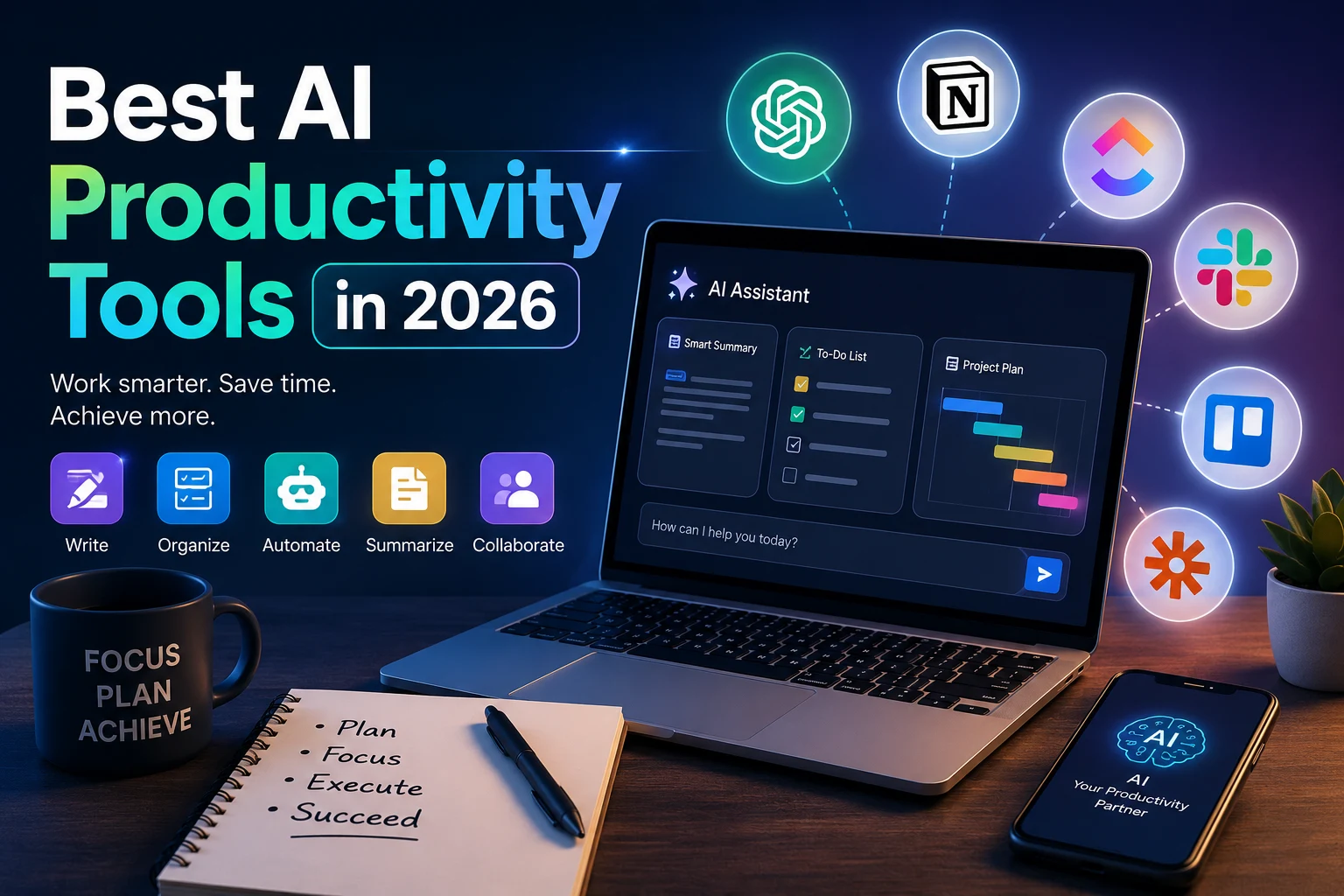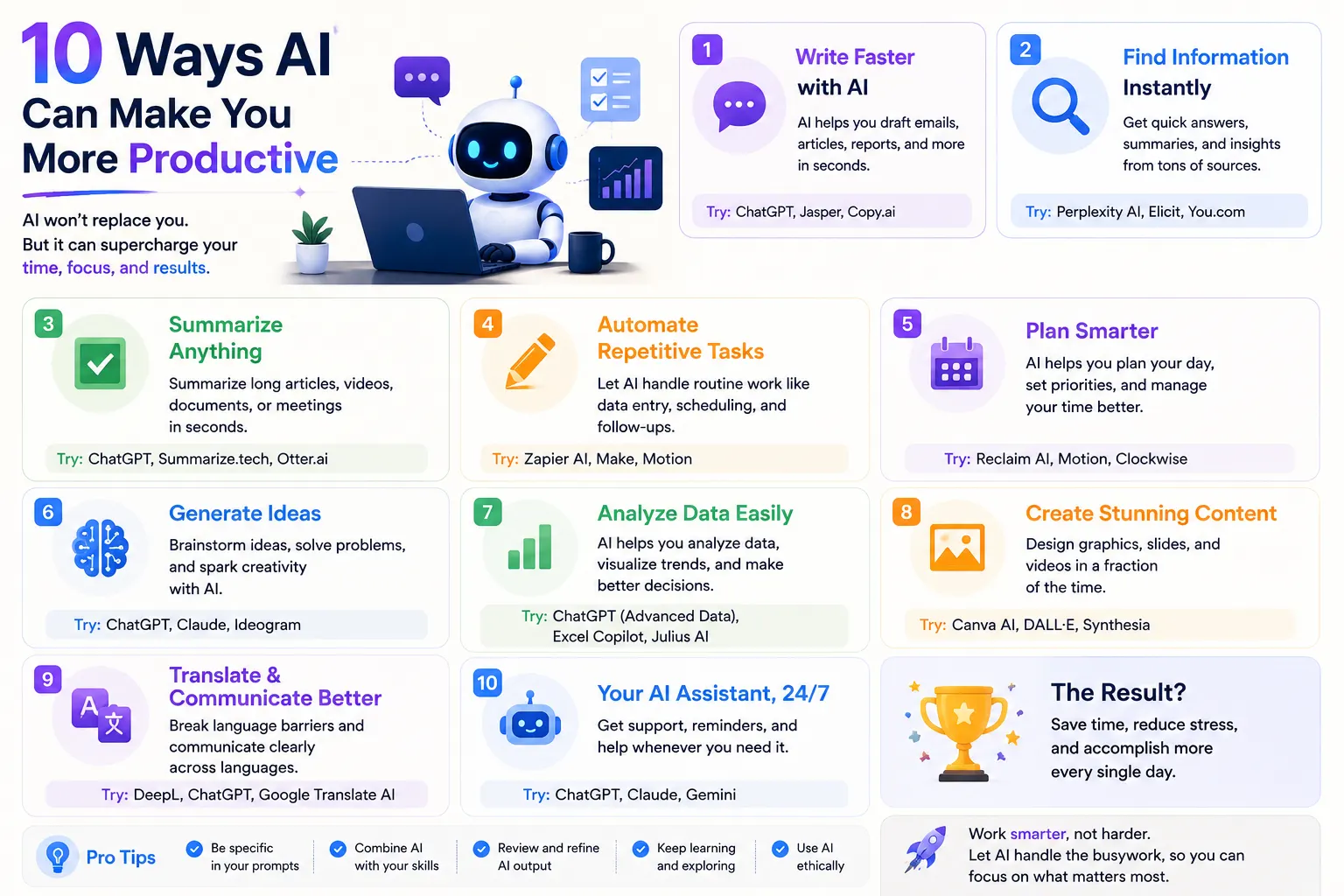

Artificial intelligence is changing the way people work, study, communicate, and manage their daily tasks. Instead of using AI only to generate text or answer questions, you can use it as a practical productivity assistant throughout your day.
AI can help you plan your schedule, organize tasks, write emails, summarize meetings, research information, automate repetitive work, and turn large amounts of information into useful summaries.
The biggest productivity benefit does not necessarily come from asking AI to do everything for you. It comes from using AI to reduce repetitive work and spend more time on tasks that require human judgment, creativity, and decision-making.
In this guide, we'll look at 10 practical ways AI can make you more productive in 2026 and show you how to incorporate AI into your everyday workflow.
10 Ways AI Can Make You More Productive in 2026
AI can improve productivity in many different ways. The best approach is to identify repetitive or time-consuming tasks in your workflow and determine which ones can be assisted or automated with AI.
- Plan your day — Use AI to organize priorities and create realistic schedules
- Manage emails — Draft, summarize, and organize email communication
- Write faster — Create drafts, rewrite text, and improve clarity
- Summarize information — Turn long documents and articles into concise summaries
- Research faster — Find and organize information more efficiently
- Automate repetitive tasks — Reduce manual work with AI-powered workflows
- Improve meetings — Create transcripts, summaries, and action items
- Manage projects — Break large projects into manageable tasks
- Learn faster — Use AI as a personalized learning assistant
- Optimize your workflow — Identify bottlenecks and improve how you work
1. Use AI to Plan Your Day
One of the simplest ways to use AI for productivity is to start your day with a clear plan.
Instead of looking at a long list of tasks and trying to decide what to do first, you can give an AI assistant your tasks, deadlines, available time, and priorities.
AI can then help organize your work into a realistic schedule.
I have these tasks to complete today:
- Finish a 2-hour project
- Reply to important emails
- Attend a 30-minute meeting at 2 PM
- Write a report
- Review three documents
I have 7 hours available. Prioritize these tasks based on urgency and importance and create a realistic schedule with short breaks.
AI can also help you identify tasks that can be postponed, delegated, combined, or completed more quickly.
Why AI planning helps
- Creates a clearer daily plan
- Helps prioritize important tasks
- Reduces decision fatigue
- Creates realistic time blocks
- Helps identify scheduling conflicts
The important part is to treat the AI-generated schedule as a starting point. Adjust it according to your actual workload and energy levels.
Best for: Professionals, students, freelancers, entrepreneurs, and anyone managing multiple daily tasks.
2. Use AI to Manage Your Emails
Email can consume a significant amount of time, especially when you receive dozens of messages every day.
AI can help reduce the time spent reading, organizing, and responding to email.
You can ask AI to summarize long messages, identify action items, draft replies, or rewrite an email to make it clearer and more professional.
Example email prompt
Summarize this email in three bullet points. Identify what the sender needs from me, any deadlines mentioned, and suggest an appropriate response.
You can also use AI to improve your own messages.
Rewrite this email to be concise, professional, and friendly. Keep the original meaning and remove unnecessary wording.
AI can help with:
- Email summaries
- Email drafts
- Reply suggestions
- Professional rewriting
- Grammar correction
- Extracting deadlines
- Identifying action items
- Prioritizing messages
AI should not automatically send important emails without human review. Always check the final message, especially when communicating with customers, employers, clients, or business partners.
Best for: Anyone who spends a large part of the day managing email.
3. Use AI to Write Faster
Writing is one of the areas where AI can provide an immediate productivity boost.
AI can help you create first drafts, outlines, headlines, reports, product descriptions, documentation, social media posts, and other types of written content.
Instead of starting with a blank page, you can provide the AI with your objective and ask it to create a first draft.
Create an outline for a 1,500-word article about improving remote-work productivity. Include an introduction, five practical strategies, examples, common mistakes, and a conclusion.
You can then review the outline and write or edit the final content yourself.
AI can help with:
- Brainstorming ideas
- Creating outlines
- First drafts
- Rewriting
- Editing
- Grammar correction
- Summarization
- Headline generation
- Content formatting
The most effective approach is often to use AI as a writing assistant rather than blindly publishing everything it generates.
Best for: Writers, marketers, students, professionals, content creators, and business owners.
4. Use AI to Summarize Information
Modern professionals often have to process more information than they can realistically read in detail.
AI can summarize articles, reports, research papers, meeting transcripts, documents, and other long-form information.
For example, instead of spending 30 minutes reading a lengthy report just to understand its main points, you can ask AI to create a structured summary.
Summarize this report in 500 words. Include the main argument, five key findings, important statistics, limitations, and recommended actions. Do not add information that is not contained in the report.
You can also ask AI to summarize information for a specific audience.
Summarize this technical document for a non-technical business manager. Explain the most important points in simple language and highlight anything that requires a decision.
AI summarization can help with:
- Research papers
- Business reports
- News articles
- Meeting transcripts
- Technical documentation
- Books and chapters
- PDF documents
- Long emails
Always verify important facts against the original source, particularly when the information is financial, legal, medical, scientific, or otherwise high-stakes.
Best for: Researchers, students, managers, professionals, and anyone who regularly reads large amounts of information.
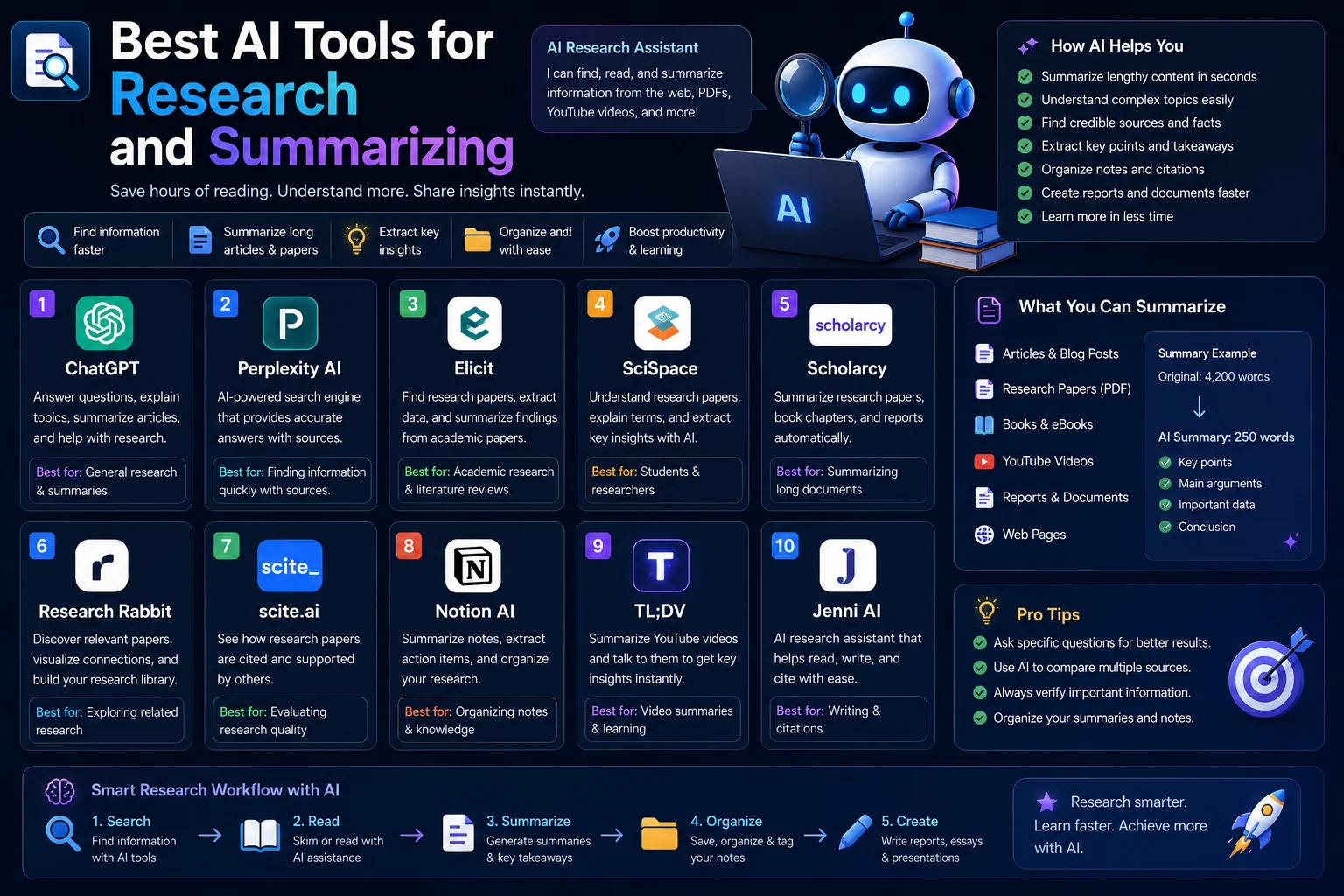
5. Use AI to Research Faster
Research can take hours when you have to search through websites, reports, articles, papers, and other sources.
AI research tools can help you identify relevant information, organize findings, compare sources, and generate research summaries.
Instead of starting with a vague request such as:
Research AI marketing.
give the AI a specific research objective:
Research how generative AI is being used in digital marketing in 2026. Identify the most common applications, potential benefits, major limitations, and important trends. Separate established information from predictions and identify the original sources for important claims.
AI can help you:
- Define research questions
- Find relevant information
- Summarize sources
- Compare information
- Extract important facts
- Organize research notes
- Identify trends
- Create research outlines
AI can dramatically speed up research, but it should not replace source verification. Always inspect important original sources before relying on a claim.
Best for: Students, researchers, writers, analysts, marketers, and business professionals.
6. Use AI to Automate Repetitive Tasks
Repetitive tasks are some of the best candidates for AI-powered automation.
Many workflows involve copying information between applications, categorizing data, generating standard responses, creating reports, or performing the same sequence of actions repeatedly.
AI automation can help reduce this manual work.
Examples of repetitive tasks AI can assist with:
- Sorting and categorizing information
- Generating recurring reports
- Creating summaries
- Processing form responses
- Drafting routine messages
- Extracting information from documents
- Converting information between formats
- Creating task lists
For example, a business could create a workflow that takes customer feedback, summarizes each response, identifies common complaints, and organizes the results into categories.
The goal is not to automate everything. Instead, automate predictable work so you can spend more time on tasks requiring judgment.
Best for: Businesses, operations teams, marketers, developers, and professionals with repetitive workflows.
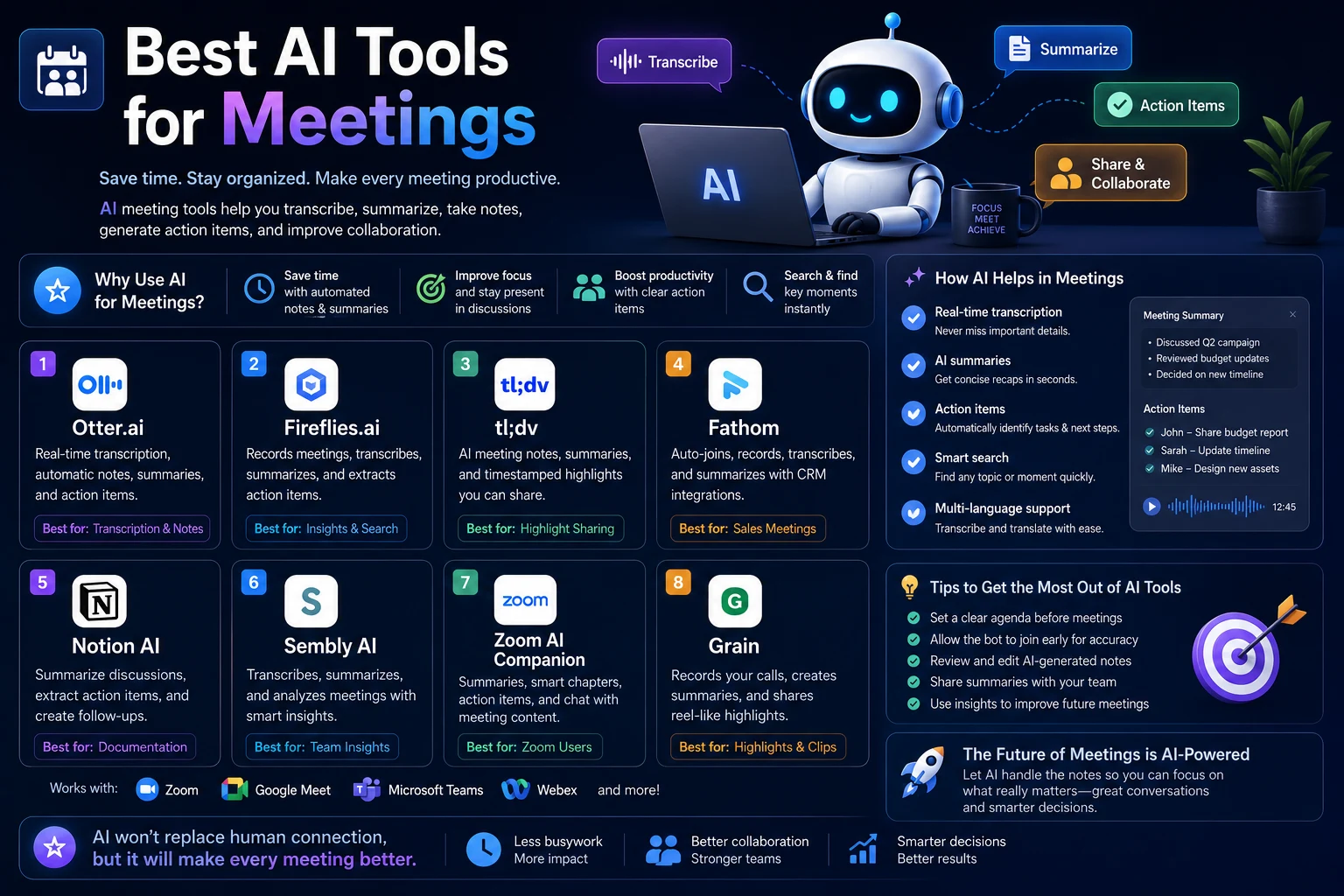
7. Use AI to Improve Meetings
Meetings often create additional work because participants have to remember what was discussed, identify decisions, and manually create follow-up tasks.
AI meeting assistants can help create transcripts, summaries, key points, decisions, and action items.
Before a meeting
AI can help create an agenda based on the meeting objective and previous discussions.
Create a 30-minute meeting agenda for a project-status meeting. Include the most important topics, decisions that need to be made, and questions that should be answered before the meeting ends.
After a meeting
You can use AI to turn meeting notes or a transcript into a structured summary.
Turn these meeting notes into a concise summary. Separate decisions, action items, responsible people, deadlines, unresolved questions, and follow-up tasks.
This can make it much easier to turn conversations into actual work.
Best for: Managers, teams, consultants, sales professionals, and remote workers.
8. Use AI to Manage Projects
Large projects can become overwhelming when they contain dozens or hundreds of individual tasks.
AI can help break a large objective into smaller steps and create a logical sequence of tasks.
Break this project into smaller tasks. Organize them into phases, identify dependencies, estimate the relative complexity of each task, and identify which tasks should be completed first.
For example, launching a website could be divided into:
- Planning
- Content creation
- Design
- Development
- Testing
- SEO
- Performance optimization
- Launch
- Post-launch monitoring
AI can also help identify missing tasks or potential project risks.
AI project management can help with:
- Task breakdown
- Project planning
- Prioritization
- Risk identification
- Meeting follow-ups
- Progress summaries
- Project documentation
AI-generated project plans should still be reviewed by someone familiar with the project, because estimates and dependencies may not always be accurate.
Best for: Project managers, entrepreneurs, developers, agencies, and teams.
9. Use AI to Learn Faster
AI can also improve productivity by helping you learn new skills more efficiently.
Instead of searching through dozens of tutorials, you can ask an AI assistant to explain a concept at your current skill level and provide examples.
Teach me JavaScript promises as if I understand basic JavaScript but have never used asynchronous programming. Explain the concept step by step, provide simple examples, then give me five exercises with answers hidden below each question.
AI can adapt explanations based on your questions and provide additional examples when something is unclear.
AI can help you:
- Learn programming
- Understand difficult concepts
- Create study plans
- Generate practice questions
- Review notes
- Explain mistakes
- Create flashcards
- Practice languages
The key is to use AI interactively. Ask follow-up questions, solve problems yourself, and use the AI to explain mistakes rather than simply giving you answers.
Best for: Students, professionals learning new skills, developers, and anyone pursuing continuous education.
10. Use AI to Optimize Your Workflow
One of the most powerful ways to use AI for productivity is to analyze how you work and identify opportunities for improvement.
Instead of simply asking AI to complete individual tasks, describe your entire workflow.
Here is my daily workflow. Identify repetitive tasks, unnecessary steps, bottlenecks, tasks that could be automated, and areas where AI could save time. Then propose an improved workflow while keeping human review for important decisions.
For example, a content creator might discover that their workflow includes:
- Finding article ideas
- Researching topics
- Creating outlines
- Writing drafts
- Editing
- Creating images
- Optimizing SEO
- Publishing
- Promoting content
AI could potentially assist with several stages without replacing the person's final editorial decisions.
Questions AI can help you answer
- Which tasks take the most time?
- Which tasks are repetitive?
- Which tasks can be automated?
- Where are the biggest bottlenecks?
- Which tasks require human judgment?
- Where can AI reduce unnecessary work?
Best for: Professionals, business owners, creators, developers, and anyone who wants to build a more efficient workflow.
Best AI Productivity Uses by Task
| Task | How AI Helps | Potential Benefit |
|---|---|---|
| Planning | Creates schedules and prioritizes tasks | Less decision-making |
| Summarizes and drafts messages | Faster communication | |
| Writing | Creates drafts and improves text | Faster content creation |
| Research | Finds, summarizes, and organizes information | Faster information gathering |
| Meetings | Creates summaries and action items | Better follow-up |
| Automation | Handles repetitive workflows | Less manual work |
| Projects | Breaks goals into tasks | Better organization |
| Learning | Explains concepts and creates exercises | Faster skill development |
| Analysis | Identifies patterns and summarizes information | Faster decision support |
| Workflow optimization | Identifies bottlenecks and automation opportunities | More efficient processes |
How to Build an AI-Powered Productivity Workflow
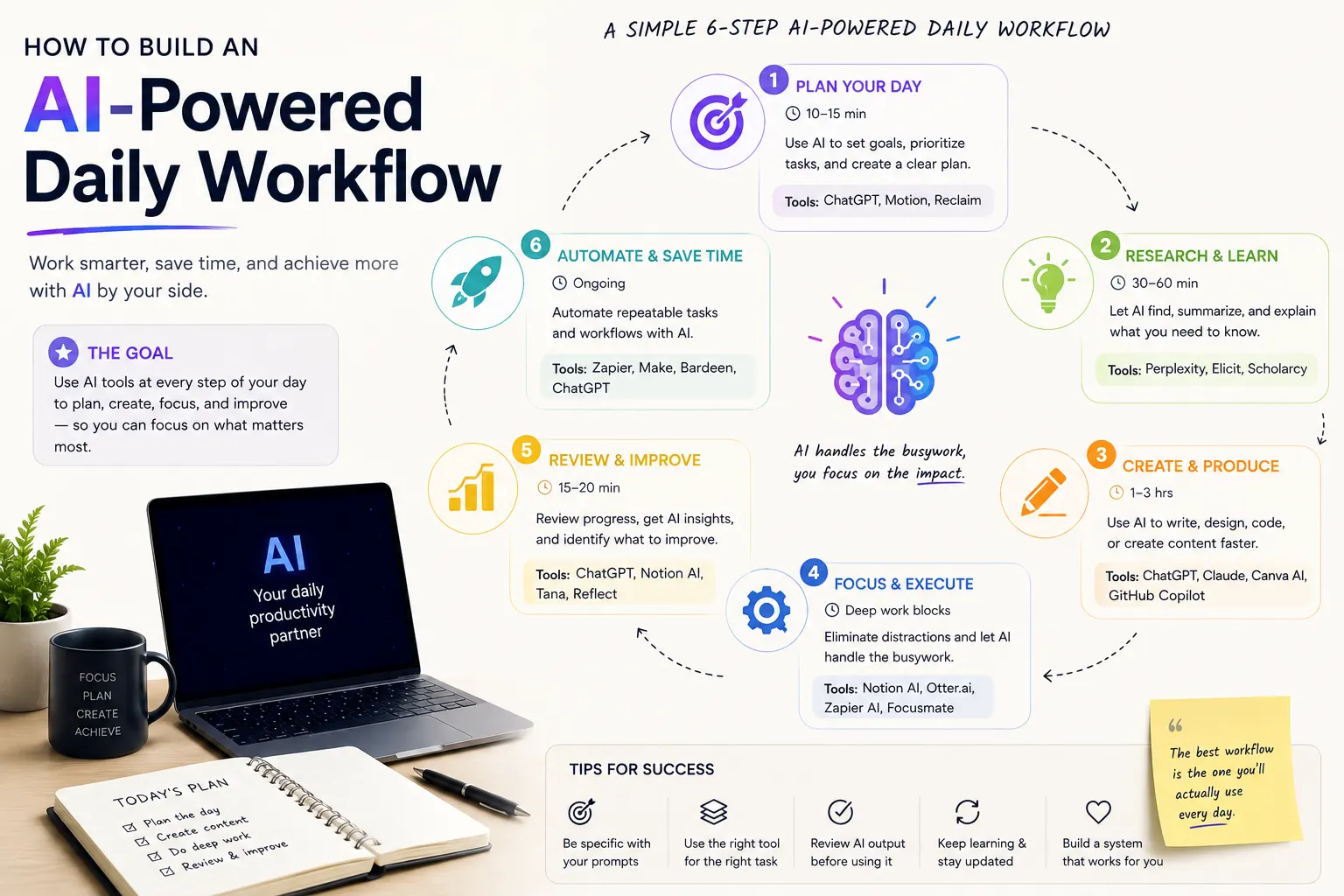
The best productivity results usually come from combining several AI capabilities into one workflow rather than using AI for isolated tasks.
A simple AI-powered daily workflow could look like this:
- Plan: Start the day by identifying your highest-priority tasks.
- Prioritize: Separate important work from low-value tasks.
- Focus: Use AI to help prepare information before starting deep work.
- Write: Use AI for outlines, drafts, editing, and repetitive writing.
- Research: Use AI to find and summarize relevant information.
- Meet: Use AI to capture notes and identify action items.
- Automate: Identify repetitive tasks that can be handled automatically.
- Review: At the end of the day, summarize completed work and unfinished tasks.
How to Use AI Without Losing Productivity
AI can increase productivity, but using too many AI tools can have the opposite effect.
Constantly switching between different applications, rewriting prompts, checking AI outputs, and experimenting with new tools can create additional work.
Instead, choose a small number of AI tools that solve problems you actually have.
Follow the 80/20 rule
Focus on the AI use cases that save the most time.
For example, if email consumes five hours per week, improving email management may provide more value than spending hours experimenting with an AI tool for a task you perform only once a month.
Keep human review
AI-generated output should be reviewed before it is used for important decisions or published publicly.
This is especially important for:
- Financial information
- Legal documents
- Medical information
- Business decisions
- Security-related work
- Customer communication
- Published content
Common AI Productivity Mistakes
1. Using AI for Everything
Not every task needs AI. Some tasks are faster when completed manually.
2. Accepting AI Output Without Checking It
AI can generate incorrect information, flawed reasoning, or inappropriate recommendations. Review important outputs before using them.
3. Using Vague Prompts
A vague request often produces a generic answer. Give AI the context, objective, constraints, and desired output format.
4. Creating Unnecessary Complexity
Adding multiple AI tools to a simple workflow can make your process slower instead of faster.
5. Sharing Sensitive Information
Do not provide passwords, API keys, private credentials, confidential business information, or other sensitive data unless you are authorized to do so and understand how the service handles that information.
How to Write Better AI Productivity Prompts
The quality of an AI productivity workflow depends heavily on the instructions you provide.
Instead of:
Make me productive.
try:
I have eight hours available today. My top goals are finishing a project report, replying to important emails, researching a new topic, and preparing for a meeting at 3 PM. Help me prioritize these tasks, create a realistic schedule, identify tasks that can be delegated or automated, and leave time for breaks.
A strong productivity prompt should usually include:
- Your objective
- Available time
- Priorities
- Deadlines
- Important constraints
- Current resources
- Desired output
Useful AI Productivity Prompts
Daily Planning
Here are everything I need to accomplish today. Prioritize the tasks by urgency and importance, group related tasks together, estimate the time required, and create a realistic schedule with breaks.
Weekly Planning
Review these goals for the week and create a practical weekly plan. Identify the three most important outcomes, break them into actionable tasks, and suggest what I should complete first.
Email Management
Summarize these emails, identify which ones require a response, group them by priority, and draft concise replies for the most important messages.
Meeting Preparation
Help me prepare for this meeting. Based on the information below, create an agenda, identify important questions, list decisions that need to be made, and suggest the information I should prepare beforehand.
Workflow Optimization
Analyze my workflow below and identify repetitive tasks, bottlenecks, unnecessary steps, and opportunities for AI automation. Create a simpler workflow and clearly separate tasks that should remain under human control.
AI Productivity for Students
Students can use AI to organize study schedules, summarize course materials, explain difficult concepts, create practice questions, and organize research.
For example, an AI assistant can transform lecture notes into a study guide:
Turn these lecture notes into a structured study guide. Explain the most important concepts, define key terms, create ten practice questions, identify areas that are likely to require additional study, and provide answers after the questions.
AI can also help students create realistic study schedules around exams and assignments.
However, students should use AI as a learning aid rather than a replacement for actually understanding the material. They should also follow their school's academic-integrity policies.
AI Productivity for Professionals
Professionals can use AI throughout the workday to reduce administrative work and focus on higher-value activities.
Common applications include:
- Email management
- Meeting summaries
- Report writing
- Research
- Data analysis
- Project planning
- Presentation preparation
- Document analysis
- Customer communication
- Workflow automation
The greatest benefit often comes from connecting these capabilities into a consistent workflow.
AI Productivity for Small Businesses
Small businesses can use AI to perform tasks that would otherwise require significant amounts of manual work.
AI can assist with:
- Customer support
- Marketing content
- Email communication
- Market research
- Data analysis
- Business reports
- Social media content
- Administrative tasks
- Internal documentation
- Process automation
For small businesses, it is usually better to start with one or two high-impact workflows rather than attempting to automate the entire business at once.
AI Productivity vs Traditional Productivity
| Task | Traditional Approach | AI-Assisted Approach |
|---|---|---|
| Daily planning | Manual task organization | AI-assisted prioritization and scheduling |
| Read and write manually | Summaries and draft responses | |
| Research | Search and read manually | AI-assisted discovery and summarization |
| Writing | Start from a blank page | AI-assisted outlines and drafts |
| Meetings | Manual notes | AI-assisted summaries and action items |
| Projects | Manual task breakdown | AI-assisted planning |
| Repetitive work | Manual execution | Potential automation |
A Practical AI Productivity Routine
You do not need dozens of AI tools to build an effective productivity system. A simple routine can be enough.
Morning
- Review your goals.
- Ask AI to help prioritize your tasks.
- Create a realistic schedule.
- Prepare for important meetings.
During the Workday
- Use AI for research and information gathering.
- Use AI to create first drafts.
- Summarize long documents.
- Automate repetitive tasks.
- Use AI to clarify difficult problems.
After Meetings
- Review the AI-generated summary.
- Confirm important decisions.
- Turn action items into tasks.
- Assign deadlines and responsibilities.
End of the Day
- Review completed tasks.
- Identify unfinished work.
- Move important tasks to the next day.
- Ask AI to help organize tomorrow's priorities.
Final Verdict
AI can make you more productive by reducing repetitive work, helping you process information faster, improving communication, and making it easier to organize your day.
The most useful applications are often simple: planning your day, summarizing information, drafting emails, researching topics, preparing meetings, and breaking large projects into manageable tasks.
AI can also become more powerful when several productivity improvements are connected into one workflow. For example, you can use AI to plan your day, summarize research, draft content, prepare meetings, and review unfinished tasks at the end of the day.
However, productivity is not about doing more work as quickly as possible. The goal is to spend less time on low-value repetitive tasks and more time on work that requires creativity, judgment, problem-solving, and human interaction.
The best way to start is to identify one task that regularly consumes your time and experiment with using AI to make that task faster. Once you find a workflow that works reliably, you can gradually expand AI assistance to other parts of your day.
The best AI productivity system is not the one with the most tools. It is the one that consistently saves you time without reducing the quality of your work.
Frequently Asked Questions
How can AI make me more productive?
AI can help you plan tasks, manage emails, summarize information, research topics, write documents, prepare meetings, automate repetitive work, and organize projects. These capabilities can reduce the amount of time spent on routine tasks.
What is the best way to use AI for productivity?
Start with repetitive or time-consuming tasks that do not require constant human judgment. Use AI to assist with planning, writing, research, summarization, communication, and organization, while reviewing important outputs yourself.
Can AI automate repetitive tasks?
Yes. AI can assist with many repetitive workflows, including categorizing information, summarizing documents, generating routine reports, drafting standard messages, and processing structured information. More advanced workflows can combine AI with automation tools to perform multiple steps automatically.
Can AI help with time management?
Yes. AI can help prioritize tasks, create schedules, estimate workload, identify conflicts, and break large projects into smaller steps. You should still adjust AI-generated schedules based on your actual availability and priorities.
Can AI help me manage my emails?
Yes. AI can summarize emails, identify action items, draft responses, rewrite messages, and help organize information. Important emails should always be reviewed before sending.
Can AI help with meetings?
Yes. AI meeting tools can assist with transcripts, summaries, decisions, action items, and follow-up tasks. AI can also help create meeting agendas and prepare questions before a meeting.
Can AI help students become more productive?
Yes. Students can use AI to create study plans, summarize learning materials, explain difficult concepts, generate practice questions, organize research, and review notes. Students should follow their institution's academic-integrity rules.
Can AI replace productivity apps?
AI does not necessarily replace traditional productivity apps. Instead, it can add an intelligent layer to calendars, task managers, email systems, document tools, and project-management software.
Should I use multiple AI productivity tools?
You can use multiple tools when they solve different problems, but using too many can create unnecessary complexity. Start with one or two tools and expand your workflow only when there is a clear productivity benefit.
Can AI improve my daily workflow?
Yes. AI can analyze your workflow, identify repetitive tasks and bottlenecks, suggest automation opportunities, and help organize your daily activities. The best results usually come from applying AI to specific problems rather than trying to automate everything.
Is AI always reliable for productivity tasks?
No. AI can make mistakes, misunderstand instructions, or generate inaccurate information. Review important outputs before using them, especially for financial, legal, medical, security, or business-critical tasks.
What should I automate with AI first?
Start with tasks that are repetitive, predictable, time-consuming, and relatively low-risk. Email summaries, document summarization, routine reporting, information organization, and draft generation are often good starting points.