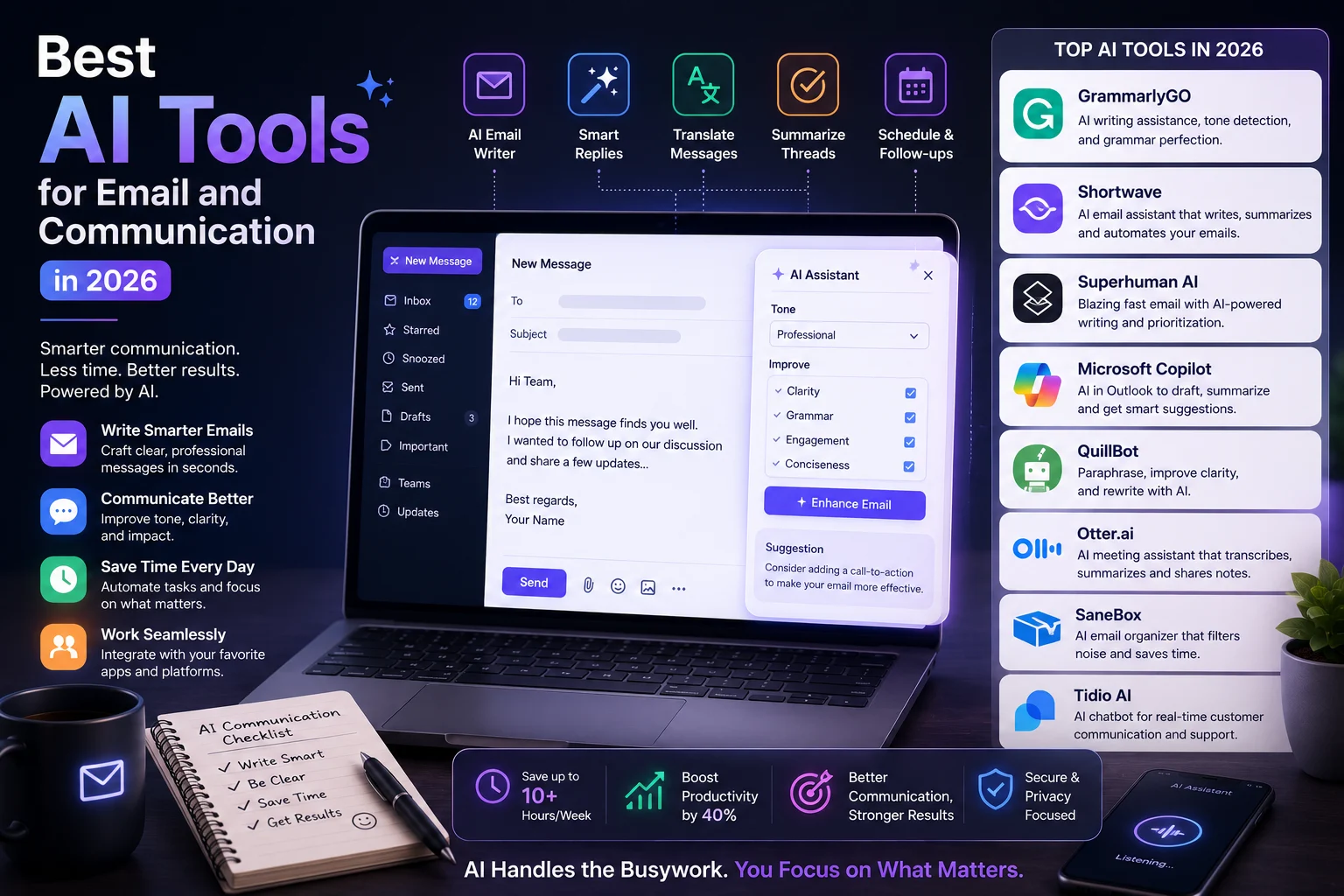

Email is still one of the most important communication tools for work and business, but managing an inbox can take a huge amount of time. Writing replies, reading long threads, following up with people, and organizing hundreds of messages can quickly become overwhelming.
Fortunately, AI is changing the way people communicate.
Modern AI email tools can draft messages, improve writing, summarize conversations, prioritize important emails, find information, and automate repetitive communication tasks. Some tools work directly inside Gmail or Outlook, while others provide completely new AI-powered email experiences.
In this guide, we'll look at the best AI tools for email and communication in 2026 and explain which tool is best for different types of users.
Best AI Tools for Email and Communication at a Glance
| Tool | Best For | Key Strength | Our Rating |
|---|---|---|---|
| ChatGPT | Email writing | Drafting and rewriting | 9.5/10 |
| Gemini | Gmail users | Google Workspace integration | 9.3/10 |
| Microsoft Copilot | Outlook users | Microsoft 365 integration | 9.3/10 |
| Grammarly | Writing quality | Grammar and tone | 9.2/10 |
| Superhuman | High-volume email | Speed and productivity | 9.1/10 |
| Shortwave | Gmail organization | AI-powered inbox management | 9.0/10 |
| Fyxer AI | Email assistance | Automated drafts and follow-ups | 8.9/10 |
| Missive | Teams | Shared inbox collaboration | 8.8/10 |
Ratings are editorial recommendations based on features, usability, and common email workflows. Pricing and features can change over time.
What Are AI Email Tools?
AI email tools are applications that use artificial intelligence to help people write, read, organize, and manage email.
Depending on the tool, AI can:
- Write complete email drafts
- Suggest replies
- Summarize long conversations
- Improve grammar
- Change the tone of a message
- Prioritize important emails
- Search through conversations
- Identify follow-up opportunities
- Organize your inbox
- Automate repetitive communication
Modern AI email assistants increasingly go beyond simple writing assistance and can help with inbox triage, task organization, and follow-up workflows.
1. ChatGPT — Best for AI Email Writing
Best for: Writing, rewriting, brainstorming, and creating personalized emails.
ChatGPT is one of the most flexible AI tools for email communication. You can give it a few details about your situation and ask it to create a professional email in seconds.
For example:
"Write a short and professional email asking a client to confirm tomorrow's meeting. Keep the tone friendly and confident."
You can also use ChatGPT to:
- Rewrite emails
- Make messages shorter
- Make communication more professional
- Change the tone
- Write follow-up emails
- Translate messages
- Brainstorm responses
- Summarize long conversations
ChatGPT is especially useful if you don't want a dedicated email application and simply need a powerful AI writing assistant.
Best feature: Flexible email drafting and rewriting.
Our rating: 9.5/10
2. Google Gemini — Best for Gmail Users
Best for: Gmail and Google Workspace users.
Gemini is a natural choice if your work revolves around Gmail and Google Workspace.
Google has integrated Gemini features into Gmail and other Workspace applications, allowing users to use AI for tasks such as drafting and summarizing email conversations. Current AI email comparisons consistently identify Gemini as a strong native option for Gmail users.
Gemini can help you:
- Draft emails
- Rewrite messages
- Summarize email threads
- Find relevant information
- Improve communication
- Work with Google Workspace information
The biggest advantage is convenience. You don't necessarily need to move information from Gmail into another application.
Best feature: Native Google Workspace integration.
Our rating: 9.3/10
3. Microsoft Copilot — Best for Outlook
Best for: Microsoft 365 and Outlook users.
Microsoft Copilot is designed to bring AI assistance directly into Microsoft's productivity ecosystem.
For people who use Outlook and Microsoft 365 every day, Copilot can help with:
- Email drafting
- Thread summaries
- Reply suggestions
- Communication improvement
- Finding information
- Working with Microsoft 365 context
That integration is its biggest advantage. Instead of copying email content into a separate AI application, you can use AI within the Microsoft environment you already work in.
Recent comparisons continue to identify Copilot as one of the strongest options for Outlook-based workflows.
Best feature: Outlook and Microsoft 365 integration.
Our rating: 9.3/10
4. Grammarly — Best for Professional Communication
Best for: Grammar, clarity, tone, and polished communication.
Grammarly is especially useful if your main problem isn't writing emails from scratch but making sure your messages sound professional and clear.
It can help identify:
- Grammar mistakes
- Spelling errors
- Unclear sentences
- Awkward wording
- Tone problems
- Overly complicated writing
Grammarly is frequently recommended for everyday email quality because it focuses heavily on clarity and tone.
Best feature: Improving the quality and tone of everyday communication.
Our rating: 9.2/10
5. Superhuman — Best for High-Volume Email
Best for: Professionals who process large numbers of emails.
Superhuman takes a different approach from a simple AI writing assistant. It is an AI-powered email client designed around speed, keyboard shortcuts, inbox organization, and productivity.
Its AI features can help with drafting, summaries, and managing large inboxes, while the interface is designed for people who want to move through email quickly.
Superhuman can be particularly useful for:
- Executives
- Entrepreneurs
- Sales professionals
- Managers
- Customer-facing professionals
- Anyone handling a large inbox
Best feature: Fast email workflow.
Our rating: 9.1/10
6. Shortwave — Best AI-Powered Gmail Inbox
Best for: Gmail users who want a smarter inbox experience.
Shortwave is an AI-focused email client that helps users search, organize, summarize, and manage email more efficiently.
It is particularly useful if your Gmail inbox has become difficult to manage.
Shortwave is regularly highlighted as one of the leading AI-native Gmail email clients in 2026.
Useful features include:
- AI-powered search
- Email summaries
- Inbox organization
- Task-oriented email management
- AI-assisted writing
Best feature: Intelligent Gmail organization and search.
Our rating: 9.0/10
7. Fyxer AI — Best for Automated Email Assistance
Best for: Professionals who want an AI assistant to help manage communication.
Fyxer AI focuses on reducing the amount of manual work involved in email and meetings.
Depending on the workflow, it can help with drafts, meeting information, and follow-ups.
Recent 2026 comparisons list Fyxer among the leading tools for assistant-style email workflows.
Best feature: Assistant-style email support.
Our rating: 8.9/10
8. Missive — Best for Team Communication
Best for: Teams sharing and managing email conversations.
Not every email problem is personal. Businesses often need multiple people to collaborate on customer emails and shared inboxes.
Missive focuses on collaborative communication and shared inbox workflows.
It can be useful for:
- Customer support teams
- Sales teams
- Operations teams
- Shared support addresses
- Team-based email management
Best feature: Collaborative email management.
Our rating: 8.8/10
AI Email Tools Comparison
| Tool | Gmail | Outlook | AI Writing | Summaries | Inbox Management | Best For |
|---|---|---|---|---|---|---|
| ChatGPT | Yes* | Yes* | Excellent | Excellent | Limited | Writing |
| Gemini | Excellent | Limited | Excellent | Excellent | Excellent | Gmail |
| Copilot | Limited | Excellent | Excellent | Excellent | Excellent | Outlook |
| Grammarly | Yes | Yes | Excellent | Good | Limited | Writing quality |
| Superhuman | Yes | Yes | Excellent | Excellent | Excellent | Power users |
| Shortwave | Excellent | No | Excellent | Excellent | Excellent | Gmail organization |
| Fyxer | Yes | Yes | Excellent | Good | Good | Automation |
*ChatGPT can be used alongside email services and through supported integrations/workflows; capabilities depend on the current product and plan.
Which AI Email Tool Should You Choose?
Choose ChatGPT If You Want:
- A flexible AI writing assistant
- Professional email drafts
- Quick rewrites
- Brainstorming help
- Translation
- Help with difficult replies
Choose Gemini If You Use Gmail
If Gmail and Google Workspace are at the center of your workflow, Gemini is one of the first tools you should try because of its native integration.
Choose Copilot If You Use Outlook
If your organization relies on Outlook and Microsoft 365, Copilot is a natural choice because it works within Microsoft's ecosystem.
Choose Grammarly If Writing Quality Is Your Priority
If you already have a good email workflow but want better grammar, clarity, and tone, Grammarly is an excellent option.
Choose Superhuman If You Have a Huge Inbox
Superhuman is designed for people who want to process email quickly and efficiently.
Choose Shortwave If You Want a Smarter Gmail Inbox
Shortwave is a strong option for Gmail users who want AI-powered search, summaries, and organization.
How AI Can Improve Email Communication
AI isn't only useful for writing emails. It can improve the entire communication workflow.
| Problem | AI Solution |
|---|---|
| Too many emails | Prioritize important messages |
| Long email threads | Generate summaries |
| Slow writing | Create first drafts |
| Unclear messages | Rewrite for clarity |
| Wrong tone | Adjust communication style |
| Forgotten follow-ups | Track conversations and reminders |
| Repetitive replies | Create reusable templates |
How to Use AI to Write Better Emails
You don't need complicated prompts to get good results.
Try giving the AI four pieces of information:
- Purpose: Why are you writing?
- Audience: Who will receive it?
- Tone: Professional, friendly, direct, or casual?
- Length: Short, medium, or detailed?
For example:
"Write a short professional email to a potential client. Thank them for their interest, explain that I am available for a call next week, and ask them which day works best."
This gives the AI enough context to create a useful first draft.
AI Email Communication Tips
1. Always Review Important Emails
Don't automatically send AI-generated messages without reading them. AI can misunderstand context or make factual mistakes.
2. Give AI Context
The more useful context you provide, the more natural and relevant your message will be.
3. Tell AI Your Tone
Specify whether you want the message to sound professional, friendly, confident, concise, persuasive, or casual.
4. Avoid Sharing Sensitive Information Unnecessarily
Before connecting an AI tool to your inbox, understand what information it can access and how that information is processed.
5. Use AI for the First Draft
One of the safest and most useful workflows is to let AI create the first draft while you remain responsible for the final message.
Are AI Email Tools Safe?
AI email tools can be extremely useful, but privacy should be considered before connecting an application to your inbox.
Email can contain sensitive business information, personal conversations, financial details, customer information, and confidential documents.
Before choosing an AI email tool, check:
- What email data it can access
- How data is stored
- Whether conversations are used for model training
- What permissions the application requires
- Whether your organization has security requirements
For sensitive business communication, use tools approved by your organization and review their current privacy and security documentation.
Our Verdict
ChatGPT is our top choice for general AI-assisted email writing and communication in 2026.
It is flexible, easy to use, and capable of creating, rewriting, summarizing, and improving messages for almost any situation.
However, there isn't one universal winner.
Gmail users should consider Gemini first. Outlook and Microsoft 365 users should consider Copilot. Professionals with large inboxes should look at Superhuman, while Gmail power users may prefer Shortwave. Grammarly remains an excellent choice when the main goal is improving writing quality.
The best AI email tool is ultimately the one that fits naturally into your existing communication workflow.
Final Comparison
| Use Case | Best AI Tool |
|---|---|
| Overall email writing | ChatGPT |
| Gmail | Gemini |
| Outlook | Microsoft Copilot |
| Grammar and tone | Grammarly |
| High-volume email | Superhuman |
| Gmail organization | Shortwave |
| Email automation | Fyxer AI |
| Team communication | Missive |
Frequently Asked Questions
What is the best AI tool for email?
ChatGPT is our overall pick for flexible AI-assisted email writing. Gemini and Microsoft Copilot are better choices when you want native Gmail or Outlook integration.
What is the best AI email tool for Gmail?
Gemini is the strongest native choice for Gmail and Google Workspace. Shortwave is another excellent option if you want a dedicated AI-powered Gmail experience.
What is the best AI email tool for Outlook?
Microsoft Copilot is the natural choice for Outlook users because it is integrated into Microsoft's productivity ecosystem.
Can AI write professional emails?
Yes. AI can create professional email drafts, rewrite existing messages, improve tone, correct grammar, and make communication clearer.
Can AI summarize email threads?
Yes. Many modern AI email tools can summarize long conversations and extract important information or action items.
Can AI automatically reply to emails?
Some AI tools can prepare or automate replies, but important messages should generally be reviewed by a person before being sent.
Are AI email assistants worth it?
They can be worthwhile if you spend significant time writing, reading, organizing, or following up on email. For occasional email users, a general AI assistant may be enough.