
An AI prompt is the instruction, question, or information you give to an artificial intelligence system to tell it what you want it to do. Prompts are how people communicate with AI tools such as ChatGPT, Gemini, Claude, and many other AI assistants.
A prompt can be as simple as a question such as "What is artificial intelligence?" or as detailed as a set of instructions describing a specific task, audience, format, tone, and expected result.
Understanding how AI prompts work is one of the easiest ways to get better results from AI. A clear prompt can help an AI system produce a more accurate, useful, relevant, and consistent response.
In this guide, we'll explain what an AI prompt is, how prompts work, the different types of AI prompts, what makes a good prompt, and how to write better prompts for everyday tasks.
What Is an AI Prompt?
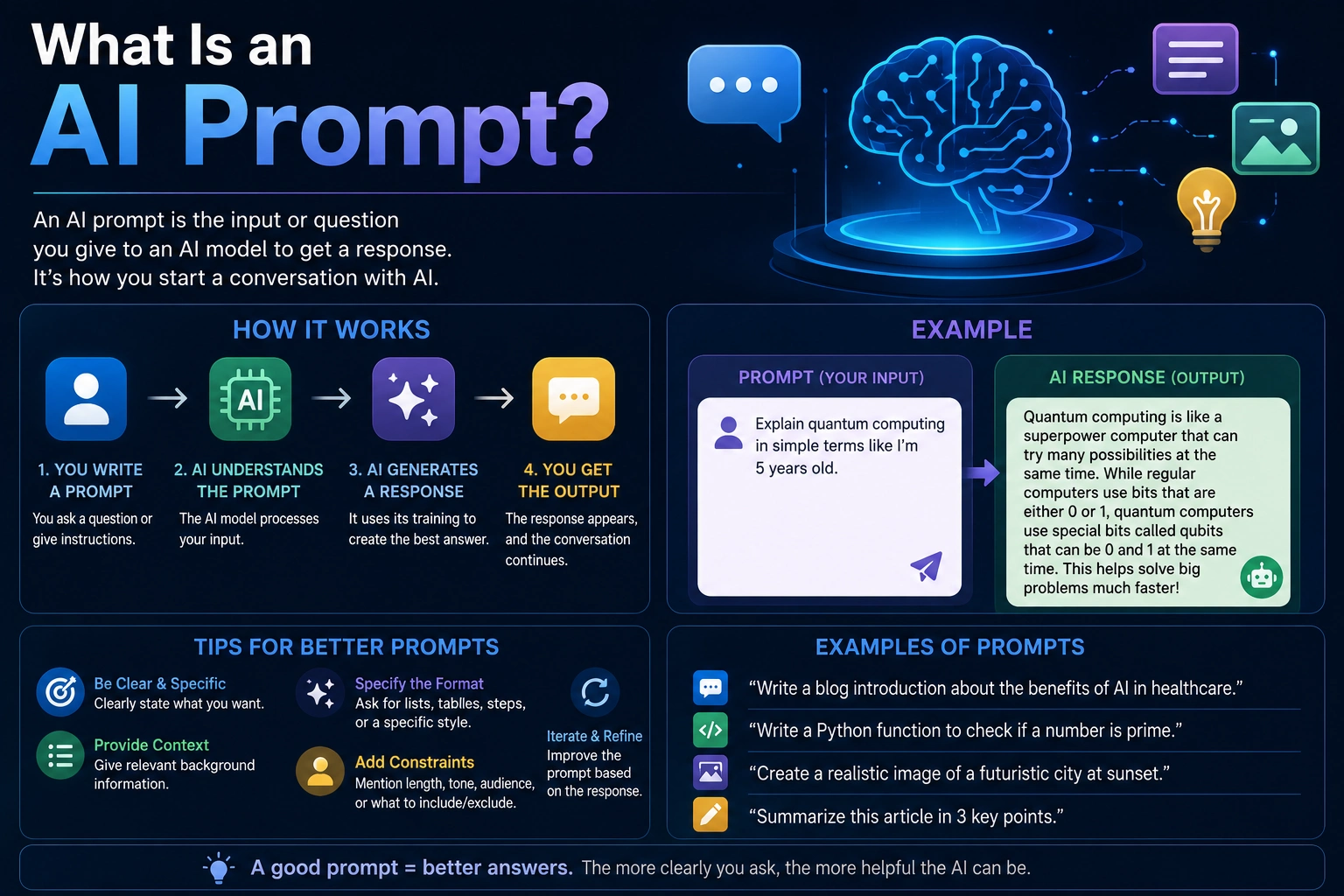
An AI prompt is an input provided to an AI model to generate a response or perform a task.
Depending on the AI tool, a prompt can contain a question, command, description, context, examples, data, or a combination of these elements.
For example, a simple prompt might be:
Explain artificial intelligence in simple terms.
A more detailed prompt could be:
Explain artificial intelligence to a beginner who has never studied computer science. Use simple language, provide three real-world examples, and keep the explanation under 300 words.
Both prompts ask about artificial intelligence, but the second prompt provides much more information about the desired response.
How Do AI Prompts Work?
When you enter a prompt into an AI application, the application sends your input to an AI model. The model processes the information and generates a response based on patterns it learned during training and the context provided in the conversation.
The AI does not simply search for an exact answer stored inside a database. Instead, language models generate responses based on the relationships between words, concepts, instructions, and other information represented in the model.
This means the way you phrase an instruction can affect the response.
For example, compare:
Write about marketing.
with:
Write a 500-word beginner-friendly guide explaining how small businesses can use AI for digital marketing. Cover content creation, customer research, email marketing, and social media. Use practical examples and a professional but accessible tone.
The second prompt gives the AI a clearer understanding of the task, audience, length, topics, and writing style.
Why Are AI Prompts Important?
AI models are capable of performing many different tasks, but they need instructions that describe what you want.
A well-written prompt can help you:
- Get more relevant answers
- Reduce unnecessary information
- Control the response format
- Specify the desired tone
- Provide important background information
- Improve consistency
- Give the AI a specific goal
- Make complex tasks easier to manage
A vague prompt may still produce a useful response, but a specific prompt usually gives the AI more information about what you actually want.
What Is a Prompt in AI?
In artificial intelligence, a prompt is the input used to guide an AI model toward a desired output.
The prompt can be written in natural language, but it can also contain structured data, code, examples, documents, images, or other information depending on the AI system.
For example, a developer might provide:
Fix this JavaScript function and explain the error.

function calculateTotal(items) {
    return items.map(item => item.price).reduce((a, b) => a + b);
}
A business user might provide a completely different prompt:
Summarize this customer feedback and identify the five most common complaints.
The underlying concept is the same: the user provides information or instructions that guide the AI toward a desired result.
Types of AI Prompts
There are many ways to structure AI prompts depending on the task.
1. Question Prompts
Question prompts ask the AI for information or an explanation.
What is machine learning, and how is it different from traditional programming?
Question prompts are useful for learning, brainstorming, research, and general information gathering.
2. Instruction Prompts
Instruction prompts tell the AI to perform a specific task.
Rewrite this paragraph in a professional tone and make it easier to understand.
These prompts are commonly used for writing, editing, coding, summarization, and productivity tasks.
3. Creative Prompts
Creative prompts ask AI to generate original content such as stories, ideas, descriptions, scripts, or marketing concepts.
Write five creative ideas for a short social media video explaining artificial intelligence to beginners.
4. Summarization Prompts
Summarization prompts ask AI to reduce a large amount of information into a shorter format.
Summarize this article in five bullet points. Focus on the main findings and practical recommendations.
5. Analysis Prompts
Analysis prompts ask AI to examine information and identify patterns, differences, problems, or important insights.
Analyze these customer reviews and identify the most common problems customers mention. Group similar complaints together.
6. Classification Prompts
Classification prompts ask AI to place information into categories.
Classify each customer message as a complaint, question, compliment, refund request, or other.
7. Extraction Prompts
Extraction prompts ask AI to identify specific information from a larger piece of text.
Extract the company names, product names, prices, and dates mentioned in this article.
8. Coding Prompts
Coding prompts are instructions that ask AI to generate, explain, debug, refactor, or review software code.
Create a JavaScript function that accepts an array of numbers and returns the average. Include input validation and explain the code.
What Makes a Good AI Prompt?
A good AI prompt clearly communicates the task and provides enough context for the AI to understand the desired result.
A strong prompt often includes several important elements:
- Task: What should the AI do?
- Context: What information does the AI need?
- Audience: Who is the result for?
- Format: How should the answer be structured?
- Constraints: What should the AI avoid or follow?
- Examples: What should the desired result look like?
You don't always need every element. A simple task may require only a short instruction, while a complicated task benefits from much more context.
Simple AI Prompt vs Detailed AI Prompt
Consider the following prompt:
Write a blog post about AI.
The instruction is understandable, but it leaves many important decisions to the AI.
A more detailed prompt might be:
Write a 1,200-word beginner-friendly blog post explaining how artificial intelligence is changing office work. Cover writing, research, data analysis, meetings, and task automation. Use clear headings, practical examples, and a professional tone. Avoid exaggerated claims and explain both benefits and limitations.
The second prompt defines the topic, audience, length, structure, tone, and scope.
This generally gives the AI a much clearer target.
The Basic Structure of an AI Prompt
A useful structure for many AI prompts is:
Role + Task + Context + Requirements + Output Format
For example:
Act as a technical writer. Explain how APIs work to a beginner who understands basic JavaScript. Use a simple analogy, provide a small example, and organize the answer with headings and bullet points.
Here:
- Role: Technical writer
- Task: Explain APIs
- Context: Beginner with basic JavaScript knowledge
- Requirements: Use an analogy and example
- Output format: Headings and bullet points
What Is Prompt Engineering?
Prompt engineering is the practice of designing and improving prompts to get more useful results from AI models.
It can range from writing clear instructions for everyday AI use to designing complex prompts for software applications and automated AI systems.
Prompt engineering does not necessarily mean using complicated technical language. In many cases, the most effective approach is simply to be clear, specific, and provide the right context.
Prompt Engineering for Beginners
Beginners do not need to learn complicated techniques before they can write useful AI prompts.
Start with five basic questions:
- What do I want the AI to do?
- What information does it need?
- Who is the result for?
- What should the response look like?
- Are there any important limitations?
Answering these questions before writing a prompt can significantly improve the quality of the resulting response.
How to Write Better AI Prompts
1. Be Specific
Avoid vague instructions when the task requires a specific result.
Instead of:
Make this better.
try:
Rewrite this paragraph to make it clearer and more concise. Keep the original meaning and use a professional tone.
2. Provide Context
AI cannot always know the background information behind your request.
For example:
I am writing a beginner's guide for people who have never used AI. Explain this concept without assuming technical knowledge.
The additional context helps the AI adapt its response.
3. Specify the Output Format
If you need a specific structure, tell the AI.
Summarize this report in a table with four columns: issue, evidence, impact, and recommendation.
You can ask for bullet points, tables, numbered steps, JSON, HTML, code, outlines, or other formats depending on the task.
4. Define the Audience
The same subject may need to be explained differently to different audiences.
Explain cloud computing to a 12-year-old using simple examples.
or:
Explain cloud computing to an experienced software engineer and focus on architecture, scalability, and infrastructure.
Both prompts discuss the same topic but require very different responses.
5. Add Constraints
Constraints can help prevent unwanted results.
Write a 500-word article about AI productivity tools. Do not mention specific brands, avoid technical jargon, and focus on practical workplace examples.
6. Provide Examples
Examples can show the AI what kind of output you want.
Rewrite the following product descriptions in this style: "Compact wireless headphones with long battery life." Style: short, clear, benefit-focused, and suitable for an online store.
Examples are particularly useful when you need a specific writing style or output format.
7. Break Complex Tasks Into Steps
Large tasks are often easier to manage when divided into smaller stages.
Instead of asking:
Create an entire marketing strategy for my business.
you could first ask the AI to analyze the target audience, then develop positioning, then generate content ideas, and finally organize everything into a marketing plan.
AI Prompt Examples
Writing Prompt
Rewrite this article introduction for beginners. Make it clear, engaging, and concise while preserving the original meaning. Avoid unnecessary technical terminology.
Research Prompt
Research this topic using reliable and recent information. Identify the most important facts, explain areas of disagreement, and clearly distinguish established information from uncertain claims.
Summarization Prompt
Summarize this document in 300 words. Include the main argument, three key findings, important limitations, and final conclusion.
Coding Prompt
Review this JavaScript code for bugs, security problems, and maintainability issues. Explain each issue and provide a corrected version without changing the intended behavior.
Business Prompt
Analyze these customer reviews and identify the five most common complaints. Group similar complaints together and provide one practical recommendation for each issue.
Learning Prompt
Teach me the basics of machine learning as a beginner. Start with the core concept, use simple examples, explain important terminology, and finish with five questions to test my understanding.
Common AI Prompt Mistakes
1. Being Too Vague
A prompt such as "Tell me about marketing" gives the AI very little information about your actual goal.
A more useful prompt specifies the audience, topic, purpose, and desired output.
2. Providing Too Little Context
If the AI doesn't know important details about your project, it may make assumptions that don't match your situation.
3. Asking for Too Many Things at Once
Extremely complicated prompts can sometimes make it harder to get a focused result.
For large projects, divide the task into smaller steps and review each result.
4. Not Specifying the Output
If you need a table, checklist, outline, JSON object, or specific format, say so explicitly.
5. Accepting the First Response
An AI response is not necessarily the best possible response.
You can continue the conversation, provide feedback, correct assumptions, and ask the AI to improve its answer.
Can You Improve an AI Prompt After Getting an Answer?
Yes. Prompting is often an iterative process.
For example, after receiving an answer, you could say:
Make the explanation shorter and easier for a beginner to understand. Remove unnecessary background information and add two practical examples.
You can also tell the AI exactly what was wrong:
The answer focuses too much on theory. Rewrite it with practical examples and step-by-step instructions.
This type of follow-up instruction can be more effective than trying to create a perfect prompt from the beginning.
AI Prompts for ChatGPT, Gemini, and Claude
The same basic prompting principles can be used across different AI assistants.
Whether you are using ChatGPT, Gemini, Claude, or another AI model, clear instructions, useful context, and a defined goal can help improve the output.
However, different AI systems may have different capabilities, interfaces, context limits, tools, and ways of handling files or other inputs. A prompt that works well in one system may need to be adjusted for another.
AI Prompts for Images
AI image generators also use prompts, but image prompts usually describe the visual result you want rather than asking for a textual answer.
For example:
A modern minimalist office with a developer working on a large monitor, subtle artificial intelligence interfaces, natural daylight, realistic photography, clean professional environment, wide composition.
Image prompts can describe elements such as:
- Subject
- Environment
- Composition
- Lighting
- Camera perspective
- Visual style
- Colors
- Mood
AI Prompts for Coding
AI coding assistants can use prompts to generate code, explain errors, refactor projects, write tests, and help developers understand unfamiliar code.
A useful coding prompt should include relevant technical context.
I am using JavaScript with Node.js. Review this function for bugs and edge cases. Keep the existing function signature unchanged, do not add external dependencies, and explain each change before providing the corrected code.
For larger coding tasks, include information about the programming language, framework, runtime, dependencies, architecture, expected behavior, and constraints.
Zero-Shot and Few-Shot Prompts
Zero-Shot Prompt
A zero-shot prompt asks an AI to perform a task without providing examples.
Classify this customer message as positive, negative, or neutral.
Few-Shot Prompt
A few-shot prompt provides examples before asking the AI to perform the task.
Classify customer messages using these examples: "Great product and fast delivery." → Positive "The product arrived damaged." → Negative "The package arrived yesterday." → Neutral Now classify: "The product works exactly as expected."
Examples can help establish the expected behavior, especially when the task involves a specific format or classification style.
Do Longer Prompts Always Produce Better Results?
No. A longer prompt is not automatically a better prompt.
The goal is to provide the information the AI actually needs to complete the task.
Adding irrelevant instructions can make a prompt unnecessarily complicated and may distract from the main objective.
A good prompt is usually clear, relevant, specific, and appropriately detailed.
How to Create a Reusable AI Prompt
If you perform the same task regularly, create a reusable prompt template.
For example, a content writer could use:
You are an experienced technology writer. Write an article about [TOPIC]. Audience: [AUDIENCE] Goal: [GOAL] Length: [WORD COUNT] Tone: [TONE] Include: - [SECTION 1] - [SECTION 2] - [SECTION 3] Requirements: - Use clear headings. - Explain technical terms for beginners. - Avoid unsupported claims. - Keep the information practical.
You can replace the variables each time instead of writing a new prompt from scratch.
AI Prompt Checklist
Before sending an important prompt, check whether you have included the information the AI needs.
- Have I clearly explained the task?
- Have I provided enough context?
- Have I identified the target audience?
- Have I specified the desired format?
- Have I included important constraints?
- Have I provided examples if necessary?
- Have I explained what a successful result should look like?
- Have I removed irrelevant information?
Final Verdict
An AI prompt is simply the instruction or input you give an AI system to guide its response. It can be a question, command, description, example, piece of data, or combination of several elements.
You don't need advanced technical knowledge to write effective AI prompts. The most important principles are to be clear about your goal, provide relevant context, specify the desired output, and explain important constraints.
For simple questions, a short prompt may be enough. For complex tasks, adding context, examples, requirements, and an output format can significantly improve the usefulness of the result.
The best approach is also iterative. Instead of trying to create a perfect prompt immediately, start with a clear instruction, review the response, and then refine the prompt based on what you need.
Whether you're using AI for writing, research, coding, productivity, learning, or image generation, learning how to write better prompts can help you get significantly more value from modern AI tools.
Frequently Asked Questions
What is an AI prompt?
An AI prompt is an instruction, question, or input given to an artificial intelligence system to guide it toward a desired response or result.
What is a prompt in AI?
A prompt is the information or instruction provided to an AI model. It tells the model what task to perform or what type of response the user wants.
What is prompt engineering?
Prompt engineering is the practice of designing and improving prompts to produce more useful, accurate, consistent, or controlled AI outputs.
How do I write a good AI prompt?
Start by clearly explaining what you want the AI to do. Then provide relevant context, identify the audience, specify the desired output format, and add important requirements or constraints.
Does a longer AI prompt produce a better answer?
Not necessarily. A prompt should contain enough relevant information to explain the task, but unnecessary details can make it less effective. Clear and relevant instructions are more important than simply making a prompt longer.
What are the main types of AI prompts?
Common types include question prompts, instruction prompts, creative prompts, summarization prompts, analysis prompts, classification prompts, extraction prompts, and coding prompts.
Can AI prompts be used for coding?
Yes. Developers can use prompts to generate code, explain programming concepts, debug errors, refactor existing code, generate tests, and analyze software projects.
Can AI prompts be used to generate images?
Yes. AI image generators use prompts to describe the subject, environment, composition, lighting, style, and other visual characteristics of the desired image.
What is a zero-shot prompt?
A zero-shot prompt asks an AI model to complete a task without providing examples of the expected output.
What is a few-shot prompt?
A few-shot prompt provides one or more examples to show the AI how a task should be performed or how the output should be structured.
Can I improve an AI response with another prompt?
Yes. AI prompting is often iterative. You can ask the AI to shorten, expand, restructure, correct, clarify, or improve its previous response based on your requirements.
Do AI prompts work with ChatGPT and Gemini?
Yes. The basic principles of effective prompting can be applied to ChatGPT, Gemini, Claude, and many other AI systems, although individual tools may have different capabilities and limitations.