
Artificial intelligence has become one of the easiest technologies to start using. You don't need to be a programmer, understand machine learning, or have technical experience to begin using AI for everyday tasks.
Modern AI tools can help you write emails, summarize documents, learn new subjects, brainstorm ideas, research topics, analyze information, create images, write code, and improve your productivity.
However, getting useful results from AI is not simply about opening a chatbot and asking random questions. Learning a few basic concepts and developing good prompting habits can make AI much more useful.
In this guide, we'll explain how to start using AI as a beginner, what AI tools can do, how to write your first prompts, how to use AI for work and learning, how to verify AI-generated information, and how to develop practical AI habits.
What Is AI?
Artificial intelligence, commonly called AI, refers to computer systems that can perform tasks that normally require human intelligence.
These tasks can include understanding language, recognizing images, generating content, analyzing information, solving problems, making predictions, and assisting with decisions.
Generative AI is a particularly important category for beginners because it can create new content based on instructions provided by the user.
For example, a generative AI tool can create:
- Text
- Images
- Code
- Summaries
- Ideas
- Reports
- Presentations
- Audio and other media
You don't need to understand how an AI model works internally to start using these tools. The most important first step is learning what they are good at and how to communicate your requirements clearly.
How to Start Using AI as a Beginner
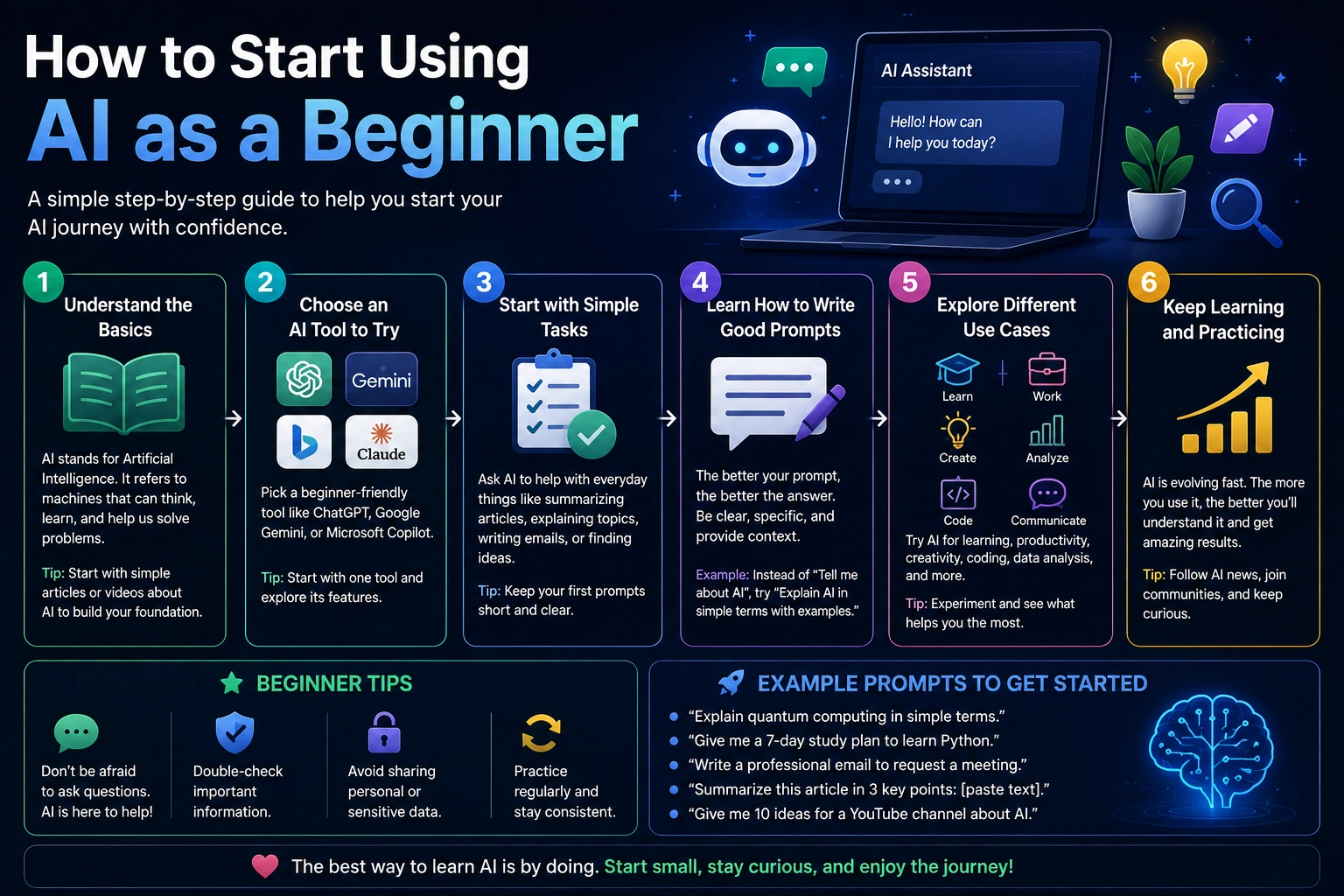
The easiest way to begin is to choose one general-purpose AI assistant and use it for simple tasks you already perform.
A beginner-friendly approach is:
- Choose an AI tool.
- Create an account if necessary.
- Start with a simple task.
- Write a clear prompt.
- Review the response.
- Ask follow-up questions.
- Verify important information.
- Gradually use AI for more advanced tasks.
You don't need to learn everything about AI before using it. You can learn through practical experimentation.
1. Choose Your First AI Tool
There are many AI tools available, and beginners can easily become overwhelmed by the number of options.
You don't need to use several AI tools at the beginning. Start with one general-purpose assistant that can handle conversations, writing, questions, summaries, and basic analysis.
Once you understand how AI works, you can explore specialized tools for specific tasks such as image generation, coding, research, presentations, or productivity.
What Should Beginners Look For?
- An easy-to-use interface
- Natural-language conversations
- Document or file support when needed
- Useful writing and analysis capabilities
- Clear privacy controls
- A free option or affordable starting plan
The best AI tool for you depends on what you actually want to accomplish.
2. Start With Simple Tasks
One of the biggest mistakes beginners make is trying to use AI for complicated projects immediately.
Instead, start with tasks you already understand.
For example, you can ask AI to:
- Rewrite an email
- Summarize an article
- Explain a difficult concept
- Create a shopping list
- Brainstorm ideas
- Translate text
- Create a study plan
- Organize notes
- Write a simple checklist
- Explain an error message
These simple tasks help you understand how AI responds to different instructions without creating unnecessary complexity.
3. Learn How to Write Your First AI Prompt
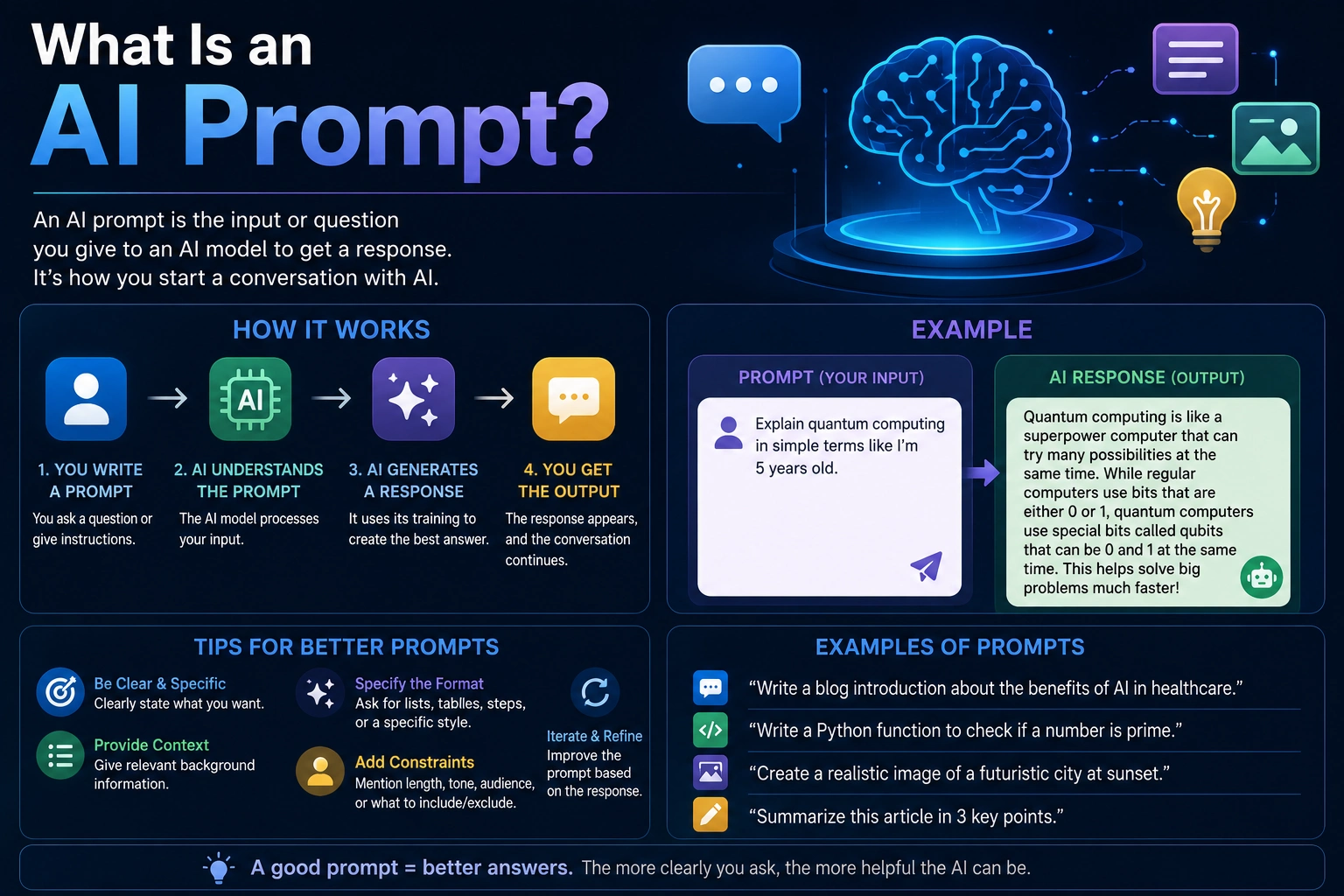
A prompt is the instruction or question you give to an AI system.
Your prompt can be very simple:
Explain photosynthesis.
However, a more specific prompt usually produces a more useful response.
Explain photosynthesis to a 12-year-old using simple language and a real-world example. Keep the explanation under 300 words.
The second prompt provides context, audience, style, and a length requirement.
4. Use the Basic Prompt Formula
Beginners can improve their prompts by including a few basic elements:
- Task: What do you want the AI to do?
- Context: What information does the AI need?
- Audience: Who is the result for?
- Format: How should the answer be presented?
- Requirements: What rules or limitations should it follow?
For example:
Write a professional email to a customer explaining that their order will arrive two days late. Keep the tone friendly and apologetic. Keep the email under 150 words.
This is much more useful than simply saying:
Write an email about a late order.
5. Ask AI to Explain Things
One of the most useful applications of AI for beginners is learning.
If you don't understand something, ask AI to explain it at a level appropriate for you.
Explain how the internet works as if I have no technical background. Start with the basic idea, then explain what happens when I open a website.
You can then continue the conversation:
I understand the basic idea. Now explain what DNS does.
This conversational approach can make difficult subjects easier to understand because you can ask follow-up questions whenever something is unclear.
6. Use AI for Writing
AI can be useful for many everyday writing tasks.
You can use it to:
- Draft emails
- Rewrite sentences
- Improve grammar
- Summarize text
- Create outlines
- Brainstorm ideas
- Write social media drafts
- Create meeting notes
- Improve clarity
Instead of asking AI to completely replace your writing, you can use it as an editor.
Rewrite this email to make it clearer and more professional. Keep the original meaning and do not make it sound overly formal.
This approach gives you more control over the final result.
7. Use AI for Learning
AI can act as a personal study assistant by explaining concepts, generating practice questions, and helping organize learning materials.
For example:
I'm learning basic computer skills. Create a seven-day beginner study plan covering files and folders, keyboard shortcuts, web browsing, email, and basic online safety. Include one practical exercise for each day.
You can also ask AI to test your knowledge.
Teach me the basics of HTML. After each section, ask me three questions and wait for my answers before continuing.
This turns AI from a simple answer generator into an interactive learning assistant.
8. Use AI for Research
AI can help you understand a topic, organize research questions, summarize documents, compare information, and identify areas that require further investigation.
For example:
I'm researching electric vehicles for a beginner-friendly article. Create a research outline covering how electric vehicles work, battery technology, charging, advantages, disadvantages, costs, and environmental considerations.
AI can then help you explore each section individually.
However, you should verify important facts against reliable original sources. AI can make mistakes, provide outdated information, or misunderstand evidence.
9. Use AI to Summarize Long Content
Reading a long report, article, or document can take considerable time. AI can help you identify the most important information more quickly.
Instead of:
Summarize this.
try:
Summarize this document in 500 words. Identify the main argument, five key findings, important statistics, limitations, and final conclusion. Do not add information that is not contained in the document.
You can also request a shorter version:
Turn this report into 10 concise bullet points for a busy executive.
10. Use AI to Improve Productivity
AI can help reduce the amount of time spent on repetitive tasks.
For example, you can ask AI to:
- Create a daily schedule
- Prioritize tasks
- Organize notes
- Create checklists
- Draft routine emails
- Summarize meetings
- Break large projects into smaller tasks
- Create templates
For example:
I have these tasks today: answer emails, prepare a presentation, finish a report, attend a meeting, and review three documents. Create a realistic schedule from 9 AM to 5 PM with short breaks and prioritize the most important work.
11. Ask Follow-Up Questions
You don't have to create a perfect prompt on your first attempt.
One of the advantages of conversational AI is that you can refine the answer through follow-up questions.
For example:
Explain machine learning in simple terms.
Then:
Give me a real-world example.
Then:
Now explain the difference between machine learning and deep learning.
This creates an interactive learning process instead of treating each question as a separate conversation.
12. Ask AI to Change the Format
If you understand the information but don't like the format, simply ask AI to restructure it.
You can ask for:
- Bullet points
- Tables
- Checklists
- Step-by-step instructions
- Short summaries
- Detailed explanations
- Examples
- Questions and answers
For example:
Turn the previous explanation into a simple table with three columns: concept, definition, and example.
13. Use AI for Brainstorming
AI can generate many ideas quickly, making it useful when you are stuck or don't know where to begin.
For example:
Give me 20 YouTube video ideas about artificial intelligence for complete beginners. Avoid overly technical topics and make each idea useful to someone who has never used AI before.
You can then ask AI to rank the ideas:
Rank these ideas based on potential usefulness to beginners. Explain why you selected the top five.
You should still apply your own judgment because AI-generated ideas are not automatically good or original.
14. Use AI for Everyday Problems
AI isn't limited to professional or technical work. Beginners can use it for many everyday tasks.
For example, you can ask AI to:
- Plan a trip
- Create a meal plan
- Organize a household project
- Explain a product manual
- Create a packing checklist
- Plan a learning routine
- Compare options
- Generate gift ideas
- Create a workout schedule
- Organize personal projects
For important decisions involving health, legal matters, finances, or safety, AI should be used as an informational assistant rather than the final authority.
15. Learn to Check AI Answers
One of the most important skills for AI beginners is understanding that AI can be wrong.
An AI system can produce an answer that sounds confident while containing incorrect information.
Before trusting an important answer, ask:
- Is the information current?
- Does the answer provide evidence?
- Can the claim be checked independently?
- Is the source reliable?
- Could important context be missing?
For important information, check the original source rather than relying entirely on an AI-generated summary.
16. Don't Share Sensitive Information
Beginners should also understand basic AI privacy and security practices.
Avoid putting sensitive information into an AI tool unless you understand how that service handles your data and you are authorized to share it.
Examples of information that may require particular caution include:
- Passwords
- Credit card numbers
- Private authentication tokens
- Confidential business documents
- Private customer information
- Personal identification information
- Private medical information
When demonstrating a problem, replace real sensitive information with placeholders.
API_KEY = "YOUR_API_KEY"Instead of pasting an actual secret into an AI conversation.
17. Don't Blindly Copy AI-Generated Content
AI-generated text can save time, but you should read and review anything you plan to publish, submit, or send.
Check for:
- Incorrect facts
- Repetitive writing
- Unclear statements
- Missing context
- Incorrect calculations
- Unsupported claims
- Unwanted assumptions
- Privacy problems
The goal should be to use AI to improve your work rather than completely disconnect yourself from the process.
AI for Beginners: Common Mistakes to Avoid
Using Extremely Vague Prompts
A vague request often produces a generic answer.
Instead of:
Write something about marketing.
try:
Explain five beginner-friendly digital marketing strategies for a small online store. Give one practical example for each strategy and keep the explanation simple.
Assuming AI Knows Everything
AI systems have limitations. They may lack current information, misunderstand your situation, or generate incorrect details.
Accepting the First Answer
If the response isn't useful, ask the AI to improve it.
Make this explanation simpler and give me two practical examples.
Providing Too Little Context
AI generally produces better results when it understands the goal, audience, constraints, and expected output.
Sharing Private Information
Never assume that an AI chat is the right place to paste confidential information. Understand the tool's privacy controls before uploading sensitive material.
How to Build an AI Habit
The easiest way to become comfortable with AI is to use it regularly for practical tasks.
A simple beginner routine could look like this:
- Day 1: Ask AI five basic questions.
- Day 2: Use AI to rewrite or improve a piece of writing.
- Day 3: Ask AI to explain something you want to learn.
- Day 4: Use AI to summarize a document or article.
- Day 5: Use AI to organize your tasks.
- Day 6: Experiment with different prompts.
- Day 7: Create your own repeatable AI workflow.
After a week of practical use, you'll usually have a much better understanding of what AI can and cannot do.
A Simple AI Workflow for Beginners
- Identify: Find a task that takes time or requires repetitive work.
- Describe: Explain what you want the AI to accomplish.
- Provide context: Give the information needed to complete the task.
- Set requirements: Specify the format, tone, length, or limitations.
- Review: Read the AI's response carefully.
- Refine: Ask follow-up questions or request changes.
- Verify: Check important facts and claims.
- Use: Apply the result to your actual task.
Beginner AI Prompts You Can Try
Learning
Explain [TOPIC] to me as a complete beginner. Start with the basic concept, then give me three simple real-world examples.
Writing
Rewrite this text to make it clearer and easier to understand. Keep the original meaning and avoid unnecessary words.
Research
Help me research [TOPIC]. Create a list of the most important questions I should answer and explain what type of sources I should look for.
Productivity
Here is my task list: [TASKS]. Organize these tasks by priority and create a realistic schedule for today.
Brainstorming
Give me 15 practical ideas for [GOAL]. Focus on ideas that are realistic for a beginner with limited time and resources.
Summarization
Summarize the following text in simple language. Identify the main idea, five key points, important evidence, and the final conclusion.
Problem Solving
Help me solve this problem step by step. First explain the possible causes, then recommend the safest and simplest solution.
What Should You Learn After the Basics?
Once you are comfortable using AI for simple tasks, you can gradually explore more advanced capabilities.
Useful next steps include:
- Advanced prompting
- AI research workflows
- AI image generation
- AI coding assistants
- Document analysis
- AI automation
- AI productivity workflows
- AI agents
- Custom AI assistants
You don't need to learn all of these at once. Choose the area that provides the most value for your work, education, or personal projects.
Final Verdict
Starting with AI doesn't require a technical background. The easiest approach is to choose one general-purpose AI assistant and begin using it for simple tasks you already understand.
Start by asking AI to explain concepts, improve writing, summarize information, organize tasks, brainstorm ideas, and help you learn. As you become more comfortable, you can move toward research, document analysis, coding, image generation, automation, and more advanced AI workflows.
The most important skill is learning how to communicate your goal clearly. Give the AI enough context, specify what you want, and explain how you want the result presented.
Just as importantly, remember that AI can make mistakes. Review important outputs, verify significant claims, and don't blindly accept everything an AI system produces.
The best way to learn AI is by using it. Start with one small task today, experiment with different prompts, and gradually build AI into the parts of your daily workflow where it can genuinely save time or improve your results.
Frequently Asked Questions
How do I start using AI as a beginner?
Start by choosing one easy-to-use AI assistant and use it for simple tasks such as asking questions, summarizing text, improving writing, brainstorming ideas, or learning a new subject. You can gradually explore more advanced AI features as you gain experience.
Do I need technical skills to use AI?
No. Most modern AI assistants can be used with natural language. You don't need to know programming or machine learning to use AI for writing, research, learning, productivity, and everyday tasks.
What should I ask AI as a beginner?
Start with practical questions related to things you already do. You can ask AI to explain a topic, rewrite an email, summarize a document, create a checklist, organize your tasks, brainstorm ideas, or help you learn a new skill.
How do I write a good AI prompt?
Clearly describe the task, provide relevant context, specify the intended audience, and explain the format or requirements you want. More specific prompts generally produce more useful results.
Can AI help me learn?
Yes. AI can explain difficult concepts, create study plans, generate practice questions, provide examples, summarize learning materials, and act as an interactive study assistant.
Can beginners use AI for work?
Yes. Beginners can use AI to draft emails, summarize meetings, organize tasks, create outlines, analyze information, brainstorm ideas, and automate parts of repetitive workflows.
Can AI make mistakes?
Yes. AI can generate incorrect or misleading information. Important facts should be verified using reliable sources, especially when the information affects health, finances, legal matters, safety, or other important decisions.
Should I use multiple AI tools?
Not necessarily. Beginners should usually start with one general-purpose AI tool and learn how to use it effectively. Once you understand your needs, you can add specialized tools for tasks such as research, coding, image generation, or automation.
Is AI difficult to learn?
The basics are relatively easy to learn because modern AI tools understand natural language. The main skill is learning how to describe your goals clearly, provide useful context, review the results, and refine your prompts.
What is the best way to learn AI?
The best way to learn is through practical use. Choose real tasks from your daily life, experiment with different prompts, compare the results, and gradually explore more advanced AI capabilities.