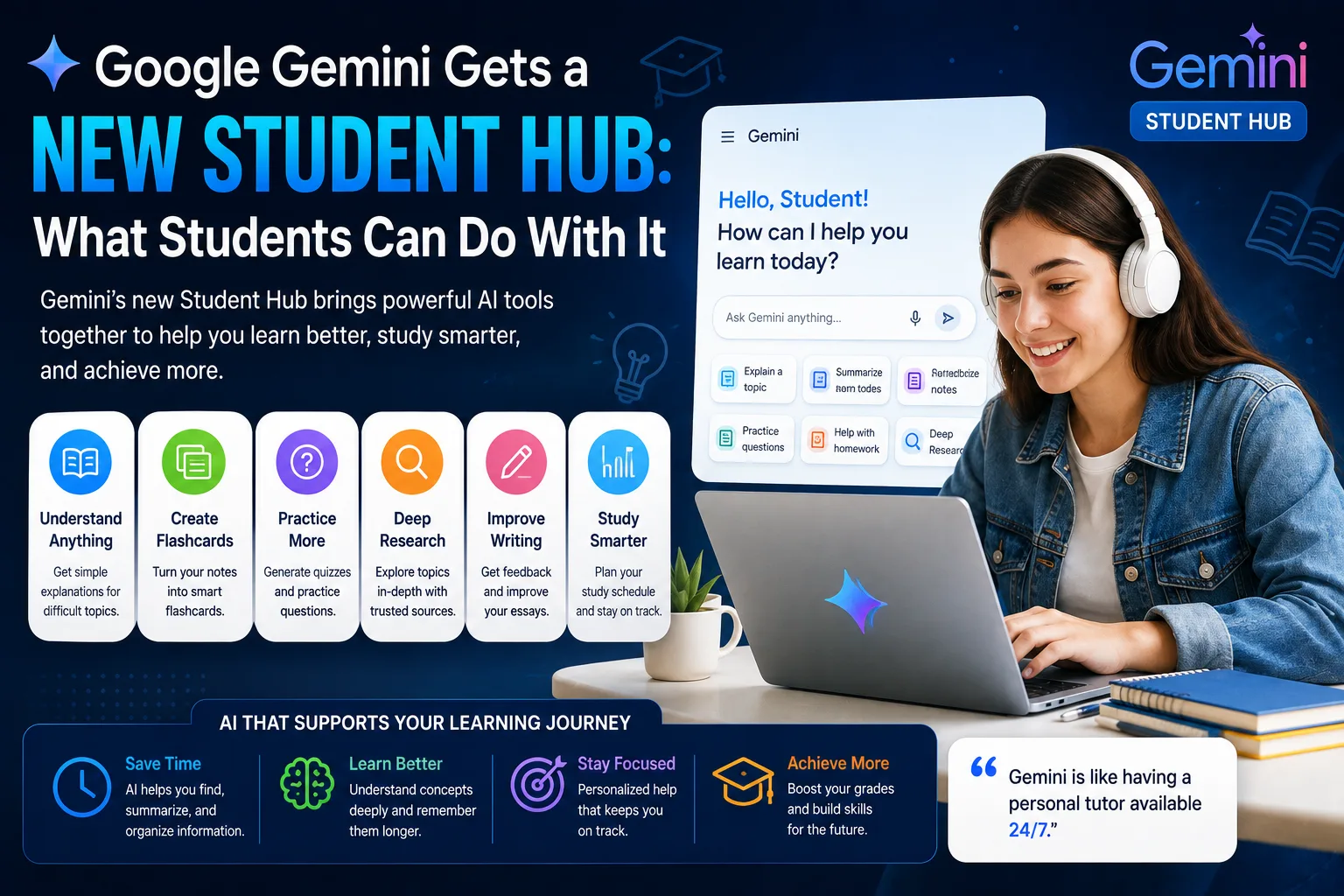

Google Gemini is expanding its focus on education with a new Student Hub designed to help students get more from AI while studying, researching, and completing school or college work.
The new student-focused experience brings together Gemini's AI capabilities and tools that can help learners understand difficult subjects, organize information, create study materials, and explore topics in more depth.
For students, the biggest advantage is not simply having an AI chatbot available. The goal is to make Gemini more useful for the actual learning process, from understanding a difficult concept to preparing for an exam.
In this guide, we'll explain what Google Gemini Student Hub is, what students can do with it, how to use Gemini for studying, and how students can build a practical AI-powered study workflow.
What Is Google Gemini Student Hub?
Google Gemini Student Hub is a student-focused destination for discovering and using Gemini's AI capabilities for education and learning.
Instead of treating AI as a general-purpose chatbot, the Student Hub puts more emphasis on common student needs such as studying, research, learning difficult concepts, creating study materials, and preparing for exams.
The hub can also make it easier for students to discover Gemini features that they may not know are useful for education.
This is important because many students already use AI tools, but they may use them mainly for simple questions or writing assistance. A more structured approach can turn Gemini into a broader learning assistant.
What Can Students Do With Gemini?
Gemini can be used for many different parts of the learning process.
- Understand difficult concepts
- Summarize study materials
- Create flashcards
- Generate practice questions
- Explain complex topics
- Brainstorm ideas for projects
- Analyze information
- Help with research
- Create study plans
- Prepare for exams
The key is to use Gemini as a learning assistant rather than simply asking it to provide answers.
Gemini for Studying
One of the most useful applications of Gemini for students is studying.
Instead of reading the same material repeatedly, students can use AI to transform information into different learning formats.
For example, you can provide a topic and ask Gemini to explain it in simple language.
Explain photosynthesis as if I am a beginner. Start with a simple explanation, then explain the process step by step and finish with five questions to test my understanding.
You can then ask follow-up questions based on the parts you do not understand.
This creates a more interactive learning experience than simply reading a definition.
How to Create Flashcards With Gemini
Flashcards can be useful for memorizing vocabulary, definitions, formulas, dates, concepts, and other information.
Gemini can help turn study notes into a set of flashcards.
Create 20 study flashcards from these notes. Put the question on one side and the answer on the other. Focus on the most important concepts and avoid trivial information.
You can also ask Gemini to make the flashcards progressively more difficult.
Create 15 beginner flashcards and 15 advanced flashcards from this material. The advanced questions should require understanding rather than simple memorization.
This approach can make study sessions more active and help students identify areas they need to review.
Use Gemini to Explain Difficult Topics
Students often encounter concepts that are difficult to understand from textbooks or classroom notes alone.
Gemini can provide alternative explanations and adjust the level of difficulty.
Explain quantum mechanics at a high-school level. Use simple examples and avoid unnecessary mathematical notation. After the explanation, ask me three questions to check whether I understand the concept.
If the explanation is still too difficult, you can ask Gemini to simplify it further.
That explanation is still too technical. Explain it using a simple real-world analogy and assume I have no previous knowledge of the subject.
Students can continue this conversation until they have a clearer understanding of the topic.
Gemini for Exam Preparation
AI can also help students prepare for exams by turning existing study material into practice exercises.
For example, you can ask Gemini to create a mock test based on a chapter.
Create a 30-question practice test based only on this study material. Include multiple-choice, short-answer, and application questions. Do not show the answers until I finish.
After completing the test, ask Gemini to review your answers.
Review my answers against the study material. Explain every incorrect answer and identify the topics I should study again.
This creates a simple feedback loop:
- Study the material.
- Generate practice questions.
- Complete the questions without assistance.
- Review mistakes.
- Study weak areas.
- Take another practice test.
How to Use Gemini for Research
Research is another area where Gemini can help students.
Students can use AI to brainstorm research questions, organize information, explain terminology, compare ideas, and create research outlines.
For example:
I'm writing a research paper about the impact of artificial intelligence on higher education. Give me 10 specific research questions covering academic performance, student engagement, cheating, accessibility, and the future of education.
Once you choose a research question, Gemini can help organize the project.
Create an outline for a research paper about the impact of generative AI on university students. Include an introduction, five main sections, potential arguments, opposing viewpoints, and a conclusion.
However, students should always verify important facts against original sources and follow their school's academic-integrity requirements.
Gemini Deep Research for Students
For more complex research questions, AI research capabilities can help students move beyond simple question-and-answer interactions.
A student researching a complicated topic can ask AI to investigate different aspects of the subject, organize findings, and identify areas that require further research.
For example:
Research the effects of renewable energy adoption on electricity prices. Focus on recent research, identify major arguments on both sides, explain the evidence, and organize the findings into sections suitable for a university research project.
Students should not assume that an AI-generated research report is automatically accurate. Important claims, statistics, and citations should be checked against the original sources.
Gemini for Homework Help
Gemini can also help students understand homework problems.
Instead of asking:
Give me the answer to this math problem.
a better approach is:
Help me solve this problem step by step. Do not give me the final answer immediately. Ask me what I think the next step should be and explain the concept if I make a mistake.
This encourages active learning rather than simply copying an answer.
The same approach can be used for programming, mathematics, science, economics, history, and many other subjects.
Gemini for Writing Assignments
Students can use Gemini during the writing process for brainstorming, outlining, editing, and improving clarity.
For example, you can ask:
Review this essay for clarity and organization. Identify weak arguments, repetitive sections, unclear sentences, and places where I need stronger evidence. Do not rewrite the entire essay.
This can be more useful than asking AI to write the entire assignment because the student remains responsible for developing the ideas and final work.
Gemini for Learning Languages
AI can also act as a language-learning partner.
Students can practice vocabulary, grammar, reading comprehension, and conversation.
Act as my English conversation partner. My level is intermediate. Ask me one question at a time about everyday life. Correct my grammar after each answer and explain my mistakes briefly.
You can also ask Gemini to create vocabulary exercises based on a specific topic.
Create a vocabulary quiz with 20 intermediate English words related to technology. Give me one question at a time and explain each answer after I respond.
Gemini for Coding Students
Students learning programming can use Gemini to understand code, identify errors, practice programming concepts, and build small projects.
For example:
Explain this JavaScript function line by line. Assume I am a beginner and explain why each part of the code is necessary.
When debugging, provide the exact error message and relevant code.
This JavaScript program produces the following error. Explain the cause, identify the problematic line, and show me how to fix it. Also explain how I can avoid this type of error in future projects.
Students should still write, test, and understand their own code rather than blindly copying AI-generated solutions.
How to Build an AI-Powered Study Workflow
The most effective way to use Gemini is to build it into a repeatable study workflow.
- Learn: Study the original material first.
- Explain: Ask Gemini to explain difficult concepts.
- Summarize: Turn your notes into concise summaries.
- Practice: Generate questions and exercises.
- Test: Complete practice tests without assistance.
- Review: Identify mistakes and weak areas.
- Repeat: Create another practice session focused on those weaknesses.
This workflow uses AI to support learning instead of replacing the learning process.
Best Gemini Prompts for Students
Study Plan
Create a seven-day study plan for my upcoming exam. I have two hours available each day. Prioritize the most important topics and include review sessions and practice questions.
Explain a Concept
Explain this concept in simple language, then explain it at an intermediate level. Give me one real-world example and three questions to test my understanding.
Flashcards
Turn these notes into 25 flashcards. Focus on important definitions, concepts, relationships, and facts that are likely to be tested.
Practice Test
Create a 20-question practice exam based on these notes. Include different question types and do not reveal the answers until I submit my responses.
Essay Feedback
Review my essay as a teacher would. Identify weaknesses in my argument, organization, evidence, grammar, and clarity. Give specific suggestions but do not rewrite the essay for me.
Research Assistant
Help me turn this broad topic into a specific research question. Give me five possible research questions and explain what evidence I would need to investigate each one.
Benefits of Gemini for Students
- Personalized explanations
- Interactive learning
- Faster study-material creation
- Practice-question generation
- Research assistance
- Writing feedback
- Programming assistance
- Language-learning practice
- Study-plan creation
- 24/7 access to an AI learning assistant
The biggest benefit is flexibility. Students can ask follow-up questions, request simpler explanations, practice specific skills, and adapt the learning experience to their needs.
Limitations of Using AI for Education
AI can be extremely useful for learning, but it also has limitations.
- AI can make factual mistakes.
- AI can misunderstand the context of a question.
- AI-generated citations may require verification.
- AI can provide overly simplified explanations.
- Students can become dependent on AI if they use it incorrectly.
- Some schools restrict how students can use AI.
The safest approach is to treat Gemini as a learning assistant rather than an unquestionable source of truth.
Should Students Use Gemini to Do Their Homework?
Students should distinguish between using AI to understand homework and using AI to complete an assignment without learning the material.
Using Gemini to explain a difficult concept, provide hints, generate practice questions, or review your work can support learning.
Simply copying an AI-generated answer can prevent you from developing the skills the assignment is designed to teach.
Students should also follow the academic-integrity policies of their school, university, or instructor.
Gemini Student Hub vs Traditional Studying
| Study Task | Traditional Approach | AI-Assisted Approach |
|---|---|---|
| Understanding concepts | Read textbooks and ask teachers | Ask AI for alternative explanations |
| Creating flashcards | Create them manually | Generate an initial set with AI |
| Practice questions | Use existing exercises | Generate customized questions |
| Research | Search and organize sources manually | Use AI to help organize and analyze information |
| Essay feedback | Ask a teacher or peer | Get immediate preliminary feedback |
| Exam preparation | Review notes and practice tests | Build personalized practice sessions |
How Students Should Use AI Responsibly
The goal of AI-assisted education should be better learning, not simply faster completion of assignments.
A responsible student should:
- Verify important information.
- Read original sources when doing research.
- Understand AI-generated answers before using them.
- Follow school and university AI policies.
- Avoid submitting AI-generated work when prohibited.
- Protect personal and confidential information.
- Use AI to practice rather than avoid learning.
Privacy and Student Data
Students should also think about privacy when using AI tools.
Avoid entering sensitive personal information, passwords, private school records, or other confidential information into an AI system unless you understand how the service handles that information.
Before uploading documents, check the service's privacy and data-use settings, especially when working with school or university materials.
What Makes Gemini Student Hub Useful?
The main value of a student-focused Gemini experience is that it brings several AI-assisted learning activities into one workflow.
Students can move from learning a concept to creating flashcards, practicing questions, researching a topic, and reviewing mistakes without having to treat every task as a separate AI use case.
This makes Gemini potentially useful throughout the entire study cycle.
Final Verdict
Google Gemini's new Student Hub represents another step toward making generative AI more useful for education. Instead of using AI only as a general chatbot, students can use Gemini for studying, research, practice, writing feedback, language learning, coding, and exam preparation.
One of the most useful applications is personalized learning. Students can ask Gemini to explain difficult concepts at different levels, generate practice questions, create flashcards, and identify areas that need more attention.
Gemini can also support research by helping students develop research questions, organize information, compare ideas, and work through complex topics.
However, AI should not replace teachers, original sources, critical thinking, or independent learning. Students should verify important information and follow their institution's rules regarding AI use.
The best way to use Gemini as a student is to treat it as an interactive study assistant: ask questions, practice concepts, challenge your understanding, and use AI to identify what you still need to learn.
Frequently Asked Questions
What is Google Gemini Student Hub?
Google Gemini Student Hub is a student-focused experience designed to help learners discover and use Gemini's AI capabilities for studying, research, learning, and academic work.
What can students do with Gemini?
Students can use Gemini to understand difficult concepts, summarize information, create flashcards, generate practice questions, prepare for exams, research topics, practice languages, get writing feedback, and learn programming.
Can Gemini help students study?
Yes. Gemini can help students create study plans, explain difficult concepts, generate flashcards, create practice questions, and review mistakes.
Can Gemini create flashcards?
Yes. Students can provide notes or study material and ask Gemini to turn the information into flashcards focused on important concepts and facts.
Can Gemini help with research?
Yes. Gemini can help students develop research questions, organize information, compare ideas, summarize material, and structure research projects. Important claims should still be checked against original sources.
Can Gemini help with homework?
Yes. Gemini can explain concepts, provide hints, walk through problems, and review work. Students should use these capabilities to understand the material rather than simply copy answers.
Can Gemini help students prepare for exams?
Yes. Students can use Gemini to create study plans, generate practice tests, make flashcards, explain difficult topics, and identify areas that require additional review.
Is Gemini good for college students?
Gemini can be useful for college students working on research, studying, writing, programming, presentations, and exam preparation. Students should follow their university's policies regarding acceptable AI use.
Should students use AI for school?
AI can be a useful educational tool when used responsibly. Students should use it to support understanding and practice while verifying information and following their school's academic-integrity rules.
Can Gemini replace a teacher?
No. AI can provide explanations and personalized practice, but teachers provide human judgment, context, mentorship, feedback, and classroom instruction that an AI assistant cannot fully replace.