
Google Gemini has become one of the most useful AI assistants for writing, research, learning, brainstorming, coding, and everyday tasks. But if you're thinking about using Gemini regularly, you may wonder whether the free version is enough or whether a paid Google AI plan is worth the money.
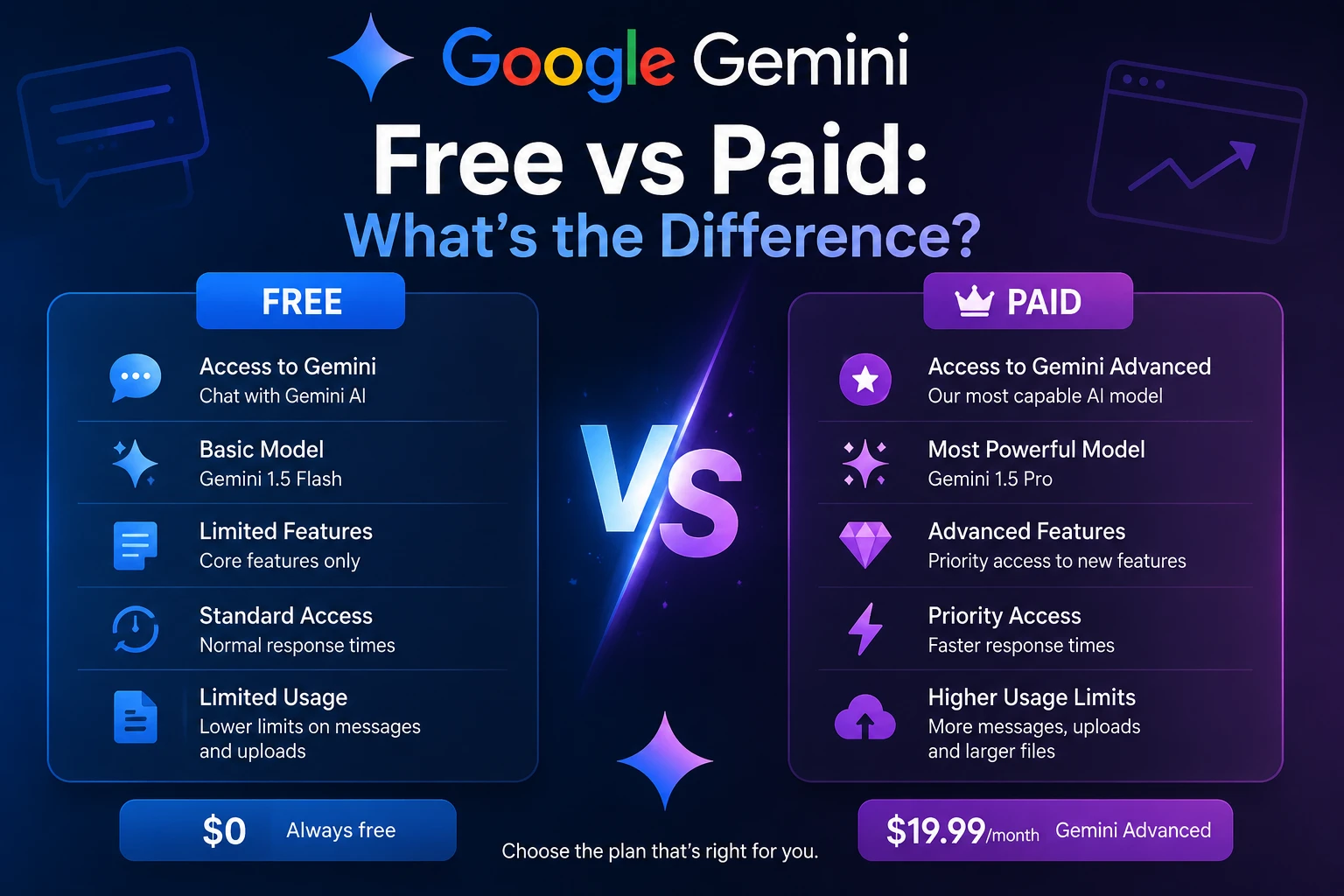
The good news is that you can use Gemini without paying for a Google AI subscription. However, paid plans provide higher usage limits, larger context windows, and access to additional features and capabilities.
In this guide, we'll compare Google Gemini Free with Google's paid AI plans and explain which option may be best for different types of users.
Is Google Gemini Free?
Yes. Gemini can be used without a Google AI subscription. Google provides standard usage limits for users who don't have an AI plan.
However, "free" does not mean unlimited. Gemini usage is subject to limits that can depend on the complexity of your prompts, the models and features you use, and the length of your conversations. Google says these limits can change over time.
For casual users who ask questions, summarize information, brainstorm ideas, or occasionally generate content, the free version can be a very practical option.
What Are the Paid Google Gemini Plans?
Google offers several Google AI subscription options that expand access to Gemini and other AI features. Current plans include Google AI Plus, Google AI Pro, and Google AI Ultra, although availability and benefits can vary by country.
Google describes these plans as providing expanded access to Gemini features and models.
For example, Google's UK pricing page currently lists Google AI Pro at £18.99 per month with 5 TB of storage, while Ultra starts at £79.99 per month. Pricing and availability can differ by country, so check Google's current pricing page before subscribing.
Google Gemini Free vs Paid: Quick Comparison
| Feature | Without Google AI Plan | Google AI Plus | Google AI Pro | Google AI Ultra |
|---|---|---|---|---|
| Gemini access | Yes | Yes | Yes | Yes |
| Usage limits | Standard | Higher | Higher | Highest |
| Context window | 32K tokens | 128K tokens | 1 million tokens | 1 million tokens |
| Advanced features | Limited | Expanded | More expanded | Most expanded |
| Video generation | Limited or unavailable | Available | Available | Available |
| Deep Research | Available with limits | Expanded | Expanded | Expanded |
Google's current Gemini documentation lists standard limits for users without a Google AI plan, while AI Plus, Pro, and Ultra provide progressively higher limits.
1. Usage Limits
One of the biggest differences between free and paid Gemini is how much you can use the service.
Users without a Google AI plan have standard limits. Google currently lists AI Plus at 2 times the standard limits and AI Pro at 4 times the standard limits. AI Ultra can provide substantially higher limits depending on the subscription.
This difference matters most if you use Gemini frequently throughout the day.
If you only ask a few questions occasionally, you may never notice the free plan's limits. Heavy users, researchers, developers, and content creators are more likely to benefit from higher limits.
2. Context Window
The context window determines how much information Gemini can process together in a conversation or uploaded material.
Google currently lists a 32K-token context window without an AI plan, 128K for AI Plus, and 1 million tokens for AI Pro and AI Ultra.
A larger context window can be particularly useful when working with:
- Long documents
- Large research projects
- Long conversations
- Books and reports
- Large codebases
- Multiple uploaded files
For simple questions and short conversations, however, the difference may not matter much.
3. Access to Advanced Models
Google's Gemini ecosystem includes different models designed for different workloads. Current documentation lists Gemini 3 Flash-Lite, Gemini 3 Flash, and Gemini 3 Pro among the available models.
Google says Gemini 3 Pro is designed for more demanding tasks such as complex mathematics and coding, with deeper understanding across text, files, images, and videos.
Importantly, Google currently lists access to these Gemini 3 models for users both with and without a Google AI plan. The major difference is generally the amount of access and the limits associated with using them.
4. Deep Research
Deep Research is designed for more extensive research tasks rather than simple questions.
Google currently lists Deep Research among Gemini features and indicates that usage limits and access can vary depending on the Google AI plan.
If you frequently use AI for research, reports, competitive analysis, academic work, or detailed investigations, the expanded limits of a paid plan can make a noticeable difference.
5. Image and Video Generation
Gemini's ecosystem also includes generative media capabilities. Google currently lists image generation capabilities across its Gemini plans, while some more advanced image and video features are available with paid subscriptions.
For users who primarily want a chatbot for questions and writing, these features may not justify a subscription. For creators who regularly produce visual content, however, they can make a paid plan more attractive.
6. Gemini for Work and Google Apps
One of the biggest reasons some users choose a Google AI subscription is its connection with Google's broader ecosystem.
Depending on the plan and eligibility, paid Google AI subscriptions can provide Gemini-related benefits across products such as Gmail, Docs, and other Google services. Google AI Pro, for example, includes Gemini capabilities in Gmail, Docs, Vids, and more.
This can be particularly useful if you already spend a large part of your day working inside Google's productivity ecosystem.
7. Cloud Storage
Google AI subscriptions can also include Google One storage benefits.
For example, Google currently lists 5 TB of storage with its Google AI Pro plan on its UK pricing page.
This means a paid plan isn't necessarily just an AI subscription. Depending on the plan, you're also paying for additional Google One benefits and storage.
Who Should Use Free Gemini?
The free version is probably the best choice if you:
- Occasionally ask AI questions
- Use Gemini for simple writing tasks
- Brainstorm ideas from time to time
- Summarize short pieces of information
- Are experimenting with AI for the first time
- Don't need very large context windows
- Don't frequently reach usage limits
For many beginners, there is no strong reason to pay immediately. Start with the free version and see whether you actually encounter limitations.
Who Should Consider Google AI Pro?
Google AI Pro may make more sense for people who use Gemini heavily.
Consider a paid plan if you:
- Use Gemini every day for work
- Regularly analyze large documents
- Need higher usage limits
- Work with complex coding or research tasks
- Use AI features across Google applications
- Want additional Google One storage
- Create AI-generated images or videos frequently
Google currently advertises substantially higher Gemini usage limits with AI Pro compared with the standard level.
Who Needs Google AI Ultra?
Google AI Ultra is aimed at users who want the highest level of access to Google's AI ecosystem.
It is more likely to appeal to professional creators, developers, researchers, and advanced AI users who regularly use demanding AI features and need higher limits.
For an average user who only wants help writing emails, answering questions, or brainstorming ideas, Ultra is likely unnecessary.
Is Google Gemini Paid Worth It?
Whether Gemini paid plans are worth it depends entirely on how you use AI.
If you use Gemini occasionally, the free version is usually the logical place to start. Paying for features you rarely use doesn't make much sense.
On the other hand, if Gemini is part of your daily workflow, higher usage limits, larger context windows, advanced features, and Google ecosystem integrations can make a paid plan much more useful.
Google Gemini Free vs Paid: Which Should You Choose?
Choose Free Gemini if: you are a casual user, beginner, student, or someone who only needs AI occasionally.
Choose Google AI Plus if: you want more usage than the standard free experience and need additional AI features without moving to the higher-priced tiers.
Choose Google AI Pro if: you use Gemini heavily for work, research, coding, content creation, or large files and want substantially higher limits and a larger context window.
Choose Google AI Ultra if: you are an advanced AI user who needs the highest available access to Google's premium AI capabilities.
Final Verdict
Google Gemini Free is surprisingly capable and is enough for many everyday users. You can use it to ask questions, write content, brainstorm ideas, learn new subjects, and perform many other AI-assisted tasks without paying for a subscription.
Paid Google AI plans are mainly about getting more access rather than simply getting "Gemini instead of no Gemini." Higher limits, larger context windows, advanced features, Google ecosystem integrations, and additional storage can become valuable when Gemini becomes part of your daily workflow.
Our recommendation is simple: start with free Gemini. If you regularly hit usage limits or need advanced capabilities, then consider upgrading to the Google AI plan that matches your needs.
Frequently Asked Questions
Is Google Gemini completely free?
Gemini can be used without a Google AI subscription, but free access has usage limits. Google says these limits can depend on the complexity of prompts, models, features, and conversation length.
What is the biggest difference between free and paid Gemini?
The biggest differences are usage limits, context window size, access to certain advanced features, and additional Google One benefits.
Does Gemini Free have access to Gemini Pro?
Google's current documentation lists Gemini 3 Pro as available without a Google AI plan as well as with paid plans. However, usage limits and availability can differ between plans.
Is Google AI Pro worth it for students?
It depends on how frequently you use Gemini. Students who mainly ask occasional questions may be perfectly fine with the free version. Students working with large documents, research projects, coding, or intensive study workflows may benefit more from higher limits and the larger context window available with Pro.
Can I upgrade to a Google AI plan later?
Yes. Google provides options to upgrade through the Gemini web app or mobile app. You can select an available Google AI plan and follow the subscription instructions.
Can I cancel a Google AI plan?
Yes. Google says you can manage or cancel your Google AI subscription through Google One settings.