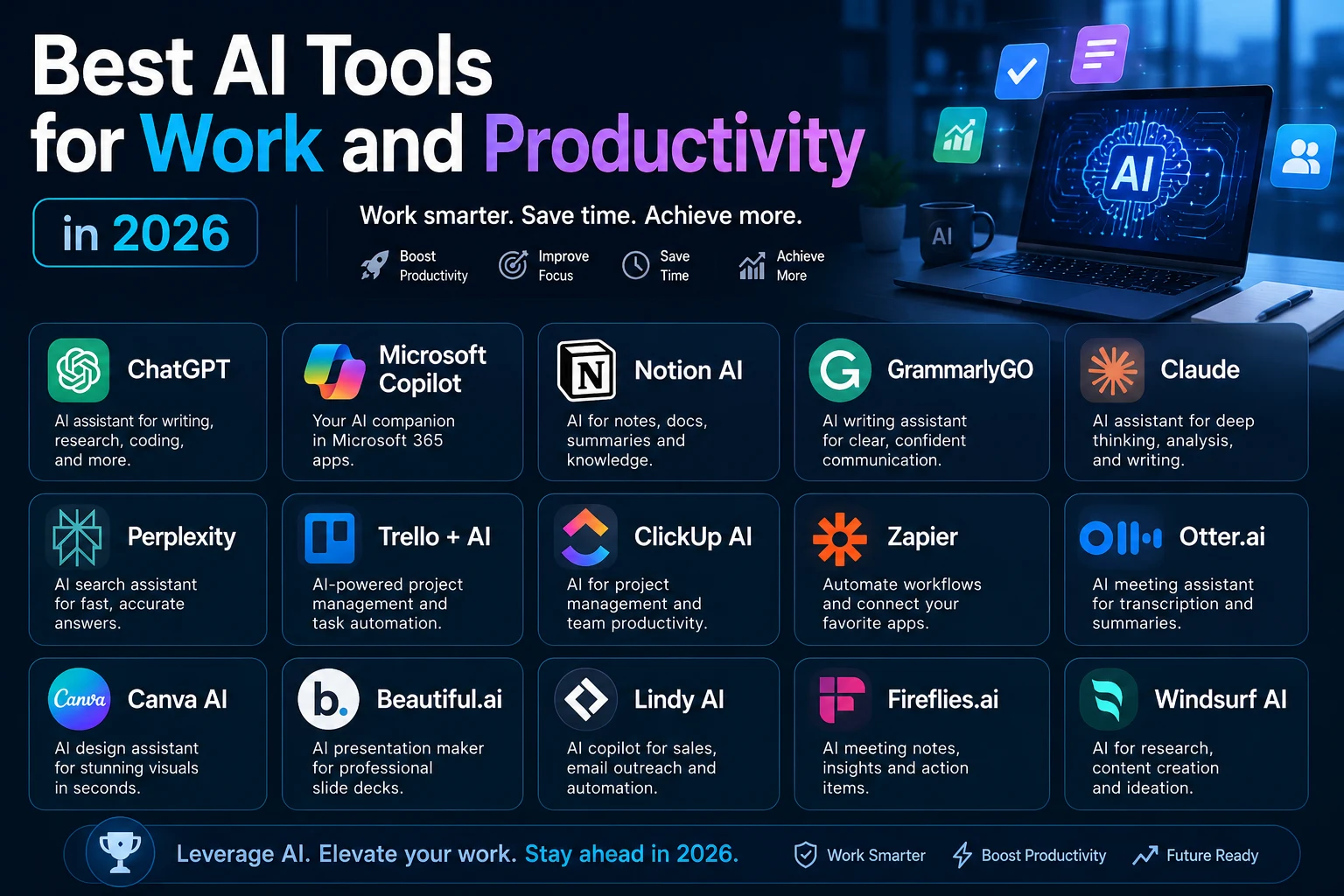

Artificial intelligence has quickly become one of the most useful technologies for modern professionals. In 2026, AI tools can help with writing, research, meetings, project management, data analysis, automation, presentations, and many other everyday tasks.
The best AI productivity tools are not necessarily the ones with the most features. The right tool is the one that fits your workflow and helps you complete important tasks faster and more efficiently.
In this guide, we'll explore some of the best AI tools for work and productivity in 2026 and explain what each tool can do and who can benefit from using it.
Why Use AI Tools for Work?
Many professionals spend a large part of their day on repetitive tasks. Writing emails, summarizing documents, organizing information, preparing presentations, and searching for information can all take valuable time.
AI can help reduce this workload and allow people to focus more on creative thinking, decision-making, communication, and other high-value activities.
- Write and edit documents
- Summarize long documents and reports
- Research topics and generate ideas
- Create presentations and visual content
- Analyze data
- Organize projects and tasks
- Take and summarize meeting notes
- Automate repetitive workflows
- Improve professional communication
1. ChatGPT — Best All-Around AI Assistant
ChatGPT is one of the most versatile AI assistants available today. It can help professionals with writing, brainstorming, research, summarization, planning, coding, data analysis, and many other tasks.
For example, you can give ChatGPT information about a project and ask it to organize the information into a report, create an action plan, or identify the most important points.
Best for:
- Writing and editing
- Brainstorming
- Research
- Summarizing documents
- Data analysis
- Planning
- Learning
- Coding
Best choice for: Professionals who want one flexible AI assistant that can handle many different tasks.
2. Microsoft Copilot — Best for Microsoft 365
Microsoft Copilot is especially useful for professionals and businesses that already use Microsoft 365.
Depending on the version and subscription, Copilot can assist with tasks involving applications such as Word, Excel, PowerPoint, Outlook, and Teams.
Best for:
- Business documents
- Email assistance
- Presentations
- Spreadsheets
- Meetings
- Microsoft 365 workflows
Best choice for: Professionals and organizations that rely heavily on Microsoft's productivity ecosystem.
3. Google Gemini — Best for Google Workspace
Google Gemini is a strong option for people who use Google's ecosystem for work and productivity.
Gemini can assist with writing, brainstorming, summarization, research, and information organization. Its integration with Google's ecosystem makes it particularly useful for people already using Google Workspace.
Best for:
- Google Workspace users
- Research
- Writing
- Brainstorming
- Summarization
- Information organization
Best choice for: Professionals who use Gmail, Google Docs, Google Drive, and other Google services.
4. Claude — Best for Writing and Long Documents
Claude is an excellent AI assistant for professionals who frequently work with large amounts of text.
It can help analyze documents, summarize reports, improve writing, brainstorm ideas, and create structured content.
Best for:
- Long documents
- Research
- Writing
- Document analysis
- Brainstorming
- Business communication
Best choice for: Writers, researchers, consultants, analysts, and professionals who work with lengthy documents.
5. Notion AI — Best for Knowledge Management
Notion combines notes, documents, databases, project management, and knowledge management in one workspace. Notion AI adds AI capabilities to help users work with that information more efficiently.
You can use it to summarize notes, improve documents, brainstorm ideas, organize information, and work with content inside your workspace.
Best for:
- Notes
- Team documentation
- Project documentation
- Meeting notes
- Knowledge bases
- Content planning
Best choice for: Teams that want their documentation, organization, and AI assistance in one workspace.
6. Grammarly — Best for Professional Writing
Grammarly is designed to help people improve their written communication. It can identify grammar problems, improve clarity, suggest better wording, and help adjust the tone of your writing.
Best for:
- Emails
- Business documents
- Reports
- Grammar correction
- Editing
- Tone improvement
Best choice for: Professionals who write emails and documents regularly.
7. Zapier — Best for AI Automation
Zapier is particularly useful when you want to connect AI with other applications and automate repetitive workflows.
For example, a business could create a workflow that receives information from a form, sends it to an AI model for analysis, saves the result to a database, and then notifies a team member.
Best for:
- Workflow automation
- Connecting applications
- Repetitive tasks
- Lead management
- Notifications
- Business processes
Best choice for: Businesses and professionals who want to automate repetitive workflows.
8. Fireflies.ai — Best for Meeting Notes
Meetings can consume a significant amount of time. AI meeting assistants can help by transcribing conversations and creating summaries.
Fireflies.ai can be useful for recording meeting discussions, finding important information, and creating useful meeting notes.
Best for:
- Meeting notes
- Transcription
- Meeting summaries
- Action items
- Team collaboration
Best choice for: Teams and professionals who attend many meetings.
9. Otter.ai — Best for Transcription
Otter.ai is another useful AI tool for converting spoken conversations into searchable text.
It can be useful for meetings, interviews, lectures, presentations, and other situations where you need a written record of a conversation.
Best for:
- Transcription
- Meetings
- Interviews
- Lectures
- Conversation notes
10. Canva AI — Best for Visual Content
Creating professional visual content no longer requires advanced graphic design skills. Canva's AI-powered features can help users create presentations, marketing graphics, social media content, and other visual materials.
Best for:
- Presentations
- Marketing graphics
- Social media content
- Visual communication
- Business designs
Best choice for: Marketers, entrepreneurs, content creators, and small businesses.
11. Asana — Best for Project Management
Asana helps teams organize projects, tasks, deadlines, and workflows. Its AI capabilities can assist with planning, project summaries, task organization, and workflow management.
Best for:
- Project management
- Task management
- Team collaboration
- Planning
- Deadlines
- Workflow organization
12. Perplexity — Best for AI Research
Perplexity is useful when research and information discovery are important. It can help users explore topics, find information, and discover sources more quickly.
Best for:
- Research
- Fact-finding
- Topic exploration
- Source discovery
- Competitive research
Best choice for: Researchers, marketers, students, analysts, and professionals who need to investigate topics efficiently.
Best AI Productivity Tools Compared
| AI Tool | Best For | Main Strength |
|---|---|---|
| ChatGPT | General productivity | Versatility |
| Microsoft Copilot | Microsoft 365 | Office integration |
| Google Gemini | Google Workspace | Google ecosystem |
| Claude | Writing and documents | Long-form analysis |
| Notion AI | Knowledge management | Workspace organization |
| Grammarly | Writing | Communication |
| Zapier | Automation | Workflow automation |
| Fireflies.ai | Meetings | Meeting summaries |
| Otter.ai | Transcription | Speech-to-text |
| Canva AI | Visual content | Design |
| Asana | Project management | Project organization |
| Perplexity | Research | Information discovery |
How to Choose the Right AI Productivity Tool
You don't need to use every AI tool available. In fact, having too many applications can make your workflow more complicated.
Start by identifying the tasks that take up the most time in your workday. Then choose an AI tool specifically designed to help with those tasks.
Consider Your Existing Software
Your existing software ecosystem should influence your decision. If your organization relies on Microsoft 365, Copilot may be a natural choice. Google Workspace users may benefit more from Gemini.
Identify Repetitive Tasks
Look for tasks that you perform repeatedly. Writing similar emails, creating reports, summarizing documents, organizing information, or transferring data between applications can all be potential opportunities for AI assistance or automation.
Consider Your Type of Work
Writers may benefit most from AI writing assistants. Researchers may prefer research-focused tools. Project managers may benefit from AI-powered project management platforms, while businesses with repetitive workflows may gain more value from automation tools.
A Simple AI Productivity Stack
A powerful AI workflow doesn't have to be complicated. A simple combination of tools can cover many common workplace needs.
- General AI assistant: ChatGPT
- Documents and office work: Copilot or Gemini
- Writing: Grammarly
- Knowledge management: Notion AI
- Automation: Zapier
- Meetings: Fireflies.ai or Otter.ai
- Research: Perplexity
- Visual content: Canva AI
How to Use AI Without Losing Productivity
1. Give AI Enough Context
The quality of an AI response often depends on the quality of the instructions you provide. Instead of simply asking AI to write something, explain the audience, goal, tone, context, and constraints.
2. Review AI-Generated Information
AI tools can make mistakes. Always review important information before using it in business documents, reports, presentations, or decisions.
3. Protect Sensitive Information
Avoid entering passwords, confidential business information, private customer data, or other sensitive information into AI tools unless your organization's policies and the specific service allow it.
4. Use AI for the Right Tasks
AI is particularly useful for repetitive, structured, and language-heavy tasks. The goal is not to use AI for everything, but to use it where it provides meaningful value.
5. Keep Humans in Control
AI should generally support human decision-making rather than replace responsibility for important decisions. Human judgment remains essential when accuracy, strategy, ethics, security, or business risk is involved.
The Future of AI Productivity
AI productivity tools are evolving beyond simple chatbots. Modern AI systems can increasingly understand context, connect information, and perform multiple steps as part of a larger workflow.
This is creating a new approach to work where people define objectives, provide direction, and review results while AI assists with parts of the execution.
The most valuable skill may therefore not be simply knowing how to use one AI application. It is learning how to integrate AI into your existing workflow effectively.
Final Thoughts
The best AI tools for work and productivity in 2026 depend on your specific needs and workflow.
ChatGPT is an excellent general-purpose assistant, Copilot is particularly useful for Microsoft users, and Gemini works naturally within Google's ecosystem. Claude is useful for writing and document analysis, Notion AI helps organize knowledge, and Zapier can automate repetitive workflows.
You don't need to adopt all of these tools at once. Start with one repetitive task, choose one AI solution, and measure whether it actually saves you time.
The goal isn't to use more AI.
The goal is to get more valuable work done with less wasted time.