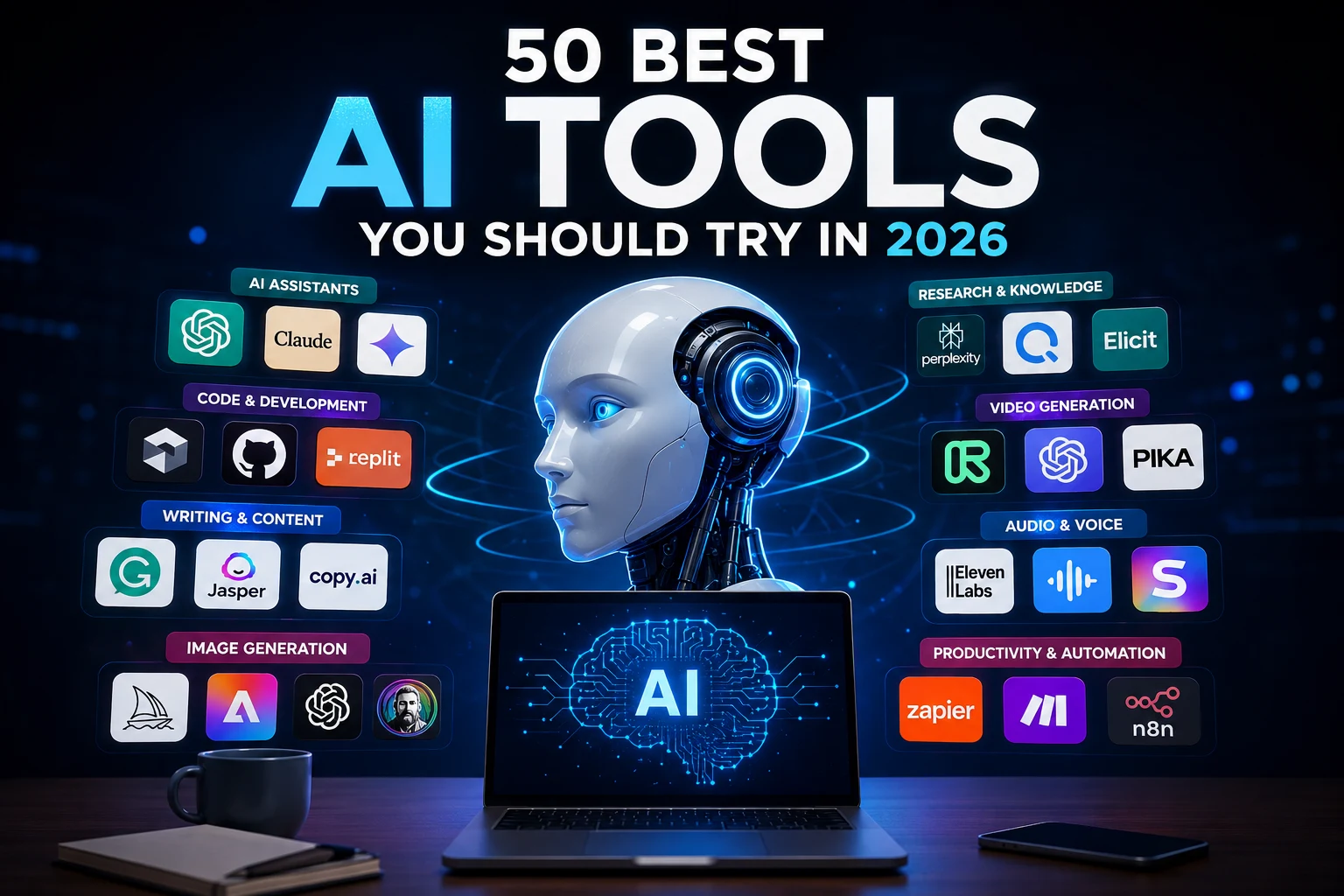

50 Best AI Tools You Should Try in 2026
Artificial intelligence has become part of everyday work, learning, business, content creation, programming, and productivity. In 2026, there are thousands of AI tools available, but choosing the right ones can be difficult.
Some AI tools are designed for writing and research, while others can generate images, create videos, write code, automate repetitive tasks, or help teams manage their daily work.
To make things easier, we have compiled 50 of the best AI tools to try in 2026, organized by what they are best at.
Whether you are a student, developer, creator, marketer, entrepreneur, or simply curious about artificial intelligence, this list can help you find the right AI tools for your needs.
Quick Answer: What Are the Best AI Tools in 2026?
The best AI tool depends on what you want to accomplish. For general-purpose AI, ChatGPT, Claude, and Google Gemini are among the most useful options. For research, Perplexity is a popular choice. Developers can use Cursor, GitHub Copilot, and Windsurf, while creators can explore Midjourney, Adobe Firefly, Runway, Kling AI, and ElevenLabs.
There is no single AI tool that is perfect for every task. The best approach is to choose a small combination of tools that match your workflow.
1. ChatGPT — Best Overall AI Assistant
ChatGPT is one of the most versatile AI assistants available. It can help users write content, answer questions, summarize documents, brainstorm ideas, analyze information, generate code, and work with different types of media.
It is useful for students, professionals, developers, marketers, writers, and everyday users.
Best for: General-purpose AI, writing, brainstorming, learning, research, coding, and productivity.
2. Claude — Best for Writing and Long Documents
Claude is an AI assistant developed by Anthropic. It is particularly useful for long-form writing, document analysis, reasoning, coding, and working with large amounts of information.
It is a strong option for people who regularly work with reports, articles, business documents, research material, and code.
Best for: Writing, analysis, long documents, reasoning, and coding.
3. Google Gemini — Best for Google Users
Google Gemini is Google's AI assistant and is deeply connected with the Google ecosystem. It can help with writing, research, brainstorming, coding, image understanding, and other AI-powered tasks.
For people who already use Google services extensively, Gemini can be particularly convenient.
Best for: Google users, research, productivity, multimodal tasks, and everyday AI assistance.
4. Perplexity — Best AI Search and Research Tool
Perplexity combines conversational AI with web search and source-based answers. Instead of simply generating a response, it is designed around finding information and presenting supporting sources.
This makes it useful when researching products, technologies, companies, current topics, and other subjects that require up-to-date information.
Best for: AI search, research, fact-finding, and source discovery.
5. Microsoft Copilot — Best for Microsoft Users
Microsoft Copilot brings AI assistance into Microsoft's ecosystem. It can help users generate text, summarize information, brainstorm ideas, and work more efficiently with Microsoft products.
It can be particularly useful for people who already depend heavily on Microsoft 365 and Windows.
Best for: Microsoft 365 users, business productivity, writing, and everyday assistance.
6. Grok — AI Assistant for Real-Time Conversations
Grok is an AI assistant designed for conversational questions, reasoning, research, and information discovery.
It is another option for users who want an alternative general-purpose AI assistant.
Best for: Conversational AI, research, brainstorming, and current topics.
7. DeepSeek — AI for Reasoning and Coding
DeepSeek has become well known for AI reasoning and coding capabilities. It is useful for developers, students, researchers, and users interested in alternative AI models.
Best for: Reasoning, coding, technical questions, and AI experimentation.
8. Mistral Le Chat — AI Assistant from Mistral
Le Chat is Mistral's conversational AI assistant. It can be used for questions, writing, analysis, coding, and general productivity.
Best for: General AI assistance and users interested in alternative AI models.
9. Poe — Access Multiple AI Models
Poe provides access to different AI models and bots through a single platform. This can be useful when you want to experiment with different AI assistants without constantly switching between services.
Best for: Comparing AI models and experimenting with different assistants.
10. Meta AI — AI Assistant from Meta
Meta AI is Meta's AI assistant and is available across parts of the company's ecosystem.
It can help with everyday questions, brainstorming, writing, and creative tasks.
Best for: Everyday AI assistance and users already using Meta's platforms.
Best AI Coding Tools in 2026
11. Cursor — Best AI Code Editor
Cursor is an AI-powered code editor designed to help developers understand, modify, and generate code.
It can work across larger codebases and allows developers to communicate with their projects using natural language.
Best for: Software development, code generation, debugging, and large codebases.
12. GitHub Copilot — Best AI Coding Assistant
GitHub Copilot helps developers write code using AI-powered suggestions and conversational assistance.
It can speed up repetitive coding tasks and help developers explore implementation ideas.
Best for: Developers, code completion, programming, and IDE assistance.
13. Windsurf — AI-Powered Development Environment
Windsurf is an AI development environment focused on helping developers write and modify software with AI assistance.
It can be useful when working on projects that require understanding multiple files and code relationships.
Best for: AI-assisted software development.
14. Replit — Build Apps with AI
Replit combines online development tools with AI assistance, making it possible to create and experiment with applications directly from a browser.
It is particularly approachable for beginners who want to build projects without setting up a complex local development environment.
Best for: Beginners, prototypes, web development, and AI-assisted coding.
15. v0 — Generate User Interfaces with AI
v0 helps developers and designers generate user interface concepts and code from natural-language descriptions.
It can significantly speed up the early stages of building modern web interfaces.
Best for: UI generation, frontend development, and prototypes.
16. Bolt.new — Build Web Apps with AI
Bolt.new allows users to describe applications in natural language and use AI to help generate working web projects.
It is useful for quickly experimenting with ideas and building prototypes.
Best for: Web apps, prototypes, and rapid development.
17. Lovable — AI App Builder
Lovable helps users turn natural-language ideas into web applications.
It is designed to make software creation more accessible to people who may not have extensive programming experience.
Best for: Prototypes, SaaS ideas, websites, and web applications.
Best AI Writing Tools in 2026
18. Grammarly — Best AI Writing Assistant
Grammarly helps users improve grammar, spelling, clarity, tone, and overall writing quality.
It is useful for emails, articles, business documents, academic writing, and everyday communication.
Best for: Grammar, editing, rewriting, and professional communication.
19. Jasper — AI for Marketing Content
Jasper focuses heavily on marketing and business content. It can help teams create drafts, campaigns, marketing copy, and content ideas.
Best for: Marketing teams, copywriting, and content marketing.
20. Copy.ai — AI for Sales and Marketing
Copy.ai provides AI-powered tools for creating marketing and business content and automating parts of sales and marketing workflows.
Best for: Marketing, sales content, and business workflows.
21. Writesonic — AI Content Platform
Writesonic provides AI-powered writing and content tools designed for marketers, businesses, and publishers.
It can help generate articles, marketing copy, and other forms of digital content.
Best for: Content marketing and SEO-focused content creation.
22. QuillBot — Paraphrasing and Writing
QuillBot is widely used for paraphrasing, rewriting, summarizing, and improving written content.
Best for: Rewriting, paraphrasing, summaries, and editing.
23. Notion AI — AI Inside Your Workspace
Notion AI brings AI features into the Notion workspace. It can help summarize notes, generate content, organize information, and answer questions about workspace content.
Best for: Notes, knowledge management, project documentation, and productivity.
Best AI Research and Knowledge Tools
24. NotebookLM — Best for Working with Your Sources
NotebookLM is designed around working with user-provided sources. It can help users understand documents, summarize information, ask questions, and explore ideas based on their material.
Best for: Students, researchers, documents, study, and knowledge management.
25. Consensus — AI Research Assistant
Consensus focuses on finding and understanding scientific research.
It can help users explore academic papers and research findings without manually searching through every paper themselves.
Best for: Academic research and scientific literature.
26. Elicit — Research Assistant
Elicit uses AI to help researchers discover and analyze academic literature.
It can be useful when starting a literature review or exploring a research question.
Best for: Academic research and literature reviews.
27. Scite — Research and Citation Analysis
Scite helps users discover scientific literature and understand how research papers are cited.
Best for: Academic research, citations, and evidence discovery.
28. Genspark — AI Search and Research
Genspark is an AI-powered research and information platform designed to help users investigate topics and complete tasks using AI.
Best for: Research, information discovery, and AI-assisted tasks.
Best AI Image Generators in 2026
29. Midjourney — Best AI Image Generator
Midjourney is one of the best-known AI image-generation platforms. It is popular for creating highly stylized images, illustrations, concepts, and creative artwork.
Best for: AI art, creative images, concepts, and visual inspiration.
30. Adobe Firefly — Best for Creative Professionals
Adobe Firefly provides generative AI features for images and creative workflows.
It is particularly interesting for designers and creators already working inside Adobe's ecosystem.
Best for: Design, image generation, creative workflows, and editing.
31. Ideogram — Best for Text in Images
Ideogram is an AI image generator known for its focus on creating images that contain text and graphic design elements.
Best for: Posters, logos, typography concepts, and graphic designs.
32. Leonardo AI — AI Creative Studio
Leonardo AI provides tools for generating and editing visual content.
It can be useful for creators who need concept art, illustrations, game assets, and marketing visuals.
Best for: Creative assets, illustrations, game concepts, and image generation.
33. FLUX — Advanced Image Generation
FLUX refers to a family of image-generation models and tools used for creating AI-generated images.
It is popular among creators and developers experimenting with high-quality generative imagery.
Best for: AI image generation and creative experimentation.
34. Recraft — AI Design Tool
Recraft focuses on AI-assisted visual design and image generation.
It can be useful for creating graphics, illustrations, icons, and brand-related visual assets.
Best for: Graphic design, illustrations, icons, and branding.
35. Canva AI — AI Design for Everyone
Canva AI brings generative AI features into Canva's popular design platform.
It is especially useful for people who want to create social media graphics, presentations, marketing materials, and visual content without advanced design skills.
Best for: Social media, presentations, marketing graphics, and beginners.
Best AI Video Generators in 2026
36. Runway — AI Video Creation
Runway is an AI-powered creative platform focused on video generation and editing.
It is widely used for experimenting with AI-generated video, visual effects, and creative production.
Best for: AI video generation, filmmaking, and creative production.
37. Kling AI — AI Video Generation
Kling AI is an AI video generation platform that can create videos from prompts and images.
It is useful for creators exploring cinematic AI-generated video.
Best for: AI video generation and visual storytelling.
38. Pika — Creative AI Video
Pika makes it easier to experiment with AI-generated and transformed video content.
It is aimed at creators who want to turn ideas and images into short visual clips.
Best for: Short videos, creative effects, and social content.
39. HeyGen — AI Avatars and Videos
HeyGen focuses on AI-generated videos featuring virtual presenters and avatars.
Businesses can use it for training, marketing, product explanations, and other communication needs.
Best for: AI avatars, marketing videos, training, and presentations.
40. Synthesia — AI Business Video Creation
Synthesia allows businesses to create videos using AI avatars and synthetic presenters.
It is particularly useful for corporate training and educational content.
Best for: Training, business communication, and educational videos.
41. Google Veo — AI Video Generation
Google Veo is Google's generative video technology designed to create video content from prompts.
It represents the growing role of generative AI in professional and creative video production.
Best for: Generative video and creative experimentation.
42. CapCut — AI Video Editing
CapCut combines traditional video editing with AI-powered features.
It is particularly popular among social media creators who need to edit short-form videos quickly.
Best for: TikTok, YouTube Shorts, Instagram Reels, and social media video.
Best AI Audio and Voice Tools
43. ElevenLabs — Best AI Voice Generator
ElevenLabs is an AI voice platform that can generate natural-sounding speech and provide tools for voice-based content.
It is useful for videos, podcasts, narration, accessibility, and other audio projects.
Best for: AI voices, narration, podcasts, and voiceovers.
44. Suno — AI Music Generation
Suno allows users to create music using AI and natural-language prompts.
It can be useful for experimenting with songs, background music, and creative audio ideas.
Best for: AI music and creative audio.
45. Descript — AI Audio and Video Editing
Descript combines transcription with audio and video editing tools.
Its text-based editing workflow can make it easier to edit podcasts, interviews, and videos.
Best for: Podcasts, transcription, video editing, and content creation.
Best AI Productivity and Automation Tools
46. Zapier — AI Automation
Zapier connects different applications and automates repetitive workflows. Its AI features make it possible to build more intelligent automations.
For businesses, automation can reduce repetitive manual work and connect tools together.
Best for: Workflow automation, business processes, and integrations.
47. Make — Visual Automation Platform
Make is a visual automation platform that allows users to connect applications and build complex workflows.
It is useful for businesses and individuals who want more control over their automations.
Best for: Workflow automation and advanced integrations.
48. n8n — Flexible AI Automation
n8n is a workflow automation platform that can connect applications, APIs, databases, and AI services.
It is particularly attractive to technical users who want greater flexibility and control over their automation infrastructure.
Best for: Developers, AI automation, APIs, and advanced workflows.
49. Motion — AI Productivity Assistant
Motion uses AI to help organize tasks, calendars, projects, and schedules.
It can be useful for people who manage many tasks and want automated planning assistance.
Best for: Scheduling, task management, planning, and personal productivity.
50. Fireflies.ai — AI Meeting Assistant
Fireflies.ai helps record, transcribe, summarize, and organize meeting conversations.
It can save teams time by turning meetings into searchable notes and summaries.
Best for: Meetings, transcription, summaries, and team productivity.
How to Choose the Right AI Tool
With so many AI tools available, it is easy to subscribe to too many services. Instead, start with your main goal.
If You Need an AI Assistant
Start with ChatGPT, Claude, Gemini, or Perplexity. Choose the one that fits your preferred workflow rather than trying to use every platform.
If You Are a Developer
Consider Cursor, GitHub Copilot, Windsurf, Replit, or v0. These tools can help with code generation, debugging, prototypes, and development workflows.
If You Create Content
Consider ChatGPT, Claude, Grammarly, Jasper, Canva, Midjourney, Runway, and ElevenLabs.
If You Create Images
Try Midjourney, Adobe Firefly, Ideogram, Leonardo AI, FLUX, Recraft, or Canva AI.
If You Create Videos
Explore Runway, Kling AI, Pika, HeyGen, Synthesia, Veo, and CapCut.
If You Want Automation
Look at Zapier, Make, and n8n. These tools can connect your applications and automate repetitive processes.
Are AI Tools Free?
Many AI tools offer free plans or limited free usage, while advanced features are usually available through paid subscriptions. Free access can be enough for casual users, but professionals may benefit from paid plans when they need higher limits, advanced models, additional features, or team functionality.
Before paying for an AI subscription, try the free version first and determine whether the tool actually improves your workflow.
Should You Use Multiple AI Tools?
Yes, but you do not need dozens of subscriptions.
A practical AI workflow might include one general AI assistant, one research tool, one coding or writing specialist, and one creative tool.
For example, a content creator might use ChatGPT for brainstorming, Perplexity for research, Canva or Midjourney for images, and CapCut for video editing.
Final Thoughts
The AI landscape is changing extremely quickly. New models, applications, and features appear every month, while existing tools continue to improve.
The 50 best AI tools in 2026 are not necessarily the same tools that will dominate next year. The most important thing is to choose tools that solve real problems and save you time.
If you are just starting, do not try all 50 tools at once. Pick one tool for your main task, learn how to use it effectively, and then add specialized tools when you actually need them.
Start with one AI tool, build a useful workflow, and expand from there.