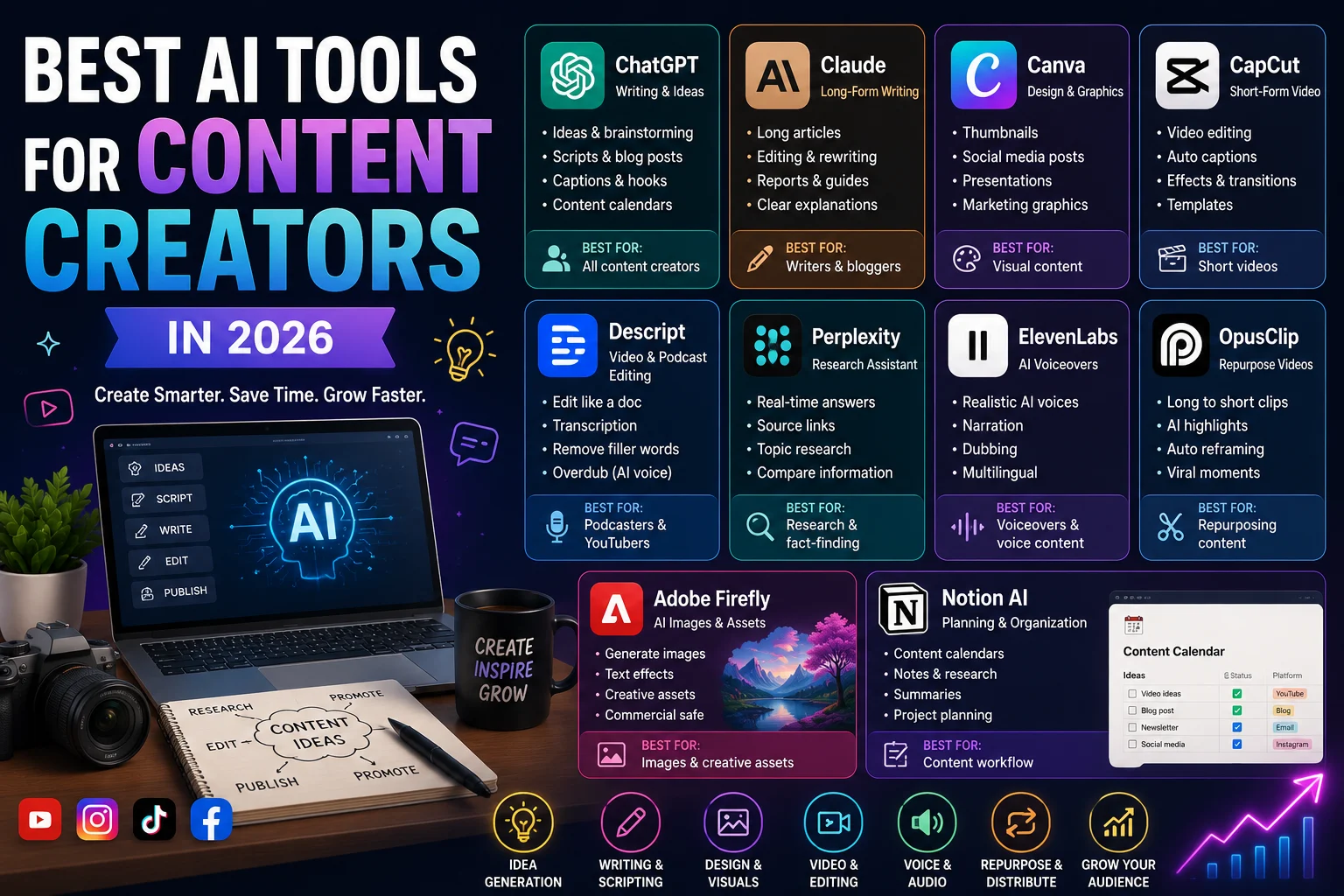

Creating content today involves much more than simply writing a blog post or recording a video. Content creators often need to research topics, write scripts, create images, edit videos, generate captions, design thumbnails, record voiceovers, and repurpose content for multiple platforms.
AI tools can make many of these tasks faster. Instead of replacing the creator, the best AI tools act as assistants that help with repetitive work and give creators more time to focus on ideas, creativity, and their audience.
In this guide, we'll look at some of the best AI tools for content creators in 2026, organized by what they are best at.
Best AI Tools for Content Creators at a Glance
| Tool | Best For | Content Type | Free Option |
|---|---|---|---|
| ChatGPT | Ideas, scripts, captions, writing | Text & social | Yes |
| Claude | Long-form writing and editing | Text | Yes |
| Canva | Thumbnails and graphics | Images & design | Yes |
| CapCut | Short-form video editing | Video | Yes |
| Descript | Video and podcast editing | Video & audio | Yes |
| Perplexity | Research | Research | Yes |
| ElevenLabs | AI voiceovers | Audio | Limited |
| OpusClip | Turning long videos into shorts | Video | Limited |
| Adobe Firefly | AI images and creative assets | Images | Limited |
| Notion AI | Planning and organization | Content workflow | Limited |
1. ChatGPT — Best Overall AI Tool for Content Creators
ChatGPT is one of the most versatile AI assistants for content creators. It can help with brainstorming, writing, scripts, hooks, captions, outlines, content calendars, research planning, and many other tasks.
For example, a YouTube creator can use ChatGPT to generate video ideas, create an outline, develop a script, write a description, and create several title variations.
What ChatGPT Is Best For
- Brainstorming content ideas
- YouTube scripts
- Blog posts
- Social media captions
- Video hooks
- Content calendars
- Email newsletters
- Content repurposing
Pros
- Very versatile
- Easy to use
- Useful across almost every content format
- Good for brainstorming and drafting
Cons
- Generic prompts can produce generic content
- Important factual information should be verified
Best for: Almost every type of content creator.
2. Claude — Best for Long-Form Writing
Claude is another powerful AI assistant that can be useful for creators who work with long-form content.
It can help writers develop articles, scripts, newsletters, reports, and other detailed content while maintaining a consistent tone and structure.
What Claude Is Best For
- Long-form articles
- Video scripts
- Editing
- Rewriting
- Brainstorming
- Content analysis
Best for: Bloggers, writers, newsletter creators, and creators who regularly produce long-form content.
3. Canva — Best for Thumbnails and Social Graphics
Visual content is essential for creators, especially on platforms such as YouTube, Instagram, TikTok, Pinterest, and LinkedIn.
Canva combines a simple design editor with AI-powered features that can help creators create graphics, presentations, social posts, thumbnails, and other visual assets.
What Canva Is Best For
- YouTube thumbnails
- Instagram posts
- Social media graphics
- Presentations
- Blog graphics
- Marketing visuals
- Simple video content
Best for: Creators who want professional-looking graphics without needing advanced design skills.
4. CapCut — Best for Short-Form Video
CapCut is particularly useful for creators who produce TikTok videos, Instagram Reels, YouTube Shorts, and other short-form videos.
Its creator-focused workflow can speed up editing tasks such as captions, cuts, effects, transitions, and formatting for vertical video.
What CapCut Is Best For
- TikTok videos
- YouTube Shorts
- Instagram Reels
- Automatic captions
- Quick video editing
- Social-media video templates
Best for: TikTokers, Instagram creators, and YouTubers who produce short-form content.
5. Descript — Best for Video and Podcast Editing
Descript takes a different approach to video editing. Instead of relying entirely on a traditional timeline, creators can work with a transcript and edit spoken content more like a document.
This can be especially useful for podcasts, interviews, tutorials, webinars, and talking-head videos.
What Descript Is Best For
- Podcast editing
- YouTube videos
- Interviews
- Transcription
- Removing filler words
- Repurposing spoken content
Best for: Podcasters and creators who regularly work with long-form spoken video.
6. Perplexity — Best for AI-Assisted Research
Research is an important part of creating high-quality content. Perplexity can help creators explore topics and find information while providing source links with its answers.
This can make it useful during the research stage of creating articles, videos, newsletters, and educational content.
What Perplexity Is Best For
- Topic research
- Finding sources
- Researching current topics
- Comparing information
- Building research notes
However, creators should still review important sources themselves rather than blindly accepting AI-generated information.
Best for: Bloggers, journalists, YouTubers, educators, and research-heavy creators.
7. ElevenLabs — Best for AI Voiceovers
Voice can add another dimension to content. ElevenLabs provides AI voice capabilities that can be useful for narration, voiceovers, dubbing, and other audio projects.
What ElevenLabs Is Best For
- Video narration
- Voiceovers
- Educational videos
- Faceless YouTube channels
- Audio content
- Multilingual content
Best for: Video creators, educators, and creators producing narrated or faceless content.
8. OpusClip — Best for Repurposing Long Videos
One of the biggest challenges for creators is turning one piece of long-form content into multiple pieces of short-form content.
Tools such as OpusClip can help identify potentially useful moments in longer videos and transform them into short clips suitable for social platforms.
What OpusClip Is Best For
- YouTube videos
- Podcasts
- Interviews
- Webinars
- Short-form clips
- Content repurposing
Best for: Creators who want to get more content from existing long-form videos.
9. Adobe Firefly — Best for AI Creative Assets
Adobe Firefly can help creators generate and edit visual assets using AI. It can be especially useful for creators who already work with Adobe's creative ecosystem.
Creators can use AI-generated visuals for concepts, social graphics, creative projects, and other content workflows.
What Adobe Firefly Is Best For
- AI-generated images
- Creative concepts
- Social graphics
- Image editing
- Marketing visuals
Best for: Designers, marketers, photographers, and creators already using Adobe tools.
10. Notion AI — Best for Content Planning
Creating content consistently requires organization. Notion can be used to manage content calendars, ideas, research notes, scripts, projects, and publishing workflows.
Its AI features can assist with summarizing information, creating drafts, organizing notes, and working with content inside a workspace.
What Notion AI Is Best For
- Content calendars
- Idea management
- Research notes
- Content briefs
- Project organization
- Editorial workflows
Best for: Creators who need a central place to organize their content operation.
Best AI Tools for Different Types of Creators
| Creator Type | Recommended Tools | Best Use |
|---|---|---|
| YouTubers | ChatGPT, Descript, Canva, OpusClip | Scripts, editing, thumbnails, shorts |
| TikTok Creators | ChatGPT, CapCut, Canva | Ideas, short videos, graphics |
| Bloggers | ChatGPT, Claude, Perplexity, Canva | Research, writing, images |
| Podcasters | Descript, ChatGPT, ElevenLabs | Editing, scripts, audio |
| Instagram Creators | Canva, ChatGPT, CapCut | Graphics, captions, Reels |
| Faceless Creators | ChatGPT, ElevenLabs, CapCut, Canva | Scripts, voiceovers, video |
| Newsletter Creators | ChatGPT, Claude, Notion AI | Research, writing, organization |
Best Free AI Tools for Content Creators
If you're just starting, you don't need to subscribe to ten different AI services.
A small collection of free or free-tier tools can cover most of the basic content creation workflow.
A Simple Free Creator Stack
- ChatGPT: Ideas, scripts, captions, and writing.
- Canva: Thumbnails and graphics.
- CapCut: Short-form video editing.
- Perplexity: Research and source discovery.
- Notion: Content planning and organization.
This combination can be enough for a beginner to start creating content without paying for a large collection of subscriptions.
How to Build an AI Content Creation Workflow
Instead of using AI randomly, creators can build a simple workflow around the different stages of content production.
Step 1: Find an Idea
Use ChatGPT or another AI assistant to brainstorm topics based on your niche and audience.
Step 2: Research the Topic
Use research tools to identify important facts, questions, trends, and sources.
Step 3: Create an Outline
Ask an AI assistant to organize the idea into a logical structure before writing or recording.
Step 4: Create the Content
Write the article or script, record the video, or produce the initial creative assets.
Step 5: Edit
Use tools such as Descript or CapCut to improve the video, captions, pacing, and presentation.
Step 6: Create Visuals
Use Canva or an image-generation tool to create thumbnails, social graphics, illustrations, or supporting visuals.
Step 7: Repurpose
Turn one long piece of content into multiple posts, short videos, quotes, graphics, or newsletter sections.
Step 8: Review Before Publishing
Always review AI-generated content for accuracy, originality, tone, and quality before publishing it.
How Much Can AI Actually Help Content Creators?
AI can reduce the time spent on many repetitive tasks, but it doesn't automatically make content successful.
A creator still needs to understand their audience, choose useful topics, develop a recognizable voice, and make decisions about what is worth publishing.
The best approach is to use AI for tasks that slow you down while keeping human judgment at the center of the creative process.
Common Mistakes When Using AI for Content Creation
Publishing AI Content Without Editing
Raw AI-generated content can sound generic. Always review and personalize the final result.
Using the Same AI Output as Everyone Else
If thousands of creators use similar prompts, their content can start to sound similar. Add your own experiences, examples, opinions, and creative direction.
Ignoring Accuracy
AI can make mistakes. Verify important facts, statistics, quotes, and current information before publishing.
Focusing on Quantity Instead of Quality
AI makes it easier to produce more content, but publishing more does not automatically mean building a better audience.
Replacing Your Creative Voice
Your perspective is one of your biggest advantages as a creator. AI should enhance your voice rather than erase it.
Which AI Tool Should You Start With?
If you're completely new to AI content creation, start with one general-purpose AI assistant and one tool for your main content format.
For example:
- Blogger: ChatGPT + Canva
- YouTuber: ChatGPT + CapCut or Descript
- TikTok creator: ChatGPT + CapCut
- Podcaster: ChatGPT + Descript
- Instagram creator: ChatGPT + Canva + CapCut
Once you understand your workflow, you can add specialized tools when they solve a real problem.
Final Thoughts
The best AI tools for content creators are not necessarily the tools with the largest number of features. The right tool is the one that removes friction from a specific part of your workflow.
ChatGPT and Claude can help with ideas and writing, Perplexity can support research, Canva can simplify design, CapCut and Descript can speed up video production, ElevenLabs can help with voiceovers, and tools such as OpusClip can make content repurposing easier.
Instead of trying to use every AI tool available, choose a small stack that fits your content type and workflow. Use AI to save time, but keep your own creativity, judgment, and voice at the center of everything you publish.
Frequently Asked Questions
What is the best AI tool for content creators?
There is no single best tool for every creator. ChatGPT is a strong general-purpose option for ideas, writing, scripts, and captions, while specialized tools such as Canva, CapCut, Descript, and ElevenLabs are better suited to specific parts of the production process.
What is the best free AI tool for content creators?
ChatGPT, Canva, CapCut, and other tools offer free options or free tiers that can cover many basic content creation tasks. The best choice depends on the type of content you create.
Can AI create content for YouTube?
Yes. AI can help with YouTube ideas, research, scripts, titles, descriptions, thumbnails, editing, captions, and short-form clips. Human review and creative direction are still important.
Can AI replace content creators?
AI can automate parts of content production, but successful creators still provide ideas, personal experiences, creativity, judgment, and an understanding of their audience.
What AI tools are best for TikTok creators?
ChatGPT can help with ideas, hooks, scripts, and captions, while CapCut is useful for short-form video editing and Canva can help with graphics and visual assets.
How many AI tools should a content creator use?
You don't need dozens of tools. Start with a small set that solves your biggest workflow problems and add more only when they provide a clear benefit.