
ChatGPT can answer questions, write content, explain difficult topics, analyze information, generate ideas, and help with many everyday tasks. However, the quality of the response often depends on the quality of the prompt you provide.
A vague prompt can produce a generic answer, while a clear and detailed prompt can give you a response that is much closer to what you actually need.
The good news is that you don't need to be an AI expert to write better prompts. By giving ChatGPT the right context, instructions, constraints, and desired format, you can dramatically improve your results.
What Is a ChatGPT Prompt?
A prompt is the instruction or question you give to ChatGPT. It tells the AI what you want it to do.
For example, this is a simple prompt:
Write an article about artificial intelligence.
It works, but it doesn't tell ChatGPT who the audience is, how long the article should be, what tone to use, or what topics to cover.
A more detailed prompt could be:
Write a 1,500-word beginner-friendly article about artificial intelligence. Explain the basic concepts in simple English, use clear H2 and H3 headings, include practical examples, and finish with a short FAQ section.
The second prompt gives ChatGPT much more information about the desired result.
Why Good Prompts Matter
ChatGPT is designed to respond to the instructions and context you provide. The clearer your instructions are, the easier it is for the model to understand your goal.
Better prompts can help you:
- Get more relevant answers
- Reduce unnecessary information
- Control the tone and writing style
- Generate content for a specific audience
- Get answers in a specific format
- Improve consistency between responses
- Save time by reducing revisions
The Basic Formula for a Better ChatGPT Prompt
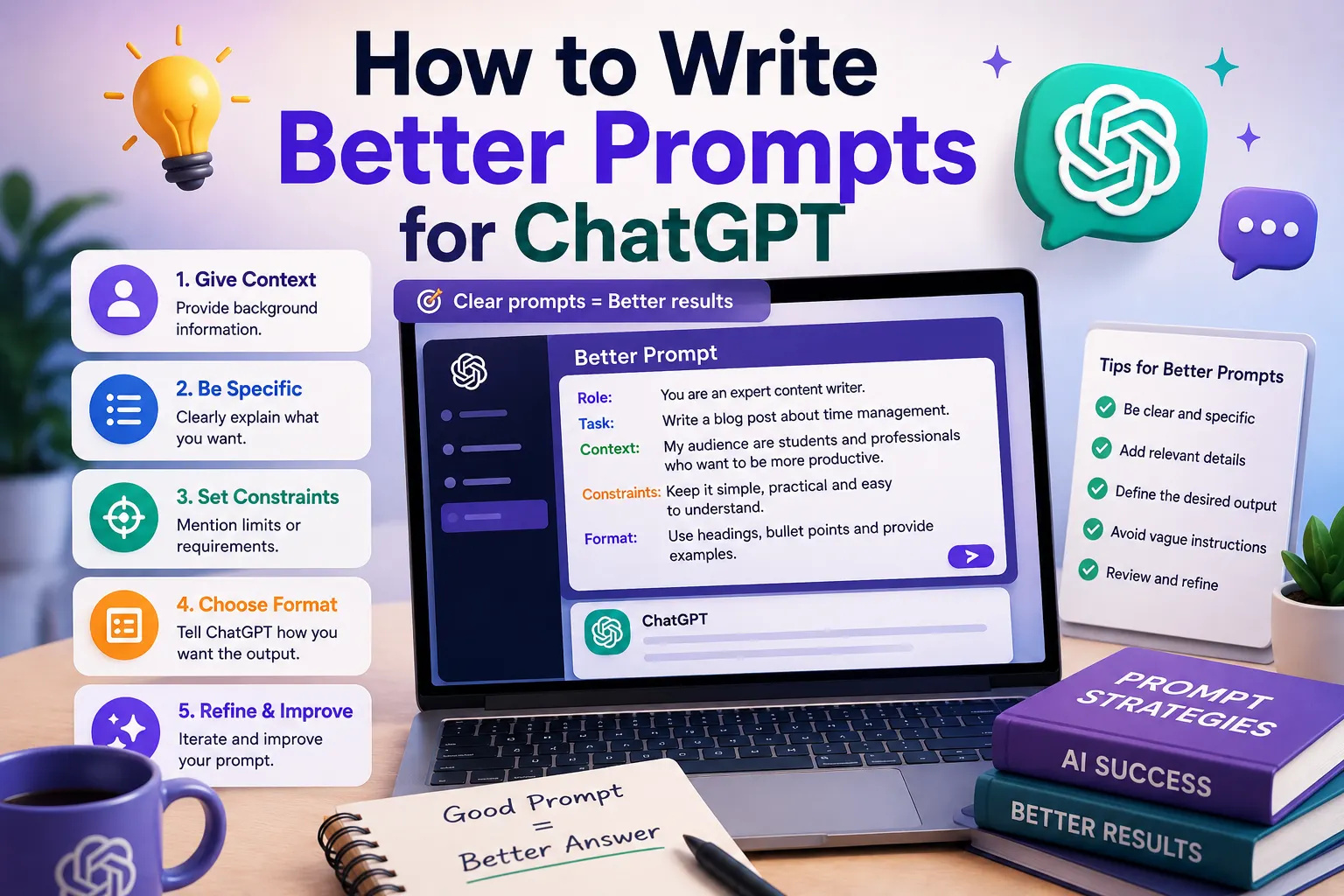
A useful prompt can often be built using five main elements:
- Role — Tell ChatGPT what perspective or expertise to use.
- Task — Clearly explain what you want it to do.
- Context — Provide relevant background information.
- Constraints — Explain limitations, requirements, or things to avoid.
- Format — Tell it how you want the answer structured.
A simple formula is:
Role + Task + Context + Constraints + Output Format
1. Give ChatGPT a Clear Role
When useful, tell ChatGPT what role it should take while completing the task.
For example:
Act as an experienced SEO content writer.
Or:
Act as a patient English teacher helping an intermediate student.
This can provide useful context about the type of response you want.
2. Clearly Explain the Task
Don't make ChatGPT guess what you want.
Instead of:
Marketing ideas.
Try:
Give me 10 marketing ideas for a small online store that sells handmade products.
The second prompt clearly defines the task and gives ChatGPT a specific objective.
3. Provide Context
Context is one of the most useful elements of a good prompt.
Suppose you want ChatGPT to write an email. Instead of simply saying:
Write an email to my customer.
Give it the relevant details:
Write a professional but friendly email to a customer whose order will be delayed by three days. Apologize for the delay, explain that the shipment is being processed, and reassure the customer that we are monitoring the delivery.
The additional context helps ChatGPT create a more appropriate response.
4. Specify Your Audience
Tell ChatGPT who will read or use the final result.
For example:
Explain machine learning to a complete beginner who has no programming experience.
This is much more useful than simply asking:
Explain machine learning.
The audience affects vocabulary, complexity, examples, and overall tone.
5. Specify the Tone
You can tell ChatGPT how you want the response to sound.
Common instructions include:
- Professional
- Friendly
- Conversational
- Simple
- Persuasive
- Educational
- Concise
- Formal
- Encouraging
For example:
Explain this concept in a friendly and conversational tone using simple English.
6. Tell ChatGPT the Desired Format
One of the easiest ways to improve a response is to specify its format.
You can ask for:
- A table
- A numbered list
- Bullet points
- Step-by-step instructions
- An email
- An article
- Frequently asked questions
- A summary
- A comparison
For example:
Compare ChatGPT and Google Gemini in a table with columns for pricing, writing, coding, research, and ease of use.
7. Set Length Requirements
If the length matters, tell ChatGPT what you need.
For example:
Summarize this article in 150 words.
Or:
Write a 700-word beginner-friendly blog post about AI image generators.
You can also ask for concise answers when you don't need a long explanation.
8. Give Examples
Examples can make your instructions much clearer.
For instance, if you want ChatGPT to rewrite product descriptions in a particular style, provide one example of the style you want.
Rewrite the following descriptions using this style: short sentences, clear benefits, friendly language, and no exaggerated claims. Here's an example: [example].
This approach is often called providing examples or few-shot prompting.
9. Tell ChatGPT What to Avoid
Good prompts don't only explain what you want. They can also explain what you don't want.
For example:
Write a professional introduction using simple language. Avoid clichés, unnecessary jargon, exaggerated claims, and overly long sentences.
Specific restrictions can make the final response more consistent with your requirements.
10. Ask for Step-by-Step Help
For complicated tasks, break the request into clear steps.
For example:
Create a content strategy for my AI blog. First identify five target audiences, then suggest content categories, then provide 10 article ideas for each category, and finally recommend which five articles I should publish first.
This gives the AI a clear workflow to follow.
Before and After: Improving a ChatGPT Prompt
Weak Prompt
Write about AI.
Better Prompt
Write a beginner-friendly 1,000-word article explaining artificial intelligence. Define AI in simple terms, explain how it works at a high level, provide three everyday examples, discuss common applications, and finish with five frequently asked questions. Use clear H2 headings and a conversational tone.
The second prompt provides much more direction, so ChatGPT has a clearer understanding of the desired result.
Useful ChatGPT Prompt Templates
For Learning
Explain [topic] as if I am a complete beginner. Start with a simple definition, then explain the key concepts using practical examples. Finish with five questions to test my understanding.
For Writing
Act as an experienced writer. Write a [type of content] about [topic] for [audience]. Use a [tone] tone, keep the language clear, and structure the response with [format].
For Research
Help me research [topic]. Organize the information into the main concepts, important questions, arguments, and areas that require further verification. Clearly distinguish established information from uncertain claims.
For Coding
Act as an experienced software developer. Review the following code, identify potential problems, explain why they occur, and provide a corrected version. Keep the existing functionality unless a change is necessary.
For Summarizing
Summarize the following text in five key points. Use simple language and preserve the most important facts. Then provide a one-paragraph summary.
Common ChatGPT Prompt Mistakes
Being Too Vague
A prompt like "Make this better" doesn't tell ChatGPT what better means.
Instead, explain whether you want better grammar, clearer language, stronger persuasion, improved SEO, or a different tone.
Giving Too Many Conflicting Instructions
Try to keep your requirements consistent. If you ask for a detailed 2,000-word explanation and a 100-word answer at the same time, ChatGPT cannot satisfy both requirements perfectly.
Leaving Out Important Context
If the response depends on information about your business, audience, project, or objective, provide that information in the prompt.
Not Specifying the Output
If you need a table, list, email, article, or specific structure, say so. Otherwise, ChatGPT will choose a format based on its interpretation of your request.
Expecting Perfect Results on the First Try
Even a good prompt may require refinement. Treat your first response as a starting point and improve the instructions based on what you receive.
Use Follow-Up Prompts
You don't always need to create one perfect prompt from the beginning.
You can start with a reasonable request and then refine the result.
For example:
Make the explanation simpler.
Give me three practical examples.
Turn this into a table.
Make the tone more professional.
Iterative prompting can be an efficient way to work with ChatGPT.
How to Write Better Prompts for Different Tasks
| Task | Include in Your Prompt |
|---|---|
| Writing | Audience, tone, topic, length, structure |
| Research | Question, context, scope, sources or verification requirements |
| Studying | Subject, level, learning goal, explanation style |
| Coding | Language, environment, goal, existing code, error |
| Marketing | Audience, product, goal, platform, tone |
| Summarization | Source text, desired length, important points |
Final Tips for Better ChatGPT Prompts
- Start with a clear objective.
- Provide enough context.
- Specify your target audience.
- Tell ChatGPT what format you want.
- Define the tone and level of detail.
- Include important constraints.
- Provide examples when appropriate.
- Break complex tasks into steps.
- Ask follow-up questions to refine the result.
- Review important information instead of assuming every AI response is correct.
Conclusion
Writing better prompts is one of the easiest ways to get more value from ChatGPT. You don't need complicated technical language or advanced prompt engineering techniques. In most cases, simply being clear about your goal, context, audience, requirements, and desired output can make a significant difference.
Instead of asking ChatGPT to simply "write something", explain exactly what you want, who it is for, how it should sound, and what the final result should look like.
With practice, you'll develop reusable prompt templates for writing, studying, research, coding, marketing, and many other tasks.
Frequently Asked Questions
What makes a good ChatGPT prompt?
A good prompt clearly explains the task and provides relevant context, requirements, constraints, and the desired output format.
How long should a ChatGPT prompt be?
There is no single ideal length. Your prompt should contain enough information for ChatGPT to understand the task without adding irrelevant details.
Should I tell ChatGPT its role?
Giving ChatGPT a role can be useful when a particular perspective, expertise, or style is important to the task.
Can I improve a ChatGPT response with another prompt?
Yes. Follow-up instructions can help you refine the response, change its tone, add details, simplify explanations, or change the format.
Do better prompts always produce better answers?
Clear prompts generally make it easier for ChatGPT to understand your goal, but AI responses can still contain mistakes. Important information should be reviewed and verified.