
Software failures can be some of the most difficult problems for engineering teams to solve. A production application can fail because of a small code change, an unexpected interaction between services, a database problem, a configuration error, or a bug that is difficult to reproduce.
Traditionally, engineers investigate these incidents by reviewing logs, examining recent changes, reproducing the problem, testing possible fixes, and monitoring the system after changes are deployed.
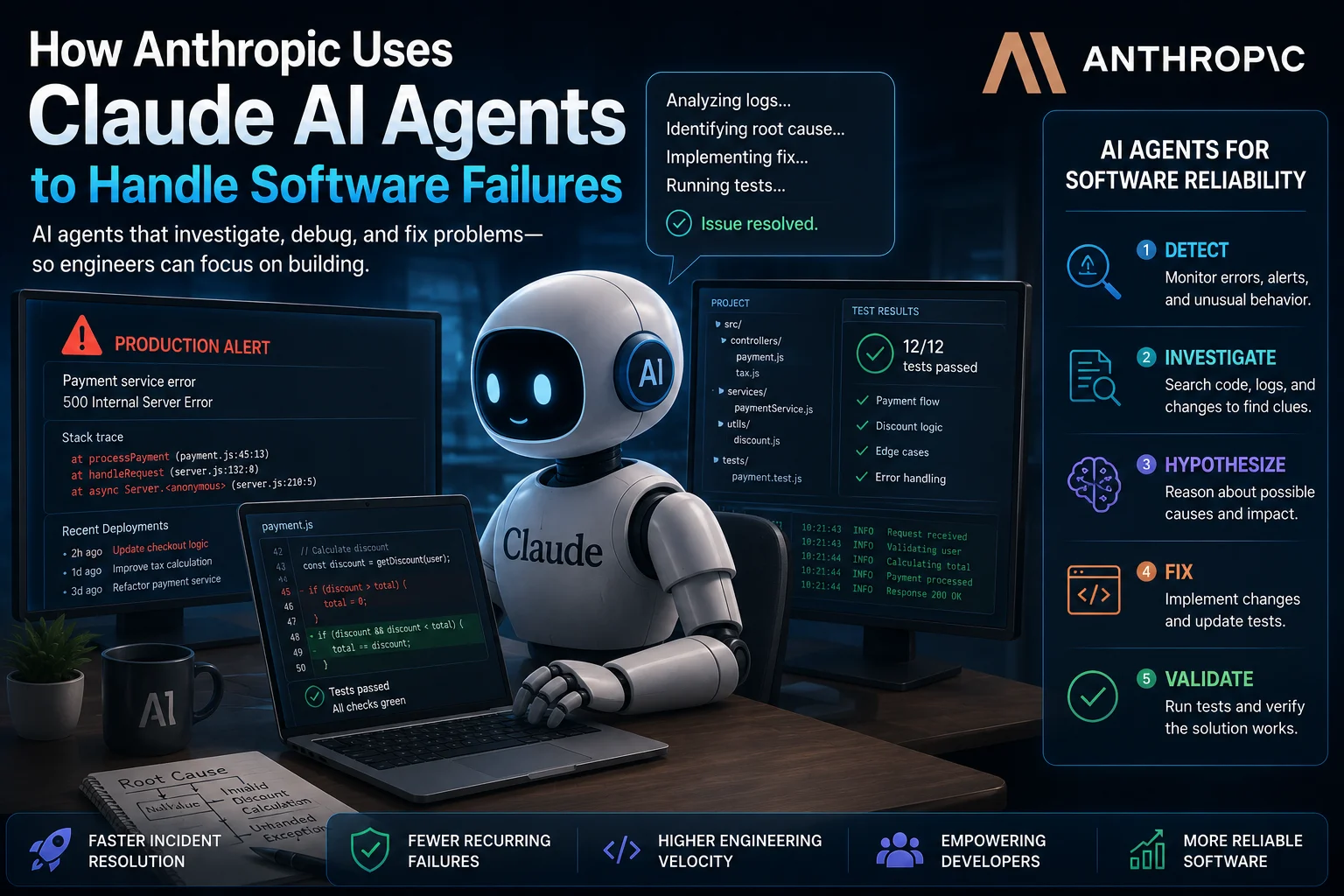
Anthropic is exploring how Claude AI agents can help with parts of this process. Instead of using AI only to generate individual lines of code, agent-based systems can investigate problems, inspect files, reason about possible causes, make changes, run tests, and iterate on solutions.
This represents an important shift in how AI can be used for software engineering. The goal is not simply to generate code faster, but to give AI systems more responsibility for understanding and solving complex engineering problems.
How Anthropic Uses Claude AI Agents for Software Problems
Claude can be used as an AI coding assistant, but agent-based workflows give the model access to a broader development environment.
Instead of asking:
Fix this function.
an engineering workflow can give an AI agent a larger objective:
Investigate why this service is failing, identify the likely cause, reproduce the problem, implement a safe fix, run the relevant tests, and explain the changes.
The difference is significant. The AI is no longer limited to producing an answer in a chat window. It can participate in a sequence of engineering actions.
What Is an AI Coding Agent?
An AI coding agent is an AI system that can perform multiple steps toward a software-development goal.
A traditional coding assistant might suggest a function or autocomplete a line of code. An AI agent can potentially inspect a repository, search through files, execute commands, run tests, modify code, and evaluate the results.
A typical agent workflow may look like this:
- Receive a software engineering task.
- Inspect the project and relevant files.
- Search for possible causes.
- Analyze logs or error messages.
- Develop a hypothesis.
- Modify the relevant code.
- Run tests or other validation commands.
- Analyze failures.
- Make additional changes if necessary.
- Report the final result to the developer.
This iterative process is one of the main differences between an AI agent and a simple code-generation tool.
Why Software Failures Are a Good Test for AI Agents
Software failures are often difficult because the problem is not necessarily located where the error appears.
For example, an application might report a database timeout even though the underlying problem is a configuration change introduced several files earlier.
An engineer may need to investigate:
- Application logs
- Recent code changes
- Configuration files
- Dependencies
- Database queries
- API requests
- Authentication systems
- Infrastructure settings
- Automated test results
An AI agent can potentially examine many of these sources much faster than a human working through each file manually.
Claude Can Investigate Instead of Simply Answering
One of the most important ideas behind agentic coding is that the AI can investigate a problem before proposing a solution.
For example, if a test fails, an agent can inspect the test, find the implementation it exercises, examine related functions, and search the repository for similar behavior.
It can then form a hypothesis about the failure and test that hypothesis.
This is closer to the way experienced software engineers debug complex applications.
From Error Message to Root Cause
Consider a hypothetical production error:
Error: Request failed with status code 500
    at processRequest
    at handleUserRequest
    at async Server.handle
The error message alone does not necessarily explain the problem.
An AI agent could investigate the surrounding code and determine whether the failure is related to:
- Invalid input
- A missing environment variable
- A failed database query
- An external API failure
- A race condition
- An incorrect assumption about returned data
- A recent code change
The important capability is not simply generating a possible fix. It is connecting evidence from different parts of the software system.
AI Agents Can Work Across Multiple Files
Many real software bugs cannot be fixed by changing a single function.
A feature may involve frontend components, backend services, database queries, configuration files, tests, and API clients.
An agent can potentially trace the relationships between these components and make coordinated changes.
For example, a developer might ask:
The checkout API is returning incorrect totals. Investigate the problem across the frontend and backend, identify the root cause, fix it, and add tests for the affected behavior.
A capable coding agent can break the request into smaller tasks and work through them sequentially.
Claude Agents and Automated Testing
Testing is particularly important when AI agents modify software.
An agent can make a change and then run the project's test suite to determine whether the change actually works.
If tests fail, the agent can inspect the failure and attempt another solution.
This creates a feedback loop:
- Analyze the problem.
- Change the code.
- Run tests.
- Inspect the results.
- Improve the implementation.
- Run tests again.
The feedback loop can make agent-based development more useful than simply asking an AI model to write code once.
AI Agents Can Help With Regressions
A regression occurs when a change causes functionality that previously worked to fail.
Finding regressions can require comparing current behavior with previous versions of a project.
An AI coding agent can examine version-control history, inspect recent changes, and compare affected files.
For example:
Identify which recent change could have introduced this regression. Compare the relevant commits, explain the likely cause, and propose the smallest safe fix.
This type of task demonstrates why access to the broader development environment is important for AI agents.
Claude Code and Agentic Software Development
Claude Code is designed around the idea of using Claude directly in a software development environment.
Instead of copying individual code snippets into a chatbot, developers can use an agent-oriented workflow where Claude can interact with a project and help perform development tasks.
This can include activities such as:
- Understanding repositories
- Searching project files
- Editing source code
- Running development commands
- Running tests
- Investigating errors
- Refactoring code
- Working with Git workflows
The result is a development workflow in which the developer gives the AI a goal and the agent performs multiple steps toward completing it.
Why Agentic Debugging Matters
Traditional AI coding assistants are often most useful when the developer already knows what needs to be changed.
Agentic systems are more interesting when the developer knows the desired outcome but does not yet know exactly where the problem is.
For example:
Users are reporting that the dashboard becomes extremely slow after several minutes. Find the cause and propose a fix.
The agent may need to inspect multiple components, understand application behavior, run diagnostic commands, and reason about possible memory or performance problems.
This is much closer to real-world debugging than autocomplete.
AI Agents Can Also Help With Code Maintenance
Software engineering does not consist only of building new features. Maintaining existing applications can consume a significant amount of developer time.
AI agents can help with tasks such as:
- Updating dependencies
- Fixing failing tests
- Removing duplicated code
- Modernizing older code
- Improving error handling
- Adding missing tests
- Updating documentation
- Finding unused code
- Investigating technical debt
These tasks may appear small individually but can become expensive when they accumulate across a large codebase.
AI Agents and Incident Response
Software failures in production require fast investigation because downtime can affect customers and revenue.
In the future, AI agents could assist engineering teams by analyzing incident information and helping identify likely causes.
An incident-response workflow might involve:
- Detecting an unusual error rate.
- Collecting relevant logs.
- Identifying recent deployments.
- Comparing current behavior with previous behavior.
- Finding suspicious code or configuration changes.
- Suggesting possible causes.
- Testing proposed fixes in a controlled environment.
- Preparing a report for engineers.
However, production systems require strong safeguards. An AI agent should not automatically make dangerous changes to critical infrastructure without appropriate authorization and human oversight.
Human Engineers Still Matter
The growth of AI coding agents does not mean software engineers are no longer necessary.
Complex failures often involve business requirements, architecture decisions, security implications, and operational risks that cannot be determined from source code alone.
Human engineers are still responsible for deciding:
- Whether a proposed fix is safe
- Whether the diagnosis is correct
- Whether production changes should be approved
- Whether security risks have been addressed
- Whether the solution matches business requirements
- Whether the system should be redesigned instead of patched
AI agents should therefore be viewed as engineering tools rather than autonomous replacements for experienced developers.
The Risks of AI Agents Fixing Software
Giving an AI agent the ability to modify software also introduces new risks.
Incorrect Fixes
An AI agent can misunderstand the root cause and make a change that appears to solve the immediate problem while introducing another bug.
Security Problems
An AI-generated fix could accidentally introduce vulnerabilities such as improper input validation, insecure authentication, or unsafe handling of sensitive information.
Unexpected Changes
An agent working across a large project may modify files that were not part of the developer's original expectations.
Over-Automation
Giving an AI unrestricted access to production systems can create serious operational risks.
For this reason, agentic development should use appropriate permissions, testing environments, review processes, and monitoring.
How Developers Can Safely Use AI Coding Agents
Developers can reduce risk by giving AI agents clearly defined permissions and requiring validation before important changes are accepted.
A practical workflow is:
- Define the task: Clearly describe the problem and desired outcome.
- Limit access: Give the agent only the permissions it needs.
- Use a development environment: Avoid unnecessary direct access to production systems.
- Review changes: Inspect the code generated or modified by the agent.
- Run tests: Verify that existing functionality still works.
- Check security: Look for vulnerabilities and unsafe assumptions.
- Monitor deployment: Watch the system after changes are released.
What This Means for Software Developers
The rise of AI agents is changing what software developers can delegate to machines.
Developers may spend less time writing repetitive code and more time defining problems, reviewing solutions, designing systems, and making architectural decisions.
Instead of asking an AI assistant:
Write this function.
developers may increasingly ask:
Investigate this problem and propose a tested solution.
That is a much broader role for AI.
AI Agents Could Change Software Engineering Workflows
The most important development may not be that AI can generate code. Modern models can already do that.
The larger change is that AI systems can increasingly participate in complete development workflows.
A future engineering workflow could involve AI agents handling routine investigations while human engineers focus on architecture, product decisions, security, and final approval.
This could make software teams more productive without removing the need for human expertise.
AI Agents vs Traditional Coding Assistants
| Capability | Traditional AI Assistant | AI Coding Agent |
|---|---|---|
| Code completion | Yes | Yes |
| Code explanation | Yes | Yes |
| Search project files | Limited | Yes |
| Edit multiple files | Limited | Yes |
| Run commands | Usually limited | Can be supported |
| Run tests | Limited | Yes |
| Investigate failures | Partially | Strong use case |
| Iterate on solutions | Limited | Yes |
What Is the Future of AI Software Agents?
AI agents are moving software development from simple code generation toward goal-oriented engineering.
Instead of generating isolated snippets, future systems may increasingly understand projects, execute development tasks, test their own changes, investigate failures, and collaborate with human engineers.
This could eventually make AI agents useful across the entire software lifecycle, from planning and development to testing, deployment, monitoring, and maintenance.
The challenge will be making these systems reliable enough to operate safely while giving developers enough control over what they can access and change.
Final Verdict
Anthropic's work with Claude and agentic software development illustrates an important direction for AI: moving from code generation toward autonomous problem solving.
AI agents can potentially investigate software failures, inspect codebases, analyze errors, modify multiple files, run tests, and iterate toward a solution.
For developers, this means AI may become useful not only for writing new code but also for maintaining existing applications and investigating difficult engineering problems.
However, autonomous software development comes with significant risks. AI-generated changes can contain bugs, introduce security vulnerabilities, or misunderstand the underlying problem.
The most practical approach is therefore to use AI agents as highly capable engineering assistants while keeping humans responsible for important technical and production decisions.
As AI models become better at reasoning, using tools, and working across entire codebases, software engineering could increasingly become a collaboration between human developers and AI agents.
Frequently Asked Questions
What are Claude AI agents?
Claude AI agents are agent-based workflows powered by Claude that can perform multiple steps toward a development or software-engineering goal. Depending on the environment and permissions provided, an agent can inspect files, modify code, run commands, and analyze results.
Can Claude fix software bugs?
Claude can help investigate and fix many types of software bugs. It can analyze error messages, inspect relevant code, suggest changes, and in agent-based environments perform changes and run tests. Developers should always review and validate the result.
Can AI agents debug production software?
AI agents can potentially assist with production incident investigation, but direct access to production systems should be carefully controlled. A safer approach is to provide agents with relevant logs and diagnostic information while requiring human approval for production changes.
What is the difference between Claude and Claude Code?
Claude is Anthropic's general AI assistant, while Claude Code is designed specifically around software-development workflows. Claude Code can work with a codebase and perform development tasks through an agent-oriented workflow.
Can AI agents replace software developers?
AI agents can automate parts of software development, but they do not eliminate the need for experienced developers. Humans still need to define requirements, evaluate architecture, review code, assess security risks, and make important engineering decisions.
Are AI coding agents safe?
AI coding agents can be useful, but their safety depends heavily on how they are configured and used. Developers should limit permissions, use isolated development environments, review changes, run tests, and avoid giving agents unnecessary access to sensitive systems.
Why are AI agents important for software engineering?
AI agents can move beyond individual code suggestions and perform multi-step engineering tasks. This includes investigating bugs, modifying multiple files, running tests, analyzing failures, and iterating on solutions.
Will AI agents change how developers work?
Yes. AI agents may reduce the amount of repetitive coding and debugging work developers perform manually. Developers may increasingly focus on defining problems, reviewing AI-generated solutions, architecture, security, and higher-level engineering decisions.