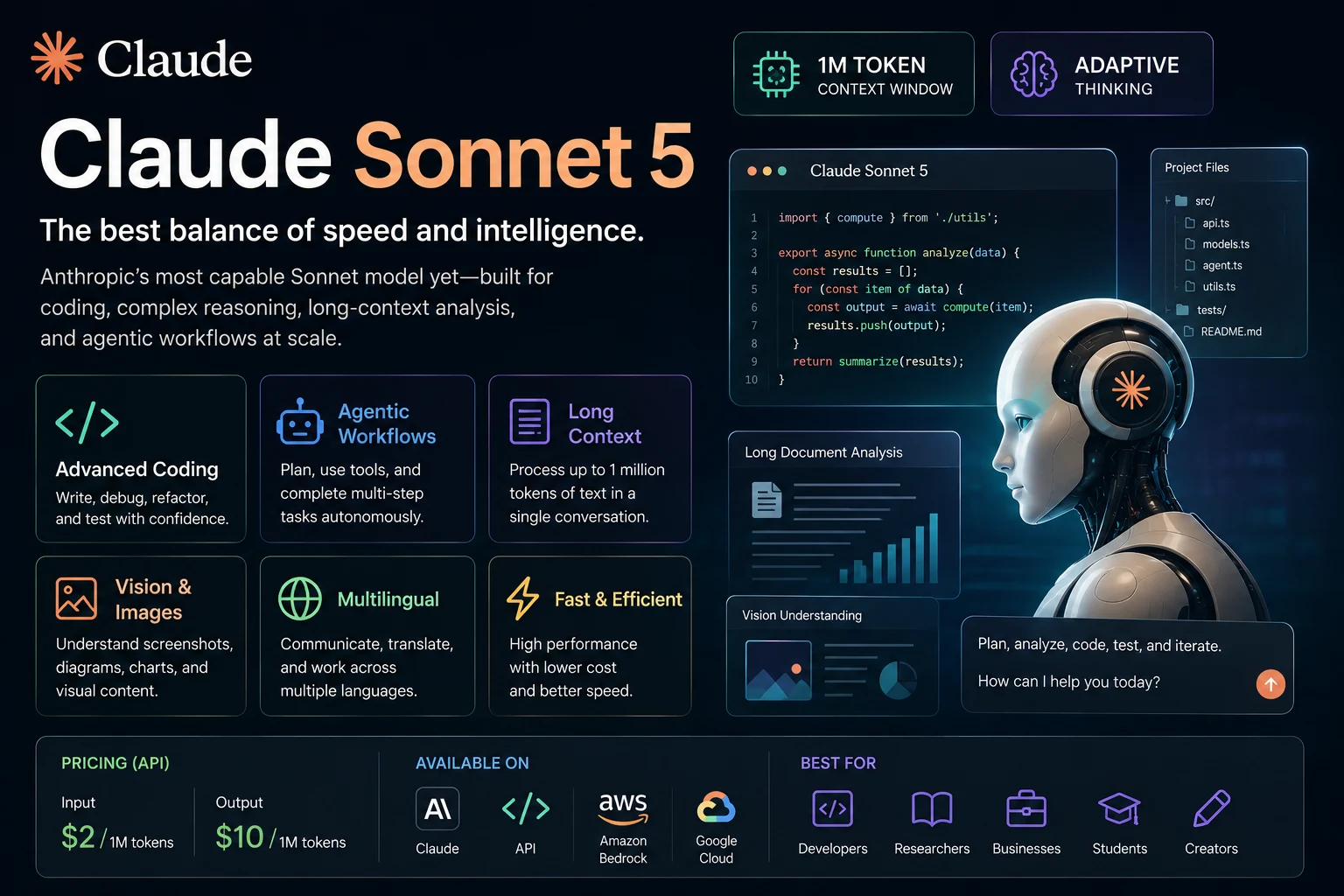

Claude Sonnet 5 is Anthropic's latest Sonnet model, designed to provide a strong balance between intelligence, speed, and cost. It is aimed at developers, businesses, researchers, and everyday users who need advanced AI capabilities without moving directly to the more expensive Opus class.
Claude Sonnet 5 brings improvements in coding, agentic tasks, reasoning, long-context processing, and computer-based workflows. It also introduces a 1 million token context window and adaptive thinking, allowing the model to adjust its reasoning effort depending on the task.
With pricing of $2 per million input tokens and $10 per million output tokens, Claude Sonnet 5 is positioned as a relatively cost-efficient option for applications that require advanced AI capabilities at scale.
In this guide, we'll explore Claude Sonnet 5's features, pricing, capabilities, availability, how to use it, and what makes it different from previous Claude Sonnet models.
What Is Claude Sonnet 5?
Claude Sonnet 5 is a large language model developed by Anthropic and part of the Claude family of AI models.
Anthropic describes Sonnet 5 as the best combination of speed and intelligence within its current model lineup. It is designed for workloads that require advanced reasoning and coding capabilities while maintaining lower costs than the Opus class.
The model is available through Claude and developer platforms, including the Claude API and supported cloud platforms.
For developers, the API model identifier is claude-sonnet-5.
Claude Sonnet 5 Features
Claude Sonnet 5 includes several improvements that make it useful for both everyday AI tasks and more advanced development workflows.
- 1 million token context window
- 128K maximum output tokens
- Adaptive thinking
- Improved coding capabilities
- Stronger agentic workflows
- Long-document analysis
- Text and image input
- Multilingual capabilities
- Vision capabilities
- Improved cost efficiency
- Tool use and API support
1. 1 Million Token Context Window
One of Claude Sonnet 5's most important features is its 1 million token context window.
A large context window allows the model to process much larger amounts of information in a single interaction. This can be particularly useful when working with large codebases, lengthy documents, research materials, business information, and complex projects.
The 1 million token context window is the default and maximum context size for Claude Sonnet 5.
However, a larger context window does not mean that every large document will automatically produce perfect results. Important information should still be organized clearly and relevant context should be provided whenever possible.
What can you do with a large context window?
- Analyze large documents
- Review large codebases
- Compare multiple documents
- Analyze lengthy research material
- Process large datasets in supported workflows
- Maintain more context during long conversations
- Work with complex multi-file projects
2. Adaptive Thinking
Claude Sonnet 5 supports adaptive thinking, allowing the model to dynamically determine how much reasoning effort is appropriate for a task.
This is useful because not every question requires the same amount of reasoning. A simple request can be handled quickly, while a complicated coding or research problem can receive more reasoning effort.
For developers using the API, adaptive thinking is enabled by default. Anthropic recommends using adaptive thinking rather than the older manual extended-thinking configuration.
Why is adaptive thinking useful?
- Better handling of complex problems
- More efficient reasoning on simpler tasks
- Useful for coding and debugging
- Useful for multi-step tasks
- Better suited to agentic workflows
3. Advanced Coding
Coding is one of the areas where Claude Sonnet 5 has received significant capability improvements over previous Sonnet models.
It can help developers write new code, understand existing projects, debug errors, refactor applications, generate tests, and work through multi-step software engineering tasks.
Claude Sonnet 5 is particularly useful when a coding task requires understanding more than one file or following a larger development workflow.
What can Claude Sonnet 5 do for developers?
- Generate JavaScript and TypeScript
- Write Python applications
- Debug software
- Refactor code
- Generate tests
- Explain unfamiliar code
- Review pull requests
- Analyze large codebases
- Find potential bugs
- Help implement new features
For example, instead of simply asking:
Fix this code.
you can provide more context:
Analyze this authentication module. Identify the root cause of the login failure, explain the problem, implement the smallest safe fix, and generate tests that verify both successful and failed authentication.
4. Agentic Workflows
Claude Sonnet 5 is designed to perform multi-step tasks rather than only responding to individual prompts.
Agentic workflows allow an AI system to plan actions, use tools, inspect results, make changes, and continue working toward a goal.
This makes Sonnet 5 useful for software development agents, automation systems, research workflows, and other applications where completing a task requires multiple steps.
Examples of agentic tasks
- Investigating a software bug
- Implementing a feature across multiple files
- Running tests and fixing failures
- Analyzing a project structure
- Searching through a codebase
- Automating repetitive workflows
- Analyzing business information
- Completing multi-step research tasks
Anthropic says early users found Sonnet 5 more agentic than previous Sonnet models, including better follow-through on complex multi-step tasks.
5. Long-Document Analysis
The large context window makes Claude Sonnet 5 useful for analyzing long documents and collections of information.
You can use it to summarize reports, compare documents, extract information, identify contradictions, and turn large amounts of text into structured outputs.
Example prompt
Analyze this report and create a structured summary containing the main argument, key findings, important statistics, limitations, recommendations, and conclusion. Clearly distinguish information stated in the report from your own analysis.
6. Vision and Image Understanding
Claude Sonnet 5 supports image input in addition to text.
This allows users to provide images such as screenshots, diagrams, charts, interfaces, and other visual information for analysis.
For developers, this can be useful when debugging interfaces or analyzing screenshots.
Examples
- Analyze a website screenshot
- Explain a diagram
- Review a user interface
- Analyze charts
- Identify visual problems
- Explain information contained in an image
7. Multilingual Capabilities
Claude Sonnet 5 supports multilingual interactions, making it useful for users and applications that work across different languages.
You can use it to translate text, summarize multilingual documents, generate content in different languages, and communicate with users in their preferred language.
Claude Sonnet 5 Pricing
Claude Sonnet 5 is priced at $2 per million input tokens and $10 per million output tokens through Anthropic's API.
Anthropic originally announced these prices as introductory pricing, but on August 10, 2026, the company made the $2/$10 pricing permanent. The previously planned increase to $3/$15 did not take effect.
| Model | Input | Output |
|---|---|---|
| Claude Sonnet 5 | $2 per million tokens | $10 per million tokens |
| Claude Sonnet 4.6 | $3 per million tokens | $15 per million tokens |
| Claude Opus 5 | $5 per million tokens | $25 per million tokens |
| Claude Haiku 4.5 | $1 per million tokens | $5 per million tokens |
The actual cost of an application depends on how many tokens it processes. Developers can also use features such as prompt caching and batch processing to reduce costs for supported workloads.
Claude Sonnet 5 Context Window and Output Limit
| Specification | Claude Sonnet 5 |
|---|---|
| Context window | 1 million tokens |
| Maximum output | 128,000 tokens |
| Input type | Text and images |
| Thinking | Adaptive thinking |
| API model ID | claude-sonnet-5 |
How to Use Claude Sonnet 5
There are several ways to use Claude Sonnet 5 depending on whether you are an everyday user or a developer.
Using Claude as a Regular User
Claude Sonnet 5 is available across Claude plans and can be used for tasks such as writing, research, summarization, brainstorming, coding, and analysis.
Start by describing what you want Claude to accomplish. The more useful context you provide, the easier it is for the model to produce a relevant response.
For example:
Create a 30-day content plan for an AI technology website. Focus on ChatGPT, Claude, Gemini, AI coding tools, AI productivity tools, and AI agents. Organize the plan by topic, search intent, article title, and target audience.
Using Claude Sonnet 5 for Coding
When using Claude for programming, provide the relevant project context, technology stack, expected behavior, and constraints.
A useful coding prompt might be:
Review this PHP application and identify security, performance, and SEO problems. Do not rewrite the entire application. List the problems first, explain why each matters, and then provide the smallest safe code changes needed to fix them.
Using Claude Sonnet 5 for Research
Claude can help organize research questions, summarize documents, compare information, and synthesize findings.
Analyze these research materials and organize the findings into five themes. For each theme, identify supporting evidence, conflicting evidence, limitations, and unanswered questions.
Using Claude Sonnet 5 for Writing
Claude can also help with articles, reports, emails, outlines, documentation, and other forms of written content.
For better results, specify the target audience, tone, structure, length, and information that must be included.
Claude Sonnet 5 API
Developers can access Claude Sonnet 5 through the Anthropic API using the model identifier claude-sonnet-5.
The model is also available through supported cloud platforms, including Amazon Bedrock and Google Cloud.
Claude Sonnet 5 is designed as a drop-in replacement for Claude Sonnet 4.6 for many API workloads, but developers should review token budgets and thinking configuration when migrating.
Basic API configuration
model = "claude-sonnet-5"When migrating from Sonnet 4.6, Anthropic recommends reviewing token counts because Sonnet 5 uses a newer tokenizer that produces approximately 30% more tokens for the same text on average.
Claude Sonnet 5 vs Claude Sonnet 4.6
| Feature | Claude Sonnet 5 | Claude Sonnet 4.6 |
|---|---|---|
| Context window | 1M tokens | 1M tokens |
| Input price | $2 / MTok | $3 / MTok |
| Output price | $10 / MTok | $15 / MTok |
| Maximum output | 128K tokens | 128K tokens |
| Adaptive thinking | Yes | Yes |
| Coding | Improved | Strong |
| Agentic tasks | Improved | Strong |
Sonnet 5 is positioned as a capability upgrade over Sonnet 4.6 while also offering lower per-token pricing.
Claude Sonnet 5 vs Claude Opus 5
Claude Sonnet 5 and Claude Opus 5 are designed for different levels of workload.
Sonnet 5 focuses on balancing speed, intelligence, and cost, while Opus 5 is positioned for more demanding agentic coding and enterprise workloads.
| Feature | Claude Sonnet 5 | Claude Opus 5 |
|---|---|---|
| Primary focus | Speed and intelligence | Complex agentic work |
| Context window | 1M tokens | 1M tokens |
| Input price | $2 / MTok | $5 / MTok |
| Output price | $10 / MTok | $25 / MTok |
| Maximum output | 128K tokens | 128K tokens |
| Best for | General advanced workloads | Complex agentic coding and enterprise work |
For many applications, Sonnet 5 can provide a better balance between performance and cost. Opus 5 becomes more attractive when the task requires the highest level of capability within the Opus class.
What Can Claude Sonnet 5 Do?
1. Write Code
Claude Sonnet 5 can generate code from natural-language descriptions and help developers implement new features.
2. Debug Applications
You can provide an error message, stack trace, or relevant source code and ask Claude to identify the likely cause and propose a fix.
3. Refactor Code
Claude can help simplify complex functions, improve architecture, remove duplicated code, and modernize existing applications.
4. Generate Tests
Sonnet 5 can generate unit tests, integration tests, and other testing code based on the expected behavior of an application.
5. Analyze Documents
The large context window makes it useful for summarizing and analyzing lengthy documents and collections of information.
6. Research Topics
Claude can help break complex research questions into smaller tasks, organize findings, compare information, and create structured summaries.
7. Analyze Images
Users can provide supported images and ask Claude to explain, interpret, or extract information from visual content.
How to Write Better Claude Sonnet 5 Prompts
The quality of Claude's output depends heavily on the instructions and context you provide.
Instead of:
Write an article about AI.
try:
Write a 1,500-word beginner-friendly article about how artificial intelligence is changing software development. Use clear H2 and H3 headings, explain technical concepts in simple language, include practical examples, and avoid unsupported claims.
A strong Claude prompt should usually include:
- The objective
- Relevant context
- Target audience
- Required format
- Technical requirements
- Restrictions
- Expected output
- Examples when useful
Important Things to Know About Claude Sonnet 5
1. Token Counts May Be Higher
Claude Sonnet 5 uses a newer tokenizer. Anthropic says the same text produces approximately 30% more tokens than with Claude Sonnet 4.6 on average, although the exact difference depends on the content.
This means developers should not assume that a lower price per token automatically translates into the same percentage reduction in the cost of an equivalent request.
2. Adaptive Thinking Changes API Behavior
Sonnet 5 uses adaptive thinking by default. Developers migrating from older configurations should review their thinking settings and token budgets.
3. Review AI-Generated Code
Even advanced coding models can produce incorrect or insecure code.
Before deploying generated code, check:
- Authentication
- Authorization
- Input validation
- Dependency security
- Error handling
- Data privacy
- Performance
- Testing coverage
Who Should Use Claude Sonnet 5?
- Developers: For coding, debugging, testing, and software engineering.
- Researchers: For analyzing and organizing large amounts of information.
- Writers: For drafting, editing, summarization, and content creation.
- Businesses: For automation, analysis, and knowledge workflows.
- Students: For learning, explanations, research assistance, and study materials.
- AI developers: For building applications and agents using the Claude API.
Claude Sonnet 5: Pros and Cons
| Pros | Cons |
|---|---|
| 1M-token context window | Token counts can be higher with the new tokenizer |
| Strong coding capabilities | Advanced API features require technical knowledge |
| Improved agentic workflows | AI output still requires human verification |
| Adaptive thinking | Some API behavior differs from previous models |
| Lower per-token pricing than Sonnet 4.6 | Large-context requests can still become expensive at scale |
| 128K maximum output | Not every task requires such a large context window |
Final Verdict
Claude Sonnet 5 is a significant upgrade in Anthropic's Sonnet lineup, combining advanced reasoning, coding, long-context processing, adaptive thinking, and agentic capabilities with a relatively low API price.
Its 1 million token context window makes it particularly useful for large documents, codebases, and complex projects, while its improved coding and agentic capabilities make it attractive to developers building AI-powered software workflows.
At $2 per million input tokens and $10 per million output tokens, Sonnet 5 is also considerably cheaper per token than Claude Opus 5. Anthropic made this pricing permanent in August 2026 rather than increasing it to the previously planned $3/$15 rate.
For everyday advanced AI tasks, coding, research, document analysis, and applications that require a balance between performance and cost, Claude Sonnet 5 is one of the most compelling models in Anthropic's current lineup.
If your workload requires the highest level of capability for complex agentic coding and enterprise tasks, Claude Opus 5 may be the better choice. For many other workloads, however, Sonnet 5 offers a strong combination of intelligence, speed, context, and cost.
Frequently Asked Questions
What is Claude Sonnet 5?
Claude Sonnet 5 is an AI model developed by Anthropic and designed to provide a balance between speed and intelligence. It supports advanced reasoning, coding, agentic workflows, image input, and a 1 million token context window.
How much does Claude Sonnet 5 cost?
Claude Sonnet 5 costs $2 per million input tokens and $10 per million output tokens through the Anthropic API. Anthropic made this pricing permanent in August 2026.
What is the context window of Claude Sonnet 5?
Claude Sonnet 5 has a 1 million token context window. The model also supports up to 128,000 output tokens.
Is Claude Sonnet 5 good for coding?
Yes. Coding and agentic tasks are among the areas where Anthropic reports significant improvements over Claude Sonnet 4.6. Sonnet 5 can help with code generation, debugging, refactoring, testing, and multi-step software development.
Can Claude Sonnet 5 analyze large documents?
Yes. Its 1 million token context window makes it suitable for analyzing large documents, collections of documents, research material, and large codebases.
Does Claude Sonnet 5 support images?
Yes. Claude's current models support image input, allowing Sonnet 5 to analyze supported visual content such as screenshots, diagrams, and charts.
Is Claude Sonnet 5 better than Claude Sonnet 4.6?
Sonnet 5 is positioned as a capability upgrade over Sonnet 4.6, particularly for coding and agentic tasks. It also has lower per-token API pricing, although its newer tokenizer can produce more tokens for the same text.
Is Claude Sonnet 5 better than Claude Opus 5?
They target different workloads. Sonnet 5 emphasizes the balance between speed, intelligence, and cost, while Opus 5 is positioned for more complex agentic coding and enterprise work. Sonnet 5 is also cheaper at $2/$10 per million input/output tokens compared with $5/$25 for Opus 5.
What is the Claude Sonnet 5 API model name?
The Anthropic API model identifier is claude-sonnet-5.
Can I use Claude Sonnet 5 for AI agents?
Yes. Claude Sonnet 5 is designed to support agentic workflows and can be used for applications that require multi-step reasoning, tool use, coding, debugging, and task execution.
Should developers migrate from Claude Sonnet 4.6 to Sonnet 5?
Sonnet 5 is designed as a drop-in replacement for Sonnet 4.6 for many API workloads. Developers should nevertheless review token budgets, token counts, and thinking configuration because Sonnet 5 uses a new tokenizer and adaptive thinking behavior.