
ChatGPT can be incredibly useful for learning, writing, research, brainstorming, coding, and everyday tasks. But if you're new to AI, it's easy to make mistakes that reduce the quality of the answers you receive.
Some beginners expect ChatGPT to understand exactly what they mean without providing enough information. Others assume every answer is correct or share information that should remain private.
Understanding these common mistakes can help you use ChatGPT more effectively and get better results.
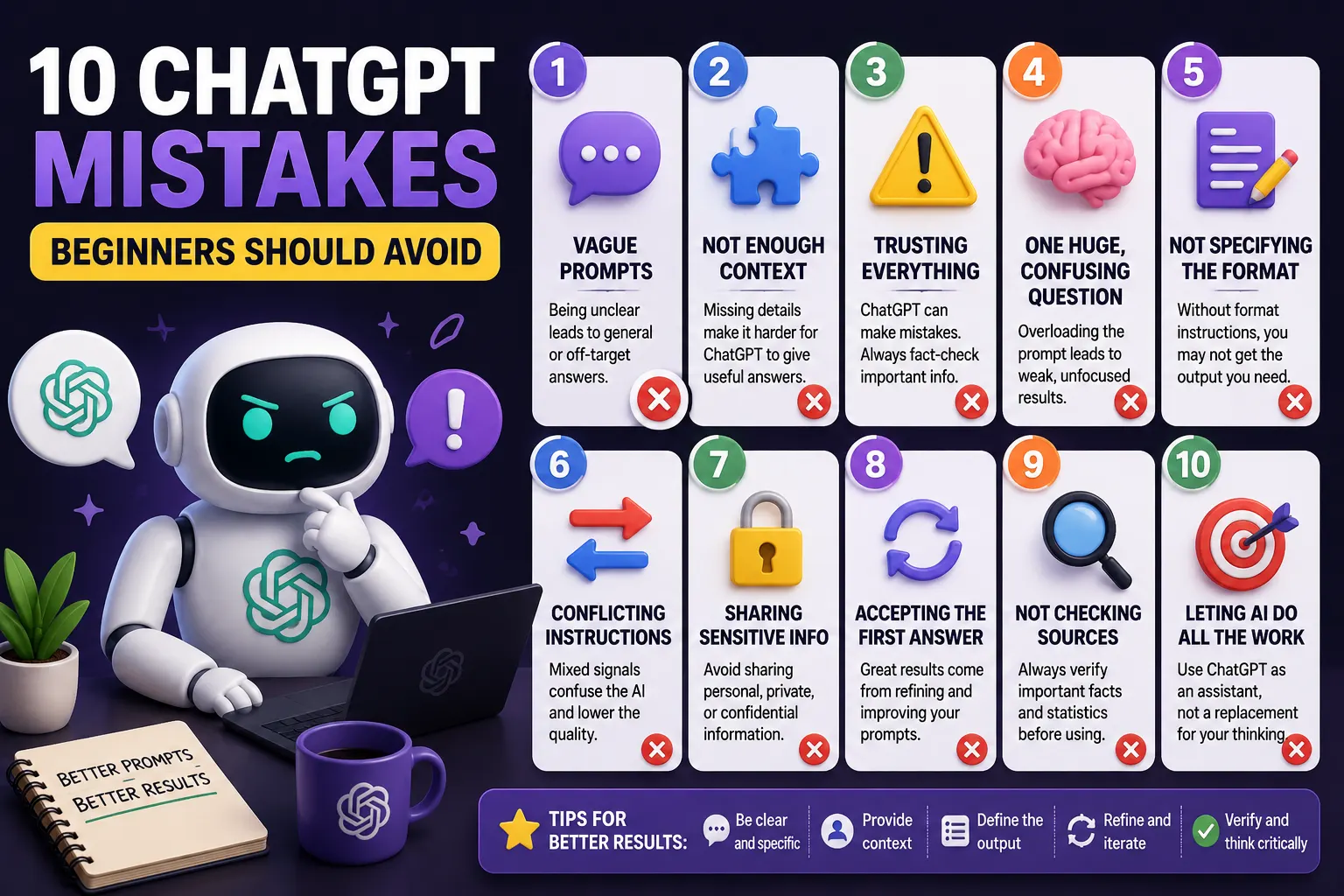
1. Using Vague Prompts
One of the most common mistakes beginners make is asking questions that are too vague.
For example:
Tell me about marketing.
This gives ChatGPT very little information about what you actually need.
A better prompt would be:
Explain five digital marketing strategies that a small online store can use to attract its first 1,000 customers. Keep the explanation beginner-friendly and include a practical example for each strategy.
The more clearly you explain your objective, the easier it is for ChatGPT to produce a useful response.
2. Not Providing Enough Context
ChatGPT doesn't automatically know everything about your situation.
If you're asking it to write an email, plan a project, explain a topic, or solve a problem, provide the relevant background information.
For example, instead of:
Write an email to my customer.
Try:
Write a friendly professional email to a customer whose order is delayed by three days. Apologize for the delay, explain that the shipment is being processed, and reassure the customer that we are monitoring the delivery.
Useful context gives ChatGPT a better understanding of the situation and your desired outcome.
3. Expecting ChatGPT to Always Be Correct
Another major mistake is assuming that everything ChatGPT says is automatically true.
AI systems can produce incorrect information, misunderstand questions, or provide outdated information. This is especially important when dealing with current events, technical details, financial decisions, legal matters, medical information, or other high-stakes topics.
For important information, verify the answer using reliable and up-to-date sources.
Think of ChatGPT as an assistant rather than an infallible authority.
4. Asking One Huge, Confusing Question
Beginners sometimes put many unrelated tasks into one enormous prompt.
For example, asking ChatGPT to research a topic, write an article, create a marketing campaign, analyze competitors, and produce social media posts all at once can make the task unnecessarily complicated.
A better approach is to divide complex projects into smaller steps.
- Research the topic.
- Organize the important information.
- Create an outline.
- Write the first draft.
- Review and improve the content.
- Create supporting content.
This makes the workflow easier to control and refine.
5. Not Specifying the Desired Format
If you don't tell ChatGPT what format you want, it will choose a format based on its interpretation of your request.
If you need a table, list, email, checklist, article, or step-by-step guide, simply say so.
For example:
Compare ChatGPT and Gemini in a table with columns for writing, coding, research, image generation, and ease of use.
This is much more precise than simply saying:
Compare ChatGPT and Gemini.
6. Giving Conflicting Instructions
Your instructions should be consistent.
For example, asking ChatGPT to write a detailed 2,000-word guide while also asking for a response of only 100 words creates conflicting requirements.
Before sending a complicated prompt, review your instructions and make sure they support the same goal.
If something is more important than another requirement, make that priority clear.
7. Sharing Sensitive Personal Information
Beginners may copy personal or confidential information into ChatGPT without considering whether they should share it.
Avoid unnecessarily entering sensitive information such as:
- Passwords
- Private authentication codes
- Credit card information
- Highly sensitive personal information
- Confidential business information
- Private information belonging to other people
When possible, remove identifying details and replace them with placeholders before sharing text for analysis or rewriting.
For example, instead of entering a real customer's personal information, use:
[CUSTOMER NAME]
and
[ORDER NUMBER]
8. Accepting the First Answer Without Refining It
You don't have to accept ChatGPT's first response as the final result.
One of the most useful ways to work with ChatGPT is to refine the answer through follow-up prompts.
You can say:
- Make this simpler.
- Give me more practical examples.
- Make the tone more professional.
- Shorten the answer.
- Explain this for a complete beginner.
- Turn this into a table.
- Find weaknesses in this explanation.
Think of the conversation as an iterative process rather than a single question-and-answer interaction.
9. Using ChatGPT Without Checking the Original Source
ChatGPT can summarize, explain, and transform information, but that doesn't mean you should stop checking original sources.
If you're working on research, academic projects, professional reports, or important decisions, use reliable primary or authoritative sources whenever possible.
For example, if ChatGPT gives you a statistic, regulation, technical specification, or recent development, verify it before relying on it.
This is particularly important when information may have changed recently.
10. Treating ChatGPT as a Replacement for Your Own Thinking
Perhaps the biggest mistake is using ChatGPT to do all of the thinking for you.
ChatGPT can help you brainstorm ideas, explain difficult concepts, organize information, and explore different approaches. But you should still evaluate the information and make your own decisions.
For students, this means using ChatGPT as a learning assistant rather than simply submitting AI-generated work without understanding it.
For professionals, it means reviewing AI-generated content before publishing, sending, or using it in important decisions.
How to Get Better Results From ChatGPT
Once you understand the common mistakes, improving your ChatGPT workflow becomes much easier.
Be Clear and Specific
Explain exactly what you want ChatGPT to accomplish.
Provide Relevant Context
Include the information ChatGPT needs to understand your situation.
Specify the Audience
Tell ChatGPT who will read or use the result.
Choose the Output Format
Ask for a table, list, article, email, summary, or another format when appropriate.
Refine the Response
Use follow-up prompts to improve the first result.
Verify Important Information
Check important facts against reliable sources, especially when accuracy and freshness matter.
Bad Prompt vs Better Prompt
| Common Mistake | Better Approach |
|---|---|
| "Write about AI." | Specify the topic, audience, length, tone, and structure. |
| Providing no context | Explain the situation and objective. |
| Trusting every answer | Verify important information. |
| One huge request | Break complex tasks into steps. |
| No output format | Request a table, list, article, or other format. |
| Conflicting instructions | Make requirements clear and consistent. |
| Sharing private information | Remove sensitive details and use placeholders. |
| Accepting the first response | Refine the answer with follow-up prompts. |
| Ignoring original sources | Check authoritative sources when necessary. |
| Letting AI do all the thinking | Use AI as an assistant and evaluate the result yourself. |
A Simple ChatGPT Prompt Formula for Beginners
If you're not sure how to write a good prompt, use this simple structure:
Task + Context + Audience + Requirements + Format
For example:
Write a beginner-friendly article about artificial intelligence for people who have never used AI. Explain the basic concepts using simple examples, avoid technical jargon, use H2 headings, and finish with five frequently asked questions.
This simple formula can improve many different ChatGPT tasks.
Final Thoughts
ChatGPT is powerful, but getting useful results depends partly on how you use it.
The most common beginner mistakes are easy to avoid: write clear prompts, provide context, specify what you want, protect sensitive information, verify important facts, and don't be afraid to refine the answer.
Most importantly, remember that ChatGPT should support your thinking rather than completely replace it. The best results usually come when you combine AI assistance with your own knowledge, judgment, and creativity.
Frequently Asked Questions
What is the biggest ChatGPT mistake beginners make?
One of the most common mistakes is using vague prompts without explaining the goal, context, audience, or desired output.
Can I trust everything ChatGPT says?
No. ChatGPT can make mistakes or provide outdated information. Important claims should be checked against reliable sources.
Should I share personal information with ChatGPT?
Avoid unnecessarily sharing sensitive or confidential information. Remove private details and use placeholders when possible.
How can I make ChatGPT give better answers?
Use clear and specific prompts, provide relevant context, explain your requirements, specify the desired format, and refine the response through follow-up instructions.
Should students use ChatGPT?
Students can use ChatGPT as a learning assistant for explanations, practice, brainstorming, and study support. They should still understand the material and follow their school's academic policies.
Does ChatGPT always understand what I mean?
No. If your prompt is ambiguous or lacks context, ChatGPT may interpret your request differently from what you intended. Clear instructions usually produce more useful results.