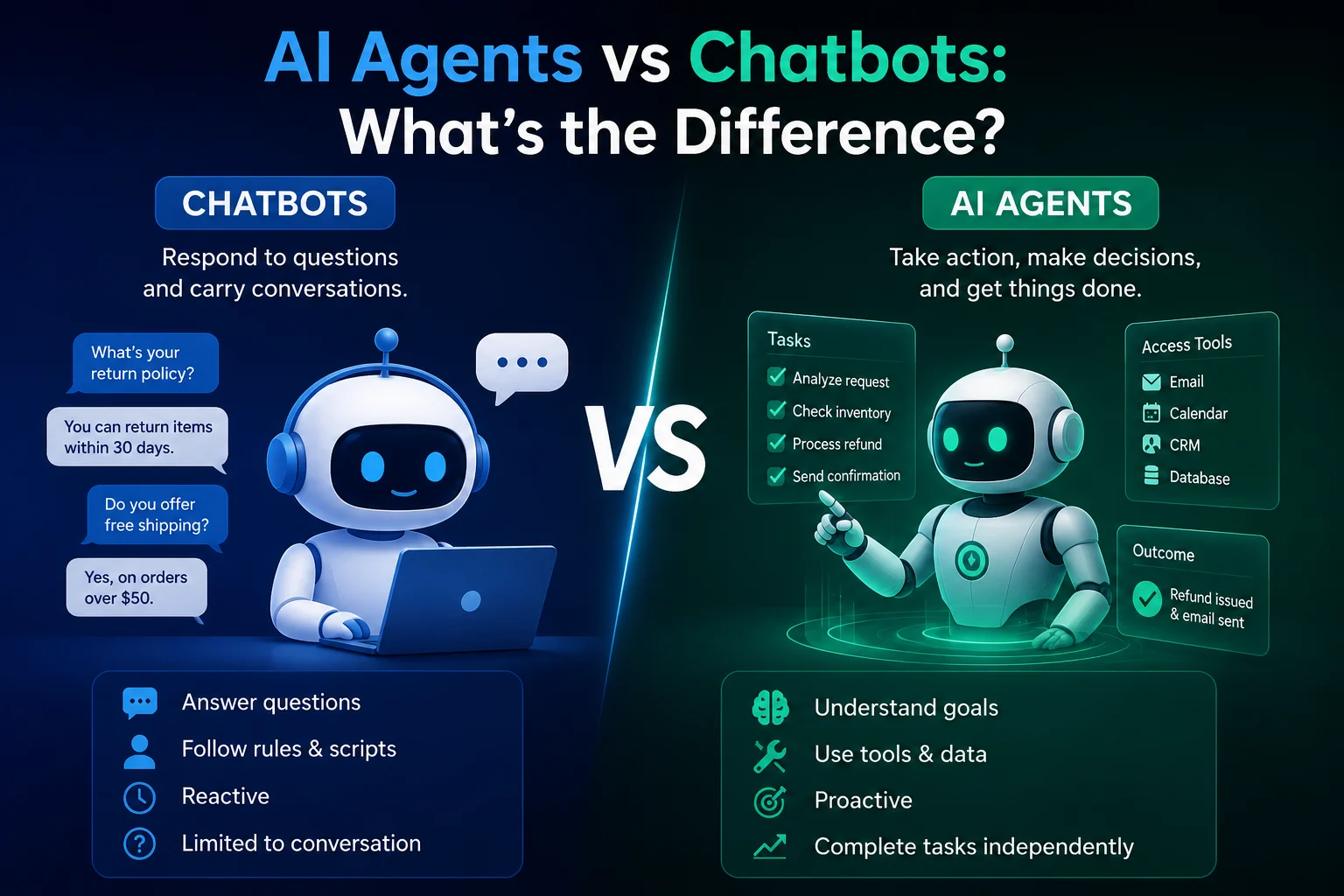
AI productivity tools have evolved beyond simple chatbots. In 2026, AI agents can increasingly research information, work with files, browse websites, use connected tools, organize tasks, and complete multi-step workflows.
Instead of asking an AI assistant to perform every step manually, you can increasingly give an agent a goal and let it work through the task.
This makes AI agents particularly interesting for people who want to save time on research, writing, administration, project management, and repetitive digital work.
In this guide, we'll look at some of the best AI agents for productivity in 2026, what each one does well, and which type of user should consider it.
What Is an AI Productivity Agent?
An AI productivity agent is an AI-powered system that can take a goal, determine the steps required, use approved tools, and complete some or all of the workflow.
A traditional AI assistant might help you write an email. An AI agent may be able to research the information needed, draft the email, access relevant files, and prepare the result for your review.
The important difference is action and autonomy.
Agentic AI is increasingly being used for longer, multi-step tasks rather than only short question-and-answer interactions. OpenAI describes this shift as moving from individual interactions toward delegated, long-horizon work.
Best AI Agents for Productivity: Quick Comparison
| AI Agent | Best For | Key Strength | Ideal User |
|---|---|---|---|
| ChatGPT | General productivity | Research, writing, analysis, and multi-step tasks | Most users |
| Claude Cowork | Files and complex projects | Working across files and tools | Professionals and researchers |
| Google Gemini | Google ecosystem | Working with Google services | Google Workspace users |
| Microsoft Copilot | Office productivity | Microsoft 365 workflows | Business users |
| Perplexity | Research | Web research and information discovery | Researchers and students |
| Manus | Autonomous workflows | Multi-step task execution | Power users |
1. ChatGPT — Best Overall AI Agent for Productivity
Best for: General productivity, research, writing, analysis, and complex tasks.
ChatGPT is one of the strongest all-purpose choices for people who want one AI system to handle many different types of productivity work.
Its agent capabilities are designed around completing multi-step tasks rather than simply generating an answer. OpenAI's current workspace-agent offering can connect agents to approved tools, run recurring workflows, and perform tasks across applications while using permissions and approval checkpoints.
What Can You Use It For?
- Researching a topic.
- Summarizing documents.
- Analyzing data.
- Creating reports.
- Writing and editing content.
- Planning projects.
- Working with files.
- Automating repetitive workflows.
- Preparing presentations and documents.
For everyday users who want a flexible AI productivity partner, ChatGPT is a strong starting point.
Best For
Choose ChatGPT if you want one general-purpose AI system that can help across writing, research, analysis, planning, and automation.
2. Claude Cowork — Best for Working With Files and Projects
Best for: Long-running projects, files, research, and complex knowledge work.
Claude Cowork is designed to take on tasks across folders and selected tools and work toward a finished result that you can review.
Anthropic says Cowork can work directly with selected folders and tools, use a browser for web tasks, show the work it is performing, and continue scheduled tasks even when the user is away.
Examples of Productivity Tasks
- Organize a folder of documents.
- Research a topic.
- Analyze business files.
- Create reports.
- Prepare presentations.
- Work with spreadsheets.
- Review large collections of documents.
- Run recurring tasks.
Claude is particularly interesting for people whose work revolves around documents, research, analysis, and complex projects.
Best For
Choose Claude Cowork if your productivity workflow involves lots of files, research, and multi-step projects.
3. Google Gemini — Best for Google Users
Best for: Gmail, Google Docs, Calendar, Drive, and other Google-based workflows.
Google Gemini is a natural choice for users who already spend most of their working day inside Google's ecosystem.
AI productivity comparisons in 2026 frequently highlight Gemini's integration with Google-based workflows such as email, documents, meetings, and research.
Productivity Examples
- Summarize information.
- Draft emails.
- Work with documents.
- Research topics.
- Organize information.
- Assist with meetings.
- Help manage Google Workspace tasks.
Best For
Gemini makes the most sense if your daily workflow already revolves around Gmail, Google Docs, Google Drive, Calendar, and other Google services.
4. Microsoft Copilot — Best for Microsoft 365 Productivity
Best for: Word, Excel, PowerPoint, Outlook, Teams, and business workflows.
Microsoft Copilot is particularly useful for people and organizations that already rely heavily on Microsoft 365.
The advantage is not simply the AI model itself. The bigger benefit is how AI can fit into the applications people already use every day.
Possible Productivity Tasks
- Summarize emails.
- Draft documents.
- Analyze spreadsheets.
- Create presentation content.
- Summarize meetings.
- Prepare reports.
- Assist with business workflows.
- Organize information.
Microsoft is also moving toward a more unified Copilot experience across personal and work scenarios, although features and availability can vary by product and plan.
Best For
Choose Microsoft Copilot if your work already happens primarily inside Microsoft 365.
5. Perplexity — Best for Research Productivity
Best for: Finding information, research, and source-driven workflows.
Research is one of the areas where AI agents can save significant amounts of time.
Instead of opening dozens of browser tabs and manually collecting information, AI-powered research tools can help discover sources, summarize information, and organize findings.
Perplexity is particularly useful when your productivity depends on quickly finding and understanding information from the web.
Useful Tasks
- Research a company.
- Compare products.
- Investigate a topic.
- Find sources.
- Summarize web information.
- Prepare research notes.
- Explore unfamiliar subjects.
For research-heavy users, AI search and research agents can significantly reduce the time spent collecting and organizing information.
Best For
Perplexity is a strong option if your main productivity problem is researching information quickly.
6. Manus — Best for Autonomous Multi-Step Tasks
Best for: Delegating complex tasks that require multiple steps.
Manus is designed around the idea of giving an AI a goal and allowing it to work through the required steps.
This type of agent can be useful when the task involves research, organization, analysis, and producing a final deliverable.
Examples
- Research a market.
- Analyze information.
- Create structured reports.
- Organize research findings.
- Complete multi-step workflows.
Manus is best suited to users who are comfortable delegating larger tasks to an autonomous system and reviewing the final result.
7. AI Agents Built Into Business Tools
You don't always need a standalone AI agent.
Many productivity platforms are increasingly adding agents directly into the tools people already use.
For example, business teams can use agents to handle tasks involving:
- Project management.
- CRM systems.
- Customer support.
- Internal knowledge.
- Sales workflows.
- Reporting.
- Team communication.
OpenAI's workspace agents, for example, are designed to work with approved applications such as Slack, Google Drive, and Microsoft applications, while administrators can define permissions and approval requirements.
What Can AI Agents Do for Productivity?
The biggest advantage of AI agents is that they can potentially handle an entire workflow instead of only one small task.
Research
An agent can help collect information, organize findings, summarize sources, and prepare a report.
Writing
An agent can help research a topic, create an outline, write a draft, edit it, and prepare the final document.
AI can help summarize messages, identify priorities, draft responses, and organize follow-up tasks.
File Management
Some agents can work with folders and documents, helping organize, rename, analyze, or summarize files.
Project Management
An agent can help turn a project goal into tasks, prepare status updates, summarize information, and identify potential issues.
Data Analysis
AI agents can help analyze spreadsheets and datasets, identify patterns, create summaries, and prepare reports.
AI Agents vs Traditional AI Assistants
| Traditional AI Assistant | AI Agent |
|---|---|
| Usually responds to prompts | Can pursue a goal |
| Usually completes one interaction | Can complete multiple steps |
| Mostly provides information | Can take actions with approved tools |
| Requires more manual direction | Can work more independently |
| Limited autonomy | Higher potential autonomy |
The difference isn't always absolute. Many modern AI products combine assistant and agent features.
How Much Time Can AI Agents Save?
The amount of time saved depends heavily on the task.
A simple task such as summarizing a document may take only a few minutes manually. A larger research or reporting workflow can take several hours.
OpenAI reports that agentic workflows are increasingly being used for longer tasks, with a large share of Codex users in May 2026 asking it to perform work estimated to take a person more than an hour.
However, the goal should not be to automate everything. The best productivity gains usually come from automating repetitive work while keeping humans involved where judgment matters.
How to Choose the Best AI Agent for You
Choose ChatGPT If...
- You want a general-purpose productivity agent.
- You work across many different types of tasks.
- You need research, writing, analysis, and planning.
Choose Claude Cowork If...
- You work with many files.
- You handle long research projects.
- You want to delegate multi-step document workflows.
Choose Gemini If...
- You use Google Workspace heavily.
- Your work revolves around Gmail and Google Docs.
- You want AI integrated into Google's ecosystem.
Choose Microsoft Copilot If...
- You use Microsoft 365 every day.
- Your work involves Word, Excel, PowerPoint, Outlook, or Teams.
- You need AI inside existing business workflows.
Choose Perplexity If...
- Research is a major part of your work.
- You frequently need web information.
- You want to discover and summarize sources quickly.
Choose Manus If...
- You want to delegate larger multi-step tasks.
- You are comfortable reviewing autonomous work.
- You want an agent focused on task execution.
Important Limitations of AI Agents
AI agents are powerful, but they are not perfect.
An agent can misunderstand a request, use incorrect information, make an incorrect decision, or take an unintended action.
The more autonomy an agent has, the more important monitoring and permissions become.
Anthropic notes that the autonomy that makes agents useful also creates additional risks, including unintended actions and prompt-injection attacks.
Common Risks
- Incorrect information.
- Unexpected actions.
- Data exposure.
- Prompt injection.
- Excessive permissions.
- Overreliance on automation.
For sensitive workflows, use human approval before an agent sends important messages, changes records, spends money, or performs irreversible actions.
Best Way to Use AI Agents for Productivity
The most effective approach is to start with repetitive tasks that are easy to verify.
- Identify a repetitive task.
- Define the desired outcome.
- Choose an appropriate agent.
- Give it only the permissions it needs.
- Test it on a small workflow.
- Review its results.
- Automate more once it proves reliable.
For example, instead of asking an agent to manage your entire business immediately, start with something simple such as creating a weekly report from a defined set of documents.
AI Agents Can Become Your Digital Productivity Team
One of the most interesting developments in AI is the possibility of using multiple specialized agents for different tasks.
You could have:
| Agent | Responsibility |
|---|---|
| Research Agent | Finds and organizes information |
| Writing Agent | Creates drafts |
| Data Agent | Analyzes spreadsheets and datasets |
| Planning Agent | Organizes projects and tasks |
| Communication Agent | Prepares emails and updates |
| Review Agent | Checks quality and accuracy |
This could turn AI from a tool you occasionally ask questions to into a digital productivity team that helps manage recurring work.
Final Thoughts
The best AI agent for productivity depends on what you actually do every day.
ChatGPT is a strong general-purpose choice. Claude Cowork is particularly interesting for files and long-running projects. Gemini is a natural fit for Google users, while Microsoft Copilot is well suited to Microsoft 365 workflows. Perplexity is useful for research, and Manus is aimed at more autonomous multi-step work.
There is no single AI agent that is best for everyone.
The best choice is the one that fits your workflow, connects to the tools you already use, and can automate meaningful work without introducing unnecessary risk.
As AI agents become more capable, productivity will increasingly be about delegating the right tasks to AI while keeping humans in control of important decisions.
Frequently Asked Questions
What is the best AI agent for productivity?
For most users, ChatGPT is a strong general-purpose choice because it can support research, writing, analysis, planning, and multi-step workflows. The best option depends on your specific workflow and the applications you already use.
What is the best AI agent for research?
Perplexity is a strong option for research-focused workflows, while ChatGPT and Claude can also handle research and analysis tasks.
What is the best AI agent for files?
Claude Cowork is particularly suited to workflows involving files and folders because it can work directly with selected files and tools and complete tasks for review.
Is Gemini good for productivity?
Yes. Gemini can be particularly useful for people who already use Google's ecosystem, including Gmail, Google Docs, Drive, and Calendar.
Is Microsoft Copilot good for productivity?
Copilot can be a strong choice for users who work heavily with Microsoft 365 applications such as Word, Excel, PowerPoint, Outlook, and Teams.
Can AI agents work without human supervision?
Some AI agents can perform tasks with significant autonomy, but important workflows should include appropriate monitoring and human approval. Greater autonomy also increases the potential impact of mistakes.
Are AI agents safe to use?
They can be used safely when permissions are limited, actions are monitored, sensitive operations require approval, and the agent is tested before being used for important workflows.