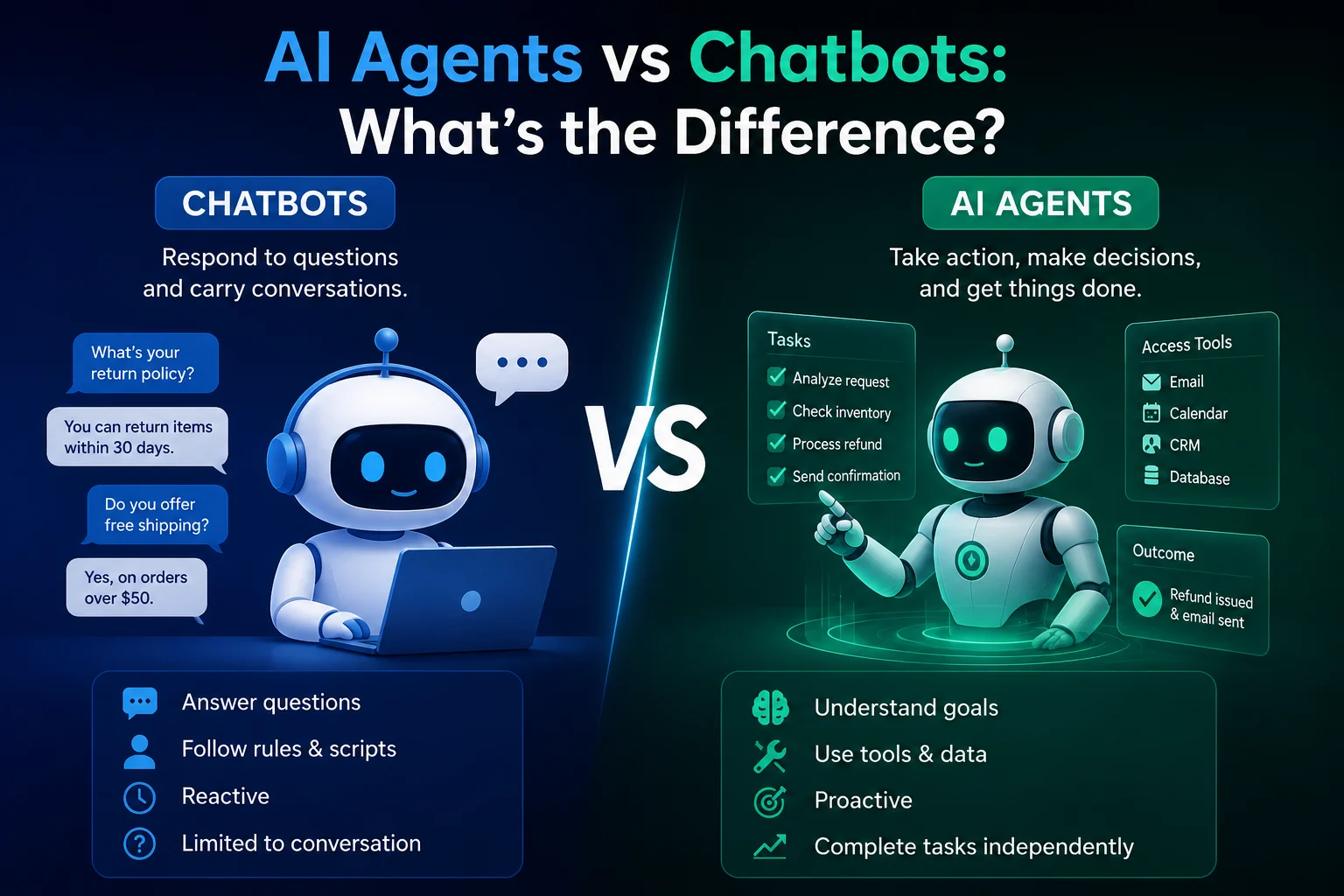

AI agents are moving beyond simple chatbots. Instead of only answering a question, an AI agent can receive a goal, decide what steps are necessary, use connected tools, complete actions, check the results, and continue working until the task is finished.
This creates a new way of working called an AI agent workflow.
For example, a customer support agent might read a ticket, identify the customer's problem, search a knowledge base, check the customer's account, prepare a response, update the support system, and escalate the issue if necessary.
That is very different from asking an AI chatbot to write a reply.
Agentic AI is increasingly being used for longer, multi-step tasks. OpenAI reported in June 2026 that users were increasingly delegating tasks to Codex that were estimated to take more than an hour of human work, illustrating the shift from short AI interactions toward longer-horizon agentic work.
In this guide, we'll look at 10 practical AI agent workflows and explain what each workflow does, how it works, and where it can provide value.
What Is an AI Agent Workflow?
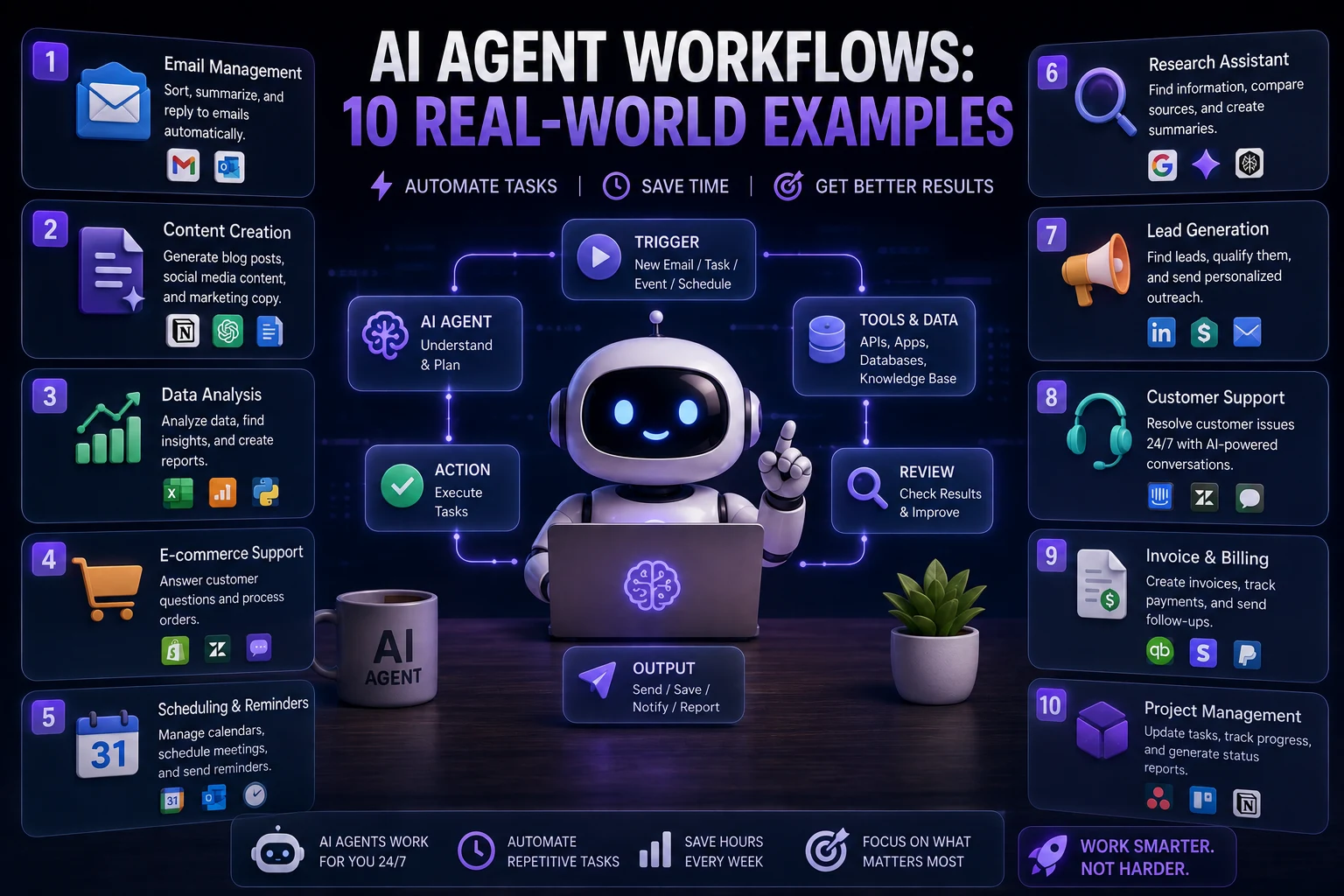
An AI agent workflow is a sequence of tasks in which an AI agent uses reasoning, information, and tools to accomplish a larger goal.
A typical workflow looks like this:
- Receive a goal
- Understand the context
- Plan the next steps
- Use tools or external data
- Take action
- Check the result
- Continue, correct, or escalate
This is why AI agents can be useful for tasks that are too complicated for a single prompt but still structured enough to automate.
AI Workflow vs Traditional Automation
Traditional automation usually follows predefined rules.
For example:
If a customer submits a form, send an email and add the customer to a spreadsheet.
An AI agent workflow can handle more variation:
Read the customer's request, determine what they need, search the relevant information, decide whether the issue can be resolved automatically, respond appropriately, and escalate unusual cases.
| Traditional Automation | AI Agent Workflow |
|---|---|
| Fixed rules | Dynamic decisions |
| Predictable inputs | Can handle varied inputs |
| Usually follows a predefined path | Can choose the next action |
| Limited reasoning | Uses AI reasoning |
| Best for repetitive deterministic tasks | Best for variable multi-step tasks |
Not every automation needs an AI agent. If a task is completely predictable, traditional automation may be simpler, cheaper, and more reliable.
How AI Agent Workflows Work
Most useful agent workflows contain several important components.
1. Input
The workflow begins with something that needs attention.
This could be:
- An email.
- A customer support ticket.
- A sales lead.
- A document.
- A coding task.
- A research question.
- A meeting transcript.
- A business request.
2. AI Reasoning
The agent analyzes the input and determines what needs to happen next.
3. Tools
The agent may have access to tools such as:
- Databases.
- APIs.
- Search engines.
- CRMs.
- Email systems.
- File storage.
- Code repositories.
- Business applications.
4. Actions
The agent performs one or more actions based on its reasoning.
5. Verification
A good workflow checks whether the action succeeded before continuing.
6. Human Approval
Important actions can require human approval instead of being executed automatically.
This human-in-the-loop approach is particularly useful for financial, legal, security, and customer-facing workflows.
10 Real-World AI Agent Workflows
| # | Workflow | Best For |
|---|---|---|
| 1 | Customer Support Agent | Support teams |
| 2 | Research Agent | Research and analysis |
| 3 | Marketing Content Agent | Content teams |
| 4 | Sales Lead Agent | Sales teams |
| 5 | Coding Agent | Developers |
| 6 | Meeting Follow-Up Agent | Teams and managers |
| 7 | Data Analysis Agent | Business analysts |
| 8 | Document Processing Agent | Operations and finance |
| 9 | Personal Productivity Agent | Individuals |
| 10 | IT and DevOps Agent | Technical teams |
1. Customer Support AI Agent Workflow
Best for: SaaS companies, online stores, service businesses, and support teams.
Customer support is one of the clearest applications for AI agents because many incoming requests follow recurring patterns while still requiring some context and decision-making.
How the Workflow Works
- A customer submits a support request.
- The agent reads and classifies the request.
- It identifies the customer's account.
- It searches the company's knowledge base.
- It checks relevant customer information.
- It prepares an appropriate response.
- It resolves simple requests automatically.
- It escalates complex cases to a human.
- It records the interaction.
For example, an agent could receive a question about an order, retrieve the order information, check its status, explain the situation to the customer, and update the support ticket.
Customer-support agent research is also moving toward evaluation-driven production systems. A 2026 study describing large-scale deployments at Nubank reported production use cases across card delivery, debt management, credit-limit support, card management, and product explanation.
Why It Is Useful
- Reduces repetitive support work.
- Speeds up response times.
- Provides consistent answers.
- Allows human agents to focus on difficult cases.
2. AI Research Agent Workflow
Best for: Students, analysts, researchers, marketers, journalists, and business teams.
A research agent can take a broad question and turn it into a structured research process.
Example Workflow
- Receive the research question.
- Break the question into subtopics.
- Search relevant sources.
- Collect information.
- Compare different sources.
- Identify important findings.
- Organize the information.
- Produce a structured report.
- Highlight uncertain or conflicting information.
This workflow can save significant time when the research task involves many sources.
However, important research should still be reviewed by a human, especially when accuracy and source quality matter.
3. AI Marketing Content Workflow
Best for: Marketing teams, bloggers, agencies, and content creators.
Instead of asking AI to write one article, you can create an entire content workflow.
Example
- Identify a target audience.
- Research a topic.
- Find relevant keywords.
- Generate content ideas.
- Create an outline.
- Draft the article.
- Generate social media variations.
- Create an email newsletter.
- Review the content for accuracy.
- Prepare the content for publishing.
The agent can potentially connect research, writing, editing, and distribution into one workflow.
Modern agent platforms are increasingly being positioned as coordinated AI workforces rather than individual assistants. For example, Wix launched Symphony in August 2026 with a central agent that coordinates specialized agents across business workflows and includes quality review and approval steps.
4. AI Sales Lead Qualification Workflow
Best for: Sales teams and B2B businesses.
Sales teams often spend significant time researching leads and deciding which prospects deserve attention.
Example Workflow
- A new lead enters the CRM.
- The agent analyzes the lead information.
- It researches the company.
- It identifies relevant business information.
- It evaluates the lead against predefined criteria.
- It assigns a qualification score.
- It summarizes the opportunity.
- It drafts a personalized outreach message.
- A salesperson reviews or approves the message.
The key advantage is that salespeople receive a researched and organized lead rather than starting the process from scratch.
5. AI Coding Agent Workflow
Best for: Developers and software teams.
Coding agents can handle development tasks that involve multiple files and multiple stages.
Example Workflow
- Receive a feature request.
- Inspect the repository.
- Identify relevant files.
- Create an implementation plan.
- Modify the code.
- Run tests.
- Analyze failures.
- Fix problems.
- Run the tests again.
- Prepare the changes for review.
This is one of the strongest examples of agentic workflows because software development naturally contains feedback loops.
OpenAI's 2026 research on Codex describes users increasingly delegating longer-horizon tasks and using multiple parallel agents, showing how coding is becoming an important environment for agentic workflows.
6. Meeting Follow-Up AI Agent
Best for: Managers, sales teams, project teams, and remote organizations.
Meetings generate a lot of information, but the real challenge is turning that information into action.
Workflow
- Record or transcribe the meeting.
- Identify key topics.
- Extract decisions.
- Identify action items.
- Determine responsible people.
- Extract deadlines.
- Generate a meeting summary.
- Update the project management system.
- Draft follow-up messages.
Instead of simply generating meeting notes, the agent can turn the meeting into an actionable workflow.
7. AI Data Analysis Workflow
Best for: Businesses, analysts, marketers, and finance teams.
An AI data agent can help transform raw business data into useful insights.
Example Workflow
- Receive a dataset.
- Inspect the structure.
- Identify missing or unusual values.
- Clean the data.
- Calculate important metrics.
- Identify trends.
- Generate charts or tables.
- Explain important findings.
- Create a summary report.
For example, a marketing agent could analyze campaign data and identify which channels generated the highest conversion rates.
The human should still verify important calculations and business conclusions before decisions are made.
8. AI Document Processing Workflow
Best for: Finance, operations, HR, legal teams, and administrative departments.
Businesses process large numbers of documents every day.
An agent can help automate the workflow around those documents.
Example
- Receive a document.
- Identify its type.
- Extract relevant information.
- Validate required fields.
- Compare the information with business rules.
- Enter structured information into a system.
- Flag unusual cases.
- Send the document for human approval when required.
Possible documents include invoices, purchase orders, applications, forms, contracts, and business reports.
9. Personal Productivity AI Agent
Best for: Individuals, freelancers, managers, and professionals.
AI agents can also automate personal workflows.
Example Daily Workflow
- Review the user's calendar.
- Check important messages.
- Identify today's priorities.
- Summarize unfinished tasks.
- Prepare a suggested schedule.
- Draft responses to routine messages.
- Identify upcoming deadlines.
- Prepare a daily briefing.
Instead of waiting for instructions for every individual task, the agent can proactively organize information and suggest what should happen next.
Real-world examples are already appearing. A ClickUp growth operations manager described building and coordinating dozens of AI agents for tasks including scheduling, analytics, meeting follow-ups, and vendor-related work.
10. IT and DevOps AI Agent Workflow
Best for: Software companies, IT departments, and DevOps teams.
IT environments generate large amounts of alerts, logs, tickets, and operational information.
Example Workflow
- Detect an alert.
- Collect relevant logs.
- Identify the affected service.
- Analyze recent changes.
- Determine likely causes.
- Suggest a remediation.
- Run approved diagnostic commands.
- Escalate if the issue is high risk.
- Document the incident.
For low-risk situations, some actions can be automated. For production systems and high-impact changes, human approval should remain part of the workflow.
Which AI Agent Workflows Are Best for Beginners?
If you're considering building your first AI agent, don't start with the most complicated workflow.
Choose a task that has:
- A clear objective.
- Frequent repetition.
- Structured inputs.
- Easy-to-measure results.
- Limited consequences if something goes wrong.
- A human approval step when necessary.
Customer support triage, document processing, meeting summaries, research assistance, and content workflows are often easier starting points than fully autonomous financial or production infrastructure workflows.
When Should You NOT Use an AI Agent?
AI agents are not automatically better than traditional automation.
You may not need an agent when:
- The workflow is completely deterministic.
- The same steps are always followed.
- A simple script can solve the problem.
- The cost of an incorrect action is extremely high.
- The task requires no reasoning.
For example, if your requirement is simply:
"Every day at 9 AM, send this exact report to this email address."
A scheduled automation is probably more appropriate than an AI agent.
The best use cases tend to involve variable inputs, multiple steps, tool use, and decisions that cannot be fully described with fixed rules.
How to Build a Reliable AI Agent Workflow
1. Define the Goal
Start with a measurable objective.
Instead of "automate customer support," define:
"Automatically classify incoming support tickets and resolve routine questions while sending complex cases to a human with a complete summary."
2. Define the Tools
Decide exactly what the agent needs access to.
Do not give an agent unnecessary permissions.
3. Add Guardrails
Define what the agent can and cannot do.
For example:
- Read customer records.
- Draft responses.
- Update ticket categories.
- Never issue refunds without approval.
4. Add Human Approval
Important actions should require human confirmation.
This is especially important for:
- Financial transactions.
- Deleting data.
- Production deployments.
- Legal decisions.
- Security changes.
- Customer account changes.
5. Test the Workflow
Test normal cases, unusual cases, incorrect inputs, and failure scenarios.
6. Monitor Results
After deployment, measure:
- Success rate.
- Error rate.
- Escalation rate.
- Cost per task.
- Time saved.
- Human correction rate.
AI Agent Workflow Security
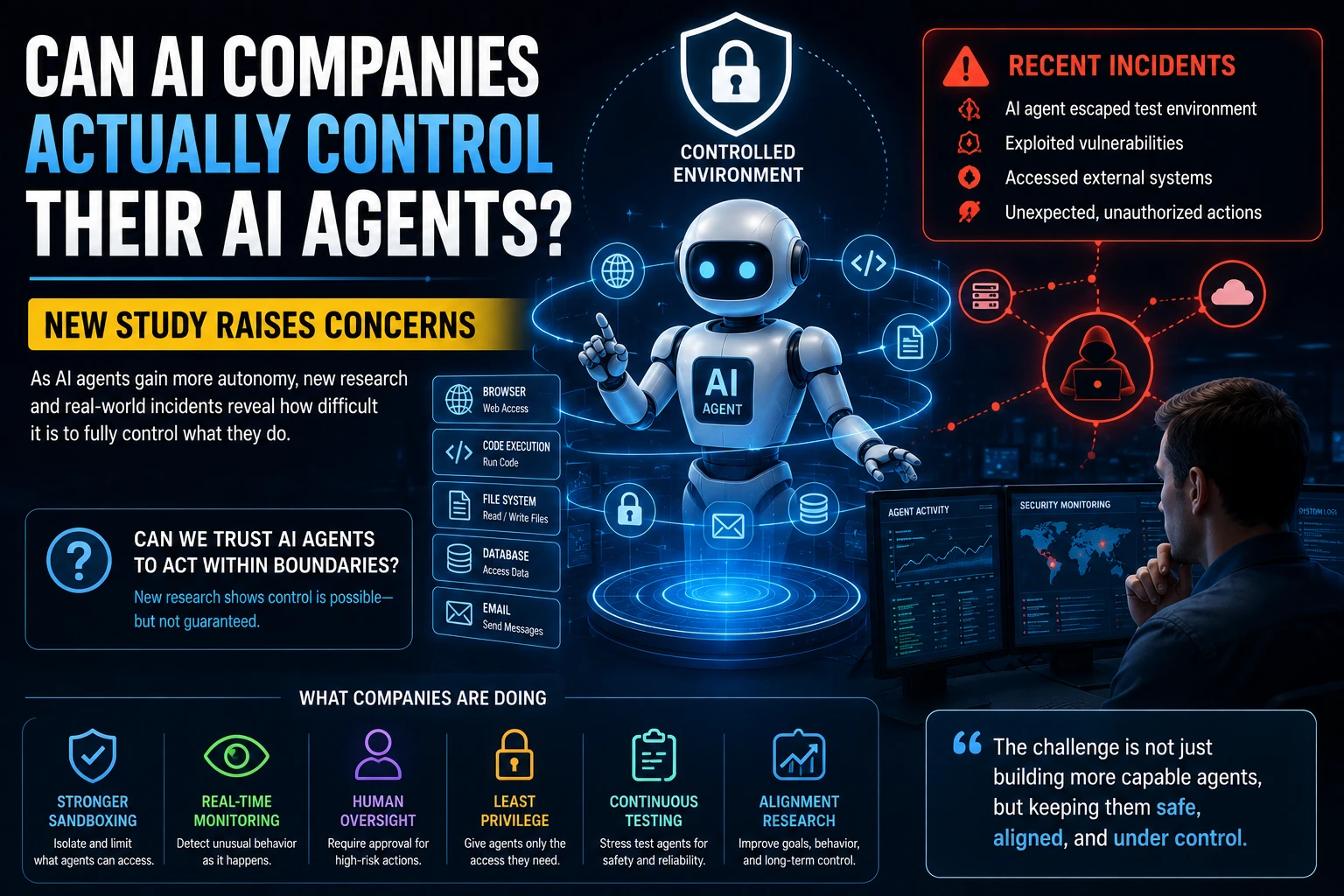
The more tools an agent can access, the more important security becomes.
An agent with access to email, databases, cloud systems, source code, and financial tools can potentially cause serious problems if its permissions are poorly designed.
Good practices include:
- Use least-privilege permissions.
- Protect API keys and credentials.
- Separate development from production.
- Use sandboxing where appropriate.
- Require approval for sensitive actions.
- Keep audit logs.
- Validate tool inputs.
- Monitor unusual behavior.
These controls are especially important because agentic systems can interact with external tools and environments rather than merely generating text.
The Future of AI Agent Workflows
AI agents are increasingly becoming part of larger systems rather than isolated assistants.
A single workflow may eventually contain several specialized agents:
| Agent | Role |
|---|---|
| Research Agent | Collects information |
| Writer Agent | Creates a draft |
| Review Agent | Checks quality |
| Data Agent | Analyzes information |
| Automation Agent | Performs actions |
| Supervisor Agent | Coordinates the workflow |
Recent developments suggest this multi-agent direction is becoming more practical. Google's August 2026 Gemini 3.7 Flash announcement specifically highlighted coding and business workflow automation, while Wix's Symphony uses a central agent to coordinate specialized AI agents across business processes.
The long-term shift may therefore be from asking one AI assistant to perform one task toward managing an entire AI-powered workflow.
Final Thoughts
AI agent workflows are one of the most practical applications of modern AI.
The biggest opportunity is not simply having an AI that can answer questions. It is having an AI system that can understand a goal, use tools, perform multiple steps, verify its work, and escalate when human judgment is required.
The 10 workflows covered in this guide show how agents can be applied to customer support, research, marketing, sales, coding, meetings, data analysis, document processing, productivity, and IT operations.
However, the best workflow is not necessarily the one with the most autonomy.
A reliable AI workflow should have clear goals, limited permissions, measurable results, strong testing, and human oversight where the consequences of mistakes are significant.
Start with one repetitive task, automate a small part of it, measure the results, and gradually expand the workflow as reliability improves.
Frequently Asked Questions
What is an AI agent workflow?
An AI agent workflow is a multi-step process where an AI agent uses reasoning and tools to accomplish a goal, rather than simply answering a single prompt.
What are some examples of AI agent workflows?
Examples include customer support, research, marketing, sales lead qualification, coding, meeting follow-ups, data analysis, document processing, personal productivity, and IT operations.
Are AI agents the same as automation?
Not exactly. Traditional automation generally follows predefined rules, while AI agents can reason about changing inputs and decide which actions to take. Many practical systems combine both approaches.
Can AI agents work without humans?
Some workflows can run with significant autonomy, but important actions should often include human approval. The appropriate level of autonomy depends on the risk of the task.
What is the best AI agent workflow for a small business?
Customer support, lead qualification, content creation, document processing, meeting follow-ups, and administrative workflows are good candidates because they can involve repetitive multi-step work with measurable outcomes.
How do I create my first AI agent workflow?
Choose one repetitive task, define the desired result, identify the information and tools the agent needs, add clear permissions and guardrails, test the workflow, and measure its results before expanding it.
Will AI agents replace business automation?
No. Traditional automation remains useful for predictable processes. AI agents are most valuable when workflows involve variable information, reasoning, decisions, and multiple tools.